
How to Delete a Course on Duolingo: A Step-by-step Guide
Are you tired of having multiple courses running on Duolingo at the same time? Do you want to delete one course without losing all your progress? Look no further! In this article, we will guide you through the process of deleting a course on Duolingo, covering both smartphone and computer versions.
Understanding Course Deletion
Before we dive into the step-by-step guide, it’s essential to understand what happens when you delete a course. Deleting a course means that all your progress, badges, and achievements for that particular language will be lost. You won’t be able to recover them even if you re-enroll in the same course.
Why Delete a Course?
You might want to delete a course for several reasons:
- You’re struggling with a particular language or skill.
- You’ve realized you don’t have enough time to dedicate to both courses.
- You want to focus on one language and move it to a more advanced level.
Deleting a Course on Duolingo: A Step-by-step Guide
Here’s how you can delete a course on Duolingo:
On Smartphone (iOS or Android)
- Open the Duolingo app.
- Tap on your profile icon in the top-left corner.
- Select “Settings” from the menu.
- Scroll down to the “Courses” section.
- Tap on the three dots next to the course you want to delete.
- Select “Delete Course”.
- Confirm that you want to delete the course by tapping “Yes”.
On Computer (Web Version)
- Log in to your Duolingo account on the web version.
- Click on your profile picture in the top-right corner.
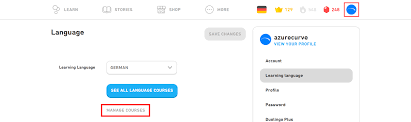
- Select “Settings” from the dropdown menu.
- Scroll down to the “Courses” section.
- Click on the three dots next to the course you want to delete.
- Select “Delete Course”.
- Confirm that you want to delete the course by clicking “Yes”.
What Happens After You Delete a Course?
After deleting a course, you won’t be able to recover your progress or badges for that particular language. However, you can re-enroll in the same course without losing any new progress.
Re-enrolling in a Deleted Course
To re-enroll in a deleted course:
- Go to the Duolingo website.
- Click on “New Course”.
- Select the course you want to re-enroll in.
- Start taking lessons from where you left off, and you’ll begin building new progress.
Important Notes
Before deleting a course, make sure:
- You’re not following another course right now. If you are, delete this one first.
- Duolingo doesn’t currently have an “undo” feature for deleted courses.
If you change your mind about deleting a course after it’s gone, there isn’t any way to get those lost badges or progress back. So think carefully before making the decision!
Conclusion
Deleting a course on Duolingo can be a liberating experience! You’ll free up space in your account for new courses and focus on learning one language at a time.
We hope this step-by-step guide has helped you understand how to delete a course on Duolingo. If you have any further questions, feel free to ask!
How to Delete a Course on Duolingo: Faqs
Q: Will I lose all my progress if I delete a course?
A: Yes, deleting a course means losing all your progress for that language.
Q: Can I re-enroll in the same course without losing new progress?
A: Yes, you can re-enroll in a deleted course and continue building new progress from where you left off.
Q: What happens if I delete one course by mistake? Can I get it back?
A: Unfortunately, no. Duolingo doesn’t currently have an “undo” feature for deleted courses. So think carefully before making the decision to delete a course!


