
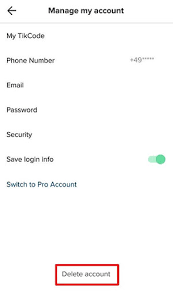
How to Delete a Tiktok Account
Are you tired of using TikTok or have decided that it’s no longer for you? Deleting your account might seem like a daunting task, but don’t worry; we’re here to guide you through the process.
Why Would You Want to Delete Your Tiktok Account?
Before we dive into the steps to delete your account, let’s consider why you might want to do so. Maybe you’ve found that TikTok is taking up too much of your time, or perhaps you’ve realized that it’s not aligning with your values.
How to Delete a Tiktok Account
If you’ve decided that deleting your TikTok account is the way forward, here are the steps to follow:
Deleting a Tiktok Account on Android And Ios/ipados
- Open the TikTok app on your device.
- Tap on the profile icon (represented by a person) located in the bottom-right corner of the screen.
- Swipe up to access the menu, then tap on “Settings” and “Privacy”.
- Scroll down to find the “Account” option and tap on it.
- Select the option that says “Delete Account” and confirm your decision.
What Happens When You Delete Your Tiktok Account?
When you delete your account, all of your videos will be removed from the platform, and you won’t be able to access your profile or view any content posted by other users. However, if you change your mind within 30 days of deleting your account, you can reactivate it.
Can I Delete a Tiktok Account Without a Phone Number?
Yes, you can delete a TikTok account without using a phone number. If you’ve misplaced your phone or don’t have access to it, you can still follow the steps outlined above and use an email address associated with your account instead.
How to Delete a Tiktok Account Without Knowing The Password
If you’ve forgotten your password, you won’t be able to delete your account using the usual method. However, you can try recovering your password first by following these steps:
- Open the TikTok app and tap on the profile icon.
- Tap on the three lines in the top-right corner and select “Settings” and “Privacy”.
- Scroll down to find the “Account” option and tap on it.
- Select the option that says “Password” and enter your email address.
- Follow the prompts to reset your password.
Can I Delete a Tiktok Account That Doesn’t Belong to Me?
Unfortunately, no, you cannot delete a TikTok account that doesn’t belong to you. For safety reasons, it’s not possible to deactivate or delete an account that isn’t yours.
How to Temporarily Disable a Tiktok Account
If you’re taking a break from TikTok and don’t want to delete your account permanently, you can temporarily disable it. This will prevent other users from seeing your content for the time being. To do this:
- Open the TikTok app and tap on the profile icon.
- Tap on the three lines in the top-right corner and select “Settings” and “Privacy”.
- Scroll down to find the “Account” option and tap on it.
- Select the option that says “Disable Account” and confirm your decision.
How Does Deleting a Tiktok Account Affect Your Videos?
When you delete your account, all of your videos will be removed from the platform, and they won’t appear in the feed or on your profile page anymore.
Conclusion
Deleting a TikTok account is a straightforward process that can be completed using either a phone or an email address associated with your account. If you’re unsure about any part of the process, feel free to reach out to us for assistance. Remember, it’s always a good idea to have a clear understanding of why you want to delete your account before taking this step.
Frequently Asked Questions (FAQs)
- What Happens When I Delete my Tiktok Account?
When you delete your TikTok account, all of your videos will be removed from the platform, and you won’t be able to access your profile or view any content posted by other users.
- Can I Delete a Tiktok Account Without Knowing The Password?
No, you cannot delete a TikTok account without knowing the password. You’ll need to recover your password first before proceeding with deletion.
- Can I Temporarily Disable my Tiktok Account Instead of Deleting It?
Yes, you can temporarily disable your TikTok account by following the steps outlined above. This will prevent other users from seeing your content for a certain period.
- Will Deleting my Tiktok Account Affect my Online Presence Elsewhere?
Deleting your TikTok account won’t have any direct impact on your online presence elsewhere. However, it may affect how you’re perceived or remembered by others who interacted with you on the platform.
- How Long Will it Take For my Videos to be Removed From Tiktok After Deleting my Account?
Your videos should be removed from the platform within a few hours of deleting your account.


