
How to Delete a Tumblr Account: A Step-by-step Guide
Are you tired of using Tumblr? Perhaps you’re looking to delete your account due to some issues or simply want to try out other social media platforms. Deleting a Tumblr account can be a bit tricky, but don’t worry; we’ve got you covered!
In this article, we’ll guide you through the process of deleting a Tumblr account on both PC and mobile devices.
Why Delete a Tumblr Account?
Before we dive into the step-by-step instructions, let’s briefly discuss why someone might want to delete their Tumblr account. Some common reasons include:
- Too Many Distractions: With so many blogs and posts to navigate through, it can be easy to get sidetracked.
- Privacy Concerns: If you’re concerned about your online privacy or have experienced harassment on the platform, deleting your account might be the best option.
- Lack of Engagement: If you find that you’re not engaging with the community as much as you’d like, it might be time to move on.
Deleting a Tumblr Account on PC
To delete a Tumblr account on PC, follow these steps:
- Log in to your Tumblr account using your username and password.
- Click on the icon of the man (located at the top right) and select “Settings.”
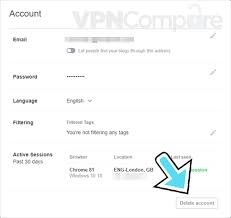
- In the settings page, click on “Account” and scroll down to find the “Delete Account” button.
- Enter your email address and password to confirm that you want to delete your account.
- Click on the red “Delete Account” button to complete the process.
Deleting a Tumblr Account on Mobile Devices
If you’re using an iPhone or Android device, follow these steps:
- Open the Tumblr app on your mobile device.
- Tap on the icon of the man (located at the bottom right) and select “Settings.”
- In the settings page, scroll down to find the “Delete Account” button.
- Enter your email address and password to confirm that you want to delete your account.
- Tap on the red “Delete Account” button to complete the process.
Deleting a Secondary Blog or Cluster
If you have multiple blogs or clusters on Tumblr, you can follow these steps to delete them:
- Log in to your Tumblr account using your username and password.
- Click on the icon of the man (located at the top right) and select “Settings.”
- In the settings page, click on “Blog” and find the secondary blog or cluster you want to delete.
- Click on the red “Delete” button next to the name of the secondary blog or cluster.
- Confirm that you want to delete the secondary blog or cluster by entering your email address and password.
Conclusion
Deleting a Tumblr account can be a bit complex, but with these step-by-step instructions, you should be able to navigate through it easily. Remember to back up any important content before deleting your account, as it will be permanently deleted.


