
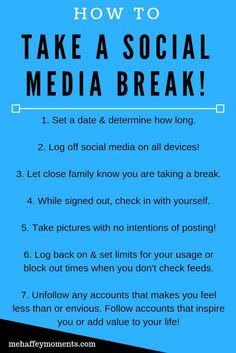
How to Detox From Instagram: A Step-by-step Guide
Are you tired of feeling like you’re spending too much time on Instagram? Do you find yourself mindlessly scrolling through your feed, only to feel guilty and regretful afterwards? You’re not alone. Many of us have fallen victim to the Instagram trap, wasting hours of our lives on a platform that’s supposed to be fun and engaging.
But fear not! In this article, we’ll show you how to detox from Instagram and take back control of your online life. We’ll share practical tips and tricks to help you reduce your screen time, increase productivity, and improve your mental well-being.
Why Do You Need to Detox From Instagram?
Before we dive into the nitty-gritty, let’s explore why detaching from Instagram is essential for our digital health.
- Addiction: Social media platforms like Instagram are designed to be addictive. They use algorithms that trigger the release of dopamine in your brain, making you feel good and encouraging you to come back for more.
- Time Waste: Spending too much time on social media can lead to a significant waste of time. Imagine all the things you could accomplish if you weren’t stuck in a never-ending loop of scrolling through feeds!
- Mental Health: Excessive social media use has been linked to depression, anxiety, and low self-esteem. It’s essential to take breaks from platforms like Instagram to protect your mental well-being.
Verifying Your Activity on Instagram
The first step towards detoxing from Instagram is to understand how much time you’re spending on the platform. Here’s how to check:
- Open the Instagram app on your device.
- Tap on the icon of the omino or your profile picture (located in the bottom right corner).
- Tap on the three horizontal lines (☰) located in the top right corner.
- Scroll down and tap on “Your activity” (represented by a clock symbol).
This will open up a summary of your usage, showing you how much time you’ve spent on Instagram over the past week.
Setting a Maximum Time Limit For Instagram
Now that you know how much time you’re spending on Instagram, it’s time to set a limit. Here’s how:
- Go back to the “Your activity” page.
- Tap on the “Manage your time” section.
- Choose a maximum daily time limit (e.G., 30 Minutes).
- Set up notifications to remind you when it’s time to take a break.
By doing so, you’ll be forced to close the app after reaching your daily limit, helping you stay on track and avoid mindless scrolling.
Disabling Notifications
Notifications can be a significant distraction, making it difficult to focus on other tasks. Here’s how to turn them off:
- Open the Instagram app.
- Tap on the icon of the omino or your profile picture (located in the bottom right corner).
- Tap on the three horizontal lines (☰) located in the top right corner.
- Scroll down and tap on “Settings.”
- Tap on “Notifications.”
- Disable notifications for a specific period (e.G., 15 Minutes, 1 hour).
Disabling Your Account Temporarily
If you’re feeling overwhelmed or struggling to disconnect from Instagram, consider disabling your account temporarily. Here’s how:
- Go to the Instagram website on your browser.
- Click on “Settings” (represented by a gear icon).
- Scroll down and click on “Account.”
- Click on “Deactivate Account.”
- Follow the prompts to disable your account.
Your account will be inactive for the specified period, giving you time to focus on other things and recharge.
Other Helpful Tips For Detoxing From Instagram
Detoxing from Instagram is not just about setting limits and disabling notifications; it’s also about cultivating healthier habits and interests. Here are some additional tips:
- Discover New Passions: Try a new hobby or activity that brings you joy, like painting, writing, or playing an instrument.
- Connect With Friends And Family: Make time for face-to-face conversations and build stronger relationships with loved ones.
- Prioritize Self-care: Take care of your physical and mental health by exercising regularly, meditating, or practicing yoga.
Conclusion
Detoxing from Instagram is a process that requires patience, discipline, and self-awareness. By setting limits, disabling notifications, and cultivating healthier habits, you can take back control of your online life and improve your overall well-being.
Remember, it’s okay to take breaks and step away from social media. Your mental health and relationships are worth the effort.
Frequently Asked Questions
Here are some frequently asked questions about detoxing from Instagram:
- What is The Ideal Amount of Time I Should Spend on Instagram Daily?
There is no one-size-fits-all answer, but a good starting point is to limit your usage to 30 minutes per day. - How Often Should I Take Breaks From Instagram?
Take breaks as frequently as you need to maintain a healthy balance between online and offline activities. - What Are Some Alternative Social Media Platforms I Can Use Instead of Instagram?
Consider using platforms like Twitter, Facebook, or TikTok for specific purposes, such as staying in touch with friends or following your favorite celebrities.
The most important thing is to find a balance that works for you and prioritizes your mental health.


