
How to Create a Puzzle on Instagram: A Step-by-step Guide
As you scroll through your friends’ profiles on Instagram, have you noticed that some of their posts are more visually appealing than others? Besides the beautiful photos, there’s something about these “split” photos that stands out. They seem to be part of a larger image, reassembled into an entire picture within the feed. This phenomenon has given rise to a new type of content known as a puzzle on Instagram.
In this article, we’ll delve into what makes a puzzle on Instagram and how you can create one for your own profile. We’ll also explore some of the best apps to help you achieve this effect.
What is a Puzzle on Instagram?
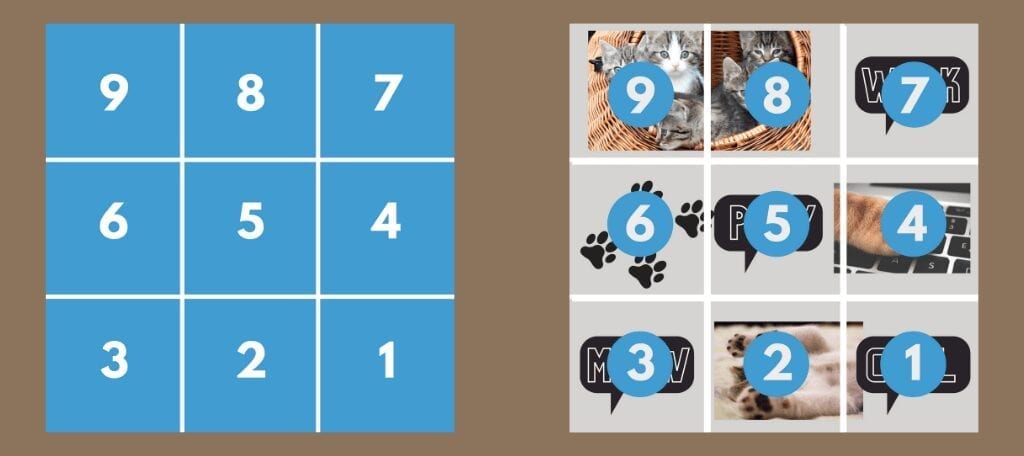
A puzzle on Instagram refers to a series of photos that, when combined in a specific sequence, form a larger image. This can be done by dividing an image into multiple parts and posting each part as a separate photo, with each part containing a fragment of the overall image.
How to Create a Puzzle on Instagram
Creating a puzzle on Instagram is a simple process that requires some creativity and planning. Since Instagram doesn’t have a native function to create puzzles, you’ll need to use third-party apps to achieve this effect.
Here are some steps to follow:
Step 1: Choose an App
There are several apps available that can help you create a puzzle on Instagram. Some of the most popular ones include:
- Grid Post (Android/iOS/iPadOS)
- Grids For Instagram (Android)
- Grids (iOS/iPadOS)
These apps allow you to divide an image into multiple parts and post each part as a separate photo, forming a larger image within the feed.
Step 2: Select Your Image
Choose the image you want to use for your puzzle. Make sure it’s high-quality and visually appealing.
Step 3: Divide The Image
Use the app of your choice to divide the image into multiple parts. You can choose from various grid sizes, such as 3×4 or 3×2.
Step 4: Post Each Part
Post each part of the image as a separate photo on Instagram. Make sure to post them in the correct sequence, so they form a larger image within the feed.
Tips And Variations
- Use a combination of different grid sizes and orientations to create a unique puzzle.
- Add filters or effects to each part of the image to give it a personalized touch.
- Experiment with different types of images, such as patterns or textures, to create a visually appealing puzzle.
Conclusion
Creating a puzzle on Instagram is a fun and creative way to enhance your profile’s visual appeal. By using third-party apps and following these steps, you can create a unique and engaging puzzle that will stand out in the feed. Remember to experiment with different grid sizes, orientations, and effects to make your puzzle truly special.
Faqs
- What is a Puzzle on Instagram?
A puzzle on Instagram refers to a series of photos that, when combined in a specific sequence, form a larger image. - How do I Create a Puzzle on Instagram?
You can use third-party apps like Grid Post, Grids for Instagram, or Grids to divide an image into multiple parts and post each part as a separate photo. - What Are The Benefits of Creating a Puzzle on Instagram?
Creating a puzzle on Instagram can enhance your profile’s visual appeal, engage your followers, and make your content more memorable. - Can I Use Any Type of Image For my Puzzle?
Yes, you can use any type of image, including patterns, textures, or graphics. - How do I Post Each Part of The Image on Instagram?
You’ll need to post each part of the image as a separate photo on Instagram, making sure to post them in the correct sequence to form a larger image within the feed. - Are There Any Apps That Can Help me Create a Puzzle on Instagram?
Yes, there are several apps available that can help you create a puzzle on Instagram, including Grid Post, Grids for Instagram, and Grids. - Can I Add Filters or Effects to Each Part of The Image?
Yes, you can experiment with different filters or effects to give your puzzle a personalized touch.
Recommended Apps
- Grid Post (Android/iOS/iPadOS)
- Grids For Instagram (Android)
- Grids (iOS/iPadOS)


