
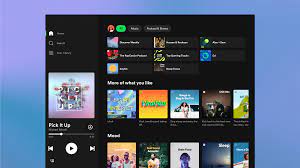
How to Use Spotify: A Comprehensive Guide
Are you tired of searching for the perfect music streaming service? Look no further than Spotify! With its vast library of songs, playlists, and podcasts, Spotify has become a go-to platform for music lovers around the world. In this article, we will guide you through the process of downloading and using Spotify on your smartphone, tablet, computer, and other devices.
What is Spotify?
Spotify is a popular music streaming service that allows users to access millions of songs, podcasts, and videos from anywhere in the world. With its user-friendly interface and seamless experience, Spotify has become one of the most widely used music streaming services globally.
Why Choose Spotify?
So, why choose Spotify over other music streaming services? Here are just a few reasons:
- Vast Library: Spotify’s vast library of songs, podcasts, and videos makes it a one-stop-shop for all your musical needs.
- User-friendly Interface: Spotify’s intuitive interface makes it easy to navigate and find the music you love.
- Cross-platform Compatibility: Spotify is available on multiple platforms, including smartphones, tablets, computers, and smart devices.
Downloading And Using Spotify
So, how do you download and use Spotify? Here’s a step-by-step guide:
Downloading Spotify on Smartphone And Tablet
To download Spotify on your smartphone or tablet, follow these steps:
- Open the App Store (for iOS devices) or Google Play Store (for Android devices).
- Search for “Spotify” in the search bar.
- Select the app from the search results.
- Tap the “Get” button to download and install the app.
- Once installed, tap the “Open” button to launch the app.
Downloading Spotify on Computer
To download Spotify on your computer, follow these steps:
- Open a web browser (such as Google Chrome or Mozilla Firefox).
- Go to the Spotify website (www.Spotify.Com).
- Click on the “Download” button.
- Select the version of Spotify that matches your operating system (Windows or macOS).
- Follow the installation prompts to install the app.
Using Spotify
Once you have downloaded and installed Spotify, here’s how to use it:
- Launch the app.
- Sign in with your account information (or create a new account).
- Browse through the various sections of the app, including Home, Search, and Your Library.
- Search for specific songs, artists, or playlists using the search bar.
- Play music by tapping on the play button.
Using Spotify Web
If you don’t want to install the Spotify app on your computer, you can still use Spotify via the web browser. Here’s how:
- Open a web browser (such as Google Chrome or Mozilla Firefox).
- Go to the Spotify website (www.Spotify.Com).
- Sign in with your account information.
- Browse through the various sections of the app, including Home, Search, and Your Library.
- Search for specific songs, artists, or playlists using the search bar.
Using Spotify on Other Devices
Spotify is available on multiple devices, including:
- Chromecast
- Smart TVs (such as Samsung and Sony)
- Gaming consoles (such as PlayStation 4 and Xbox One)
- Smart speakers (such as Amazon Echo)
Benefits of Using Spotify Premium
Spotify offers a premium subscription service that provides additional features, such as:
- Offline Listening: Listen to music without an internet connection.
- Ad-free Experience: No ads will be displayed during playback.
- High-quality Audio: Enjoy high-quality audio with CD-like sound quality.
Conclusion
In conclusion, Spotify is a popular music streaming service that offers a vast library of songs, podcasts, and videos. With its user-friendly interface and seamless experience, Spotify has become one of the most widely used music streaming services globally. Whether you’re using Spotify on your smartphone, tablet, computer, or other devices, this guide has shown you how to download and use the service.
Frequently Asked Questions (FAQs)
Here are some frequently asked questions about Spotify:
Q: What is Spotify?
A: Spotify is a popular music streaming service that allows users to access millions of songs, podcasts, and videos from anywhere in the world.
Q: Why choose Spotify over other music streaming services?
A: Spotify offers a vast library of songs, podcasts, and videos, as well as a user-friendly interface and cross-platform compatibility.
Q: How do I download and use Spotify on my smartphone or tablet?
A: To download and use Spotify on your smartphone or tablet, go to the App Store (for iOS devices) or Google Play Store (for Android devices), search for “Spotify,” select the app from the search results, tap the “Get” button to download and install the app, and once installed, tap the “Open” button to launch the app.
Q: How do I use Spotify on my computer?
A: To use Spotify on your computer, go to the Spotify website (www.Spotify.Com), click on the “Download” button, select the version of Spotify that matches your operating system (Windows or macOS), follow the installation prompts to install the app, and once installed, launch the app and sign in with your account information.
Q: What are the benefits of using Spotify Premium?
A: The benefits of using Spotify Premium include offline listening, ad-free experience, high-quality audio, and more.
Q: Can I use Spotify on other devices?
A: Yes, Spotify is available on multiple devices, including Chromecast, smart TVs, gaming consoles, and smart speakers.


