
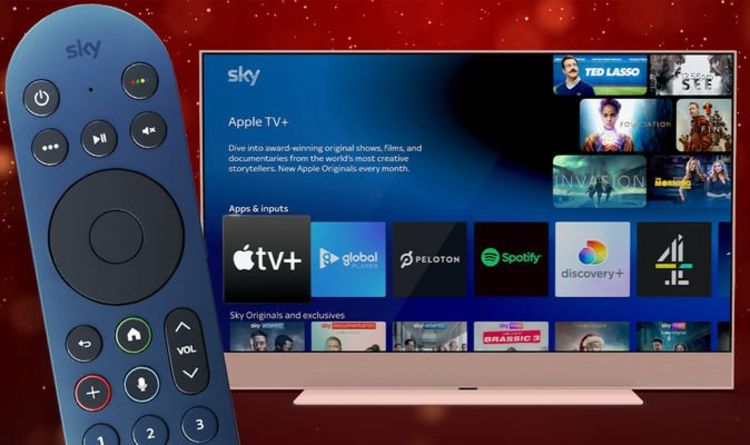
The Ultimate Guide to Sky Glass: Unlocking The Power of Smart TV
Are you curious about the latest innovation in home entertainment? Look no further than Sky Glass, a revolutionary new Smart TV that’s taking the world by storm! In this comprehensive guide, we’ll delve into the features and benefits of Sky Glass, exploring everything from its sleek design to its seamless integration with popular streaming services.
What is Sky Glass?
Sky Glass is a cutting-edge Smart TV that combines stunning visuals with advanced technology to deliver an unparalleled viewing experience. With its sleek and slim design, this TV is perfect for modern living rooms, seamlessly blending into your home decor while providing hours of entertainment and fun.
Key Features of Sky Glass
- Streaming Power: Access thousands of shows, movies, and sports events from popular streaming services like Netflix, Amazon Prime Video, and DAZN.
- Smart Remote Control: Effortlessly navigate through menus, search for content, and control your viewing experience with the intuitive remote control.
- Voice Commands: Talk to Sky Glass using voice commands to find and launch your favorite apps, making it easy to get what you want without lifting a finger!
- Integration With Sky Services: Enjoy exclusive access to Sky’s vast library of content, including live sports, news, and on-demand entertainment.
How Do I Download Apps on Sky Glass?
While Sky Glass doesn’t have its own app store like other Smart TVs, it’s surprisingly easy to access popular streaming services directly from the TV. Simply connect your Sky Glass to the internet using Wi-Fi or Ethernet, and you’ll be able to browse through the available apps.
Which Apps Are Available on Sky Glass?
Sky Glass offers an impressive selection of popular streaming services, including:
- Dazn: Catch live sports events and exclusive sports content.
- Discovery+: Enjoy a vast library of entertainment, documentaries, and more!
- Netflix: Access thousands of hours of on-demand content, from movies to shows.
- Paramount+: Watch the latest movies, TV series, and exclusive Paramount content.
- Amazon Prime Video: Stream original content, movies, and TV shows with an Amazon Prime subscription.
How Do I Use Voice Commands on Sky Glass?
Using voice commands is as simple as saying “Ciao Sky” followed by the app or service you want to access. For example, say “Open Netflix” to launch the popular streaming service directly from your remote control!
Monitoring And Updating Apps on Sky Glass
Want to keep track of new apps added to Sky Glass? Simply navigate to the Settings menu, scroll down to Display All, and voilà! You’ll have a comprehensive list of all installed apps.
Tips For Optimizing Your Sky Glass Experience
- Connect Your Sky Glass to a Stable Internet Connection: Ensure seamless streaming and app updates.
- Use The Smart Remote Control: Simplify navigation and enjoy an enhanced viewing experience.
- Update Your Sky Glass Regularly: Stay up-to-date with the latest features, security patches, and app updates.
Conclusion
Sky Glass is more than just a Smart TV – it’s a revolutionary entertainment hub that brings you closer to the content you love. With its sleek design, seamless integration with popular streaming services, and intuitive voice commands, this device is sure to transform your home viewing experience forever!
Frequently Asked Questions (FAQs)
- What is Sky Glass?
Sky Glass is a cutting-edge Smart TV that combines stunning visuals with advanced technology. - Which Apps Are Available on Sky Glass?
Popular streaming services include Netflix, Amazon Prime Video, DAZN, Discovery+, and Paramount+. - How do I Use Voice Commands on Sky Glass?
Say “Ciao Sky” followed by the app or service you want to access (e.G., “Open Netflix”). - Can I Monitor New Apps Added to Sky Glass?
Yes! Navigate to Settings > Display All for a comprehensive list of installed apps. - What is The Minimum Internet Speed Required For Sky Glass?
The minimum recommended speed is 10MB/s; for 4K Ultra HD content, you’ll need at least 25MB/s. - Can I Update my Sky Glass Manually?
No! Sky will automatically update your device with the latest features and security patches.
Stay tuned for more updates on this innovative technology!


