
How to Download Youtube Videos Online Without Programs
Are you tired of searching for ways to download YouTube videos online without installing programs on your computer? Look no further! In this article, we will explore the best services that allow you to download YouTube videos online directly from your browser.
The Problem With Installing Programs
Installing programs on your computer can be a hassle, especially if you’re not comfortable with technical stuff. Moreover, some programs may come with unwanted features or malware, which can compromise your device’s security. That’s why we’re glad to introduce you to services that allow you to download YouTube videos online without installing any programs.
The Benefits of Online Services
Online services offer several benefits over traditional program-based methods:
- Convenience: You don’t need to install anything on your computer, making it easy to use.
- Ease of Use: Most online services have user-friendly interfaces that make it simple to download videos.
- No Risk of Malware: Since you’re not installing any programs, there’s no risk of malware or other security issues.
How to Download Youtube Videos Online
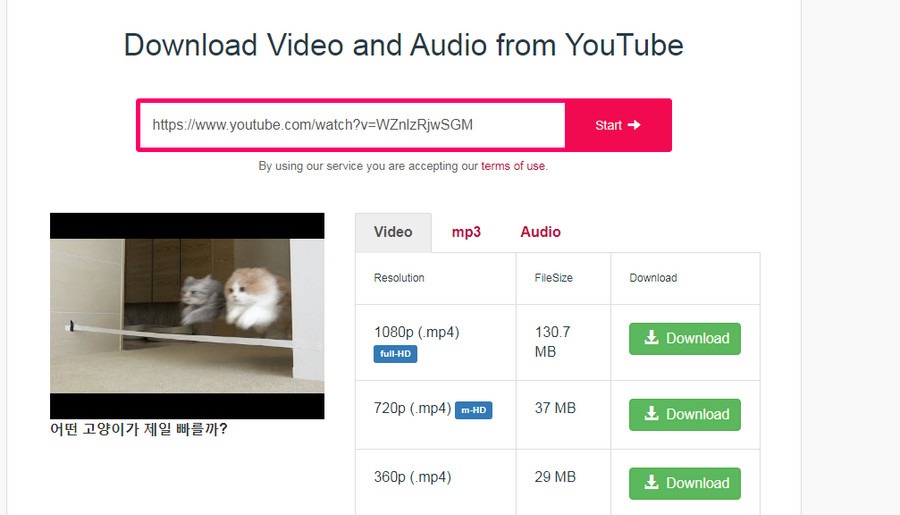
To start downloading YouTube videos online, follow these steps:
- Choose a service from our list below and visit their website.
- Enter the YouTube video URL in the provided field.
- Select the format and quality you want for your download.
- Click on the “Download” button to start the process.
Services to Download Youtube Videos Online
Here are some of the best services that allow you to download YouTube videos online without installing any programs:
1. Notube
NoTube is a popular service that supports video downloads in various formats, including Full HD with audio. It’s easy to use and doesn’t require registration.
- Visit noTube’s website (www.Notube.Io) and enter the YouTube video URL.
- Select the output format (e.G., MP4) from the dropdown menu.
- Click on the “OK” button to start the download process.
- Once the processing is complete, you’ll see a “Download” button. Clicking on it will initiate the download of your file.
2. Clipconvert
ClipConvert is another service that allows you to download YouTube videos online and convert them into various formats (e.G., MP4, MKV). It also supports downloading videos from other websites.
- Visit ClipConvert’s website (www.Clipconvert.Com) and enter the YouTube video URL.
- Select the output format (e.G., MP4) from the dropdown menu.
- Choose the conversion options as needed (e.G., Resolution, audio).
- Click on the “Start” button to initiate the download process.
3. Vido
VIDO is an optimal service that allows you to download YouTube videos online and save them in various formats. It’s easy to use and doesn’t require registration.
- Visit VIDO’s website (www.Vido.Io) and enter the YouTube video URL.
- Select the output format (e.G., MP4) from the dropdown menu.
- Click on the “OK” button to start the download process.
4. 2Conv
2Conv is a web service that allows you to convert YouTube videos into various formats, including MP4, MP3, and more. It’s easy to use and doesn’t require registration.
- Visit 2conv’s website (www.2Conv.Com) and enter the YouTube video URL.
- Select the output format (e.G., MP4) from the dropdown menu.
- Choose the conversion options as needed (e.G., Resolution, audio).
- Click on the “Start” button to initiate the download process.
5. Savefrom
SaveFrom is a simple service that allows you to download YouTube videos online and save them in various formats. It’s easy to use and doesn’t require registration.
- Visit SaveFrom’s website (www.Savefrom.Net) and enter the YouTube video URL.
- Select the output format (e.G., MP4) from the dropdown menu.
- Click on the “Download” button to start the download process.
How to Download Playlists
If you need to download a YouTube playlist, follow these steps:
- Choose a service from our list above and visit their website.
- Enter the YouTube video URL in the provided field.
- Select the output format (e.G., MP4) from the dropdown menu.
- Click on the “Download” button to start the process.
How to Download Audio
If you want to download only the audio from a YouTube video, follow these steps:
- Choose a service from our list above and visit their website.
- Enter the YouTube video URL in the provided field.
- Select the output format (e.G., MP4) from the dropdown menu.
- Click on the “Download” button to start the process.
Conclusion
Downloading YouTube videos online without programs is easy and convenient with these services. No matter what you’re looking for – downloading a single video, an entire playlist, or just the audio – our list of services has got you covered. So go ahead and explore these options, and enjoy your downloaded content!


