
Downloading Hamachi: A Step-by-step Guide
Are you looking for a way to create a virtual private network (VPN) on your computer? Look no further than Hamachi, a user-friendly software that allows you to connect multiple computers together in a secure and private network.
In this article, we will guide you through the process of downloading and installing Hamachi on your computer. We will also explain how to create a new network, add members, and access existing networks.
What is Hamachi?
Hamachi is a VPN software that allows you to create a virtual network between multiple computers. It uses encryption to secure your data and protect it from unauthorized access. With Hamachi, you can connect your computer to a network of up to 256 members, making it ideal for online gaming, file sharing, or other applications.
Downloading Hamachi
To download Hamachi on your computer, follow these steps:
- Visit The Logmein Website: Go to the official LogMeIn website and sign up for a free account.
- Click on The “Provalo Free” Button: Click on the “Provalo free” button to start the download process.
- Enter Your Email Address And Password: Enter your email address and password in the required fields.
- Create an Account: Click on the “Create account” button to create a new account.
Installing Hamachi
Once you have downloaded Hamachi, follow these steps to install it on your computer:
- Open The Installation File: Open the installation file (Hamachi.Msi) and click on the “Next” button.
- Follow The Setup Wizard: Follow the setup wizard to complete the installation process.
- Enter Your Account Information: Enter your account information, including your email address and password.
Creating a New Network
To create a new network in Hamachi, follow these steps:
- Access The Logmein Website: Access the LogMeIn website using your browser.
- Click on The “Add Net” Button: Click on the “Add net” button to create a new network.
- Choose The Type of Network: Choose the type of network you want to create, such as Mesh, Hub and Spoke, or Getaway.
- Enter The Network Name And Password: Enter the network name and password in the required fields.
Adding Members to Your Network
To add members to your network, follow these steps:
- Access The Logmein Website: Access the LogMeIn website using your browser.
- Click on The “Modification” Button: Click on the “Modification” button next to your network name.
- Choose The Option to Add/stir up Members: Choose the option to add or stir up members in your network.
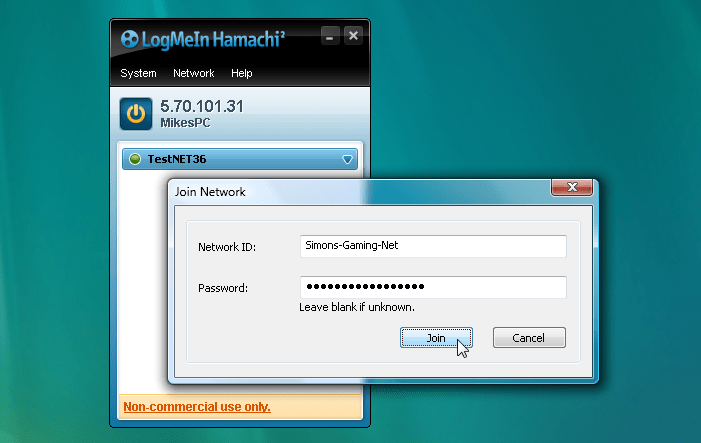
Accessing an Existing Network
To access an existing network, follow these steps:
- Access The Logmein Website: Access the LogMeIn website using your browser.
- Click on The “Take” Button: Click on the “Take” button to join an existing network.
- Enter The Network ID And Password: Enter the network ID and password in the required fields.
Troubleshooting
If you encounter any issues while downloading or installing Hamachi, check the following:
- Check Your Internet Connection: Ensure that your internet connection is stable and functioning properly.
- Restart Your Computer: Restart your computer to ensure that all system files are updated and functioning correctly.
Conclusion
Hamachi is a user-friendly VPN software that allows you to create a virtual network between multiple computers. With its simple interface and secure encryption, Hamachi makes it easy to connect with friends or colleagues online. By following the steps outlined in this guide, you can download, install, and use Hamachi on your computer.
Frequently Asked Questions (FAQs)
- What is The Maximum Number of Members I Can Add to my Network?
The maximum number of members you can add to your network depends on the type of subscription you have. With the free plan, you can add up to 5 members. With the Standard plan, you can add up to 32 members. With the Premium plan, you can add up to 256 members. - What is The Difference Between Mesh And Hub And Spoke Networks?
Mesh networks allow all computers on the network to connect directly with each other. Hub and Spoke networks allow only specific computers on the network to connect directly with each other. - How do I Access my Network From Another Computer?
To access your network from another computer, you need to enter the network ID and password in the required fields. If you are having trouble accessing your network, contact the administrator for assistance. - What is The Benefit of Using Hamachi Over Other Vpn Software?
Hamachi offers a user-friendly interface and secure encryption, making it easy to connect with friends or colleagues online. It also allows you to create a virtual network between multiple computers, making it ideal for online gaming or file sharing.
References
- LogMeIn website: Https://Www.Logmein.Com/
- Hamachi support page: Https://Support.Logmein.Com/hc/en-us/sections/360000124314-Hamachi
- Microsoft website: Https://Www.Microsoft.Com/


