
How to Download Hay Day on Pc: A Step-by-step Guide
Are you tired of playing Hay Day on your smartphone or tablet? Do you want to experience the thrill of managing your own farm on a bigger screen? Look no further! In this article, we will guide you through the process of downloading and installing Hay Day on your PC.
Why Download Hay Day on Pc?
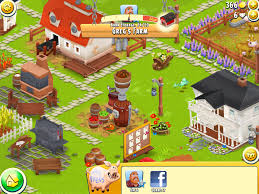
Hay Day is a popular mobile game that allows players to manage their own farms, collect resources, and trade with other players. While it’s great to play on a small screen, playing on a larger monitor can enhance the gaming experience. With Hay Day on PC, you’ll have more space to view your farm, interact with other players, and enjoy the game’s features without the hassle of a smaller screen.
What You Need to Download Hay Day on PC
To download Hay Day on PC, you’ll need:
- A computer with Windows or macOS operating system
- A stable internet connection
- BlueStacks software (more on this later)
Step 1: Download And Install Bluestacks
BlueStacks is an Android emulator that allows you to run Android apps on your PC. It’s a free software that’s easy to install and use.
To download BlueStacks, follow these steps:
- Go to the official BlueStacks website (www.Bluestacks.Com)
- Click on the “Download” button
- Choose the correct version for your operating system (Windows or macOS)
- Follow the installation instructions
Step 2: Set Up Bluestacks
Once you’ve installed BlueStacks, follow these steps to set it up:
- Open BlueStacks and sign in with your Google account
- Click on the “Play Store” icon
- Wait for the Play Store to load
- Search for Hay Day in the search bar
- Click on the Hay Day app and select “Install”
Step 3: Launch Hay Day on PC
Once you’ve installed Hay Day, follow these steps to launch it:
- Open BlueStacks and navigate to the home screen
- Click on the Hay Day icon
- Wait for the game to load
- Follow the in-game instructions to set up your farm
Step 4: Synchronize Your Progress
If you’ve already played Hay Day on your mobile device, you can synchronize your progress on PC by following these steps:
- Open BlueStacks and navigate to the settings menu
- Click on the “Supercell ID” option
- Sign in with your Supercell account credentials
- Wait for the game to sync your progress
Tips And Tricks
- Make sure you have a stable internet connection to download and install Hay Day.
- Use BlueStacks 5, which is the latest version of the software, for better performance.
- You can play Hay Day on PC with keyboard and mouse controls or use a controller for a more immersive experience.
Conclusion
Downloading and installing Hay Day on PC is a straightforward process that requires minimal technical expertise. With this guide, you’ll be able to enjoy the game’s features and gameplay on a bigger screen. Remember to synchronize your progress if you’ve already played on your mobile device.
Frequently Asked Questions
- Q: What is Bluestacks?
A: BlueStacks is an Android emulator that allows you to run Android apps on your PC. - Q: Is Hay Day Available For Download on Pc?
A: Yes, Hay Day is available for download on PC using the BlueStacks software. - Q: What Are The System Requirements For Playing Hay Day on Pc?
A: The minimum system requirements for playing Hay Day on PC include a computer with Windows or macOS operating system and a stable internet connection. - Q: Can I Play Hay Day on PC With Keyboard And Mouse Controls?
A: Yes, you can play Hay Day on PC using keyboard and mouse controls or use a controller for a more immersive experience. - Q: How do I Synchronize my Progress From Mobile to Pc?
A: To synchronize your progress, follow the in-game instructions to set up your Supercell account and then sign in with your credentials.
I hope this guide has been helpful! Let me know if you have any further questions or need assistance with downloading Hay Day on PC.


