
The Ultimate Guide to Downloading Minecraft Earth
Are you a passionate fan of Minecraft, the iconic sandbox video game developed by Mojang? If yes, then you’re in luck because we have some exciting news for you! Microsoft has announced that Minecraft Earth is available for download on all major platforms. In this article, we’ll guide you through the process of downloading and playing Minecraft Earth on your device.
What is Minecraft Earth?
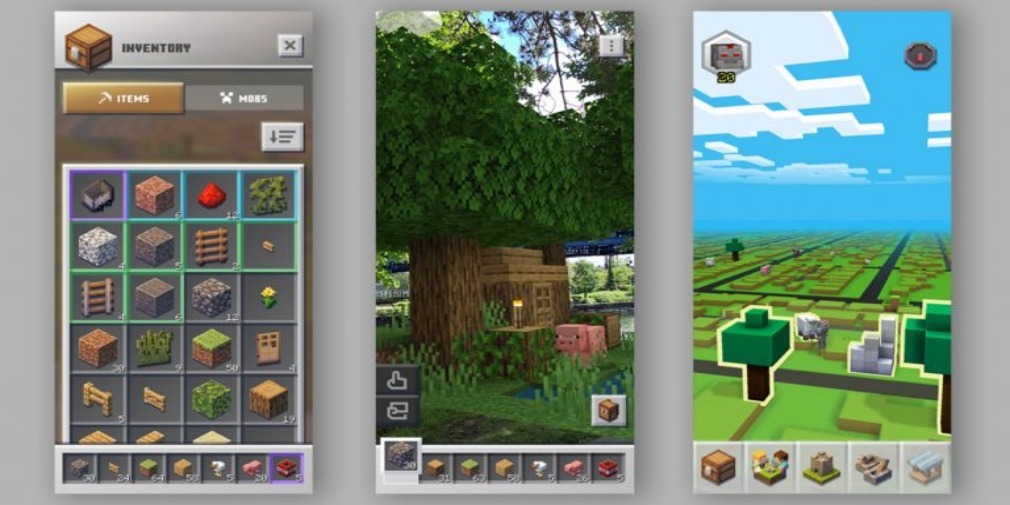
Before we dive into the guide, let’s talk about what Minecraft Earth is. Minecraft Earth is a reality augmented game that brings the world of Minecraft to life in the real world. It’s available for both Android and iOS devices, and it allows players to explore and build in a virtual world that blends seamlessly with the real one.
How to Download Minecraft Earth on Android
If you’re an Android user, then you can download Minecraft Earth from the Google Play Store. Here’s how:
- Open the Google Play Store on your device.
- Search for “Minecraft Earth” and select the app from the search results.
- Tap the “Install” button to begin the download process.
- Wait for the game to download and install on your device.
- Once installed, tap the “Open” button to launch Minecraft Earth.
How to Download Minecraft Earth on Ios
If you’re an iOS user, then you can download Minecraft Earth from the App Store. Here’s how:
- Open the App Store on your device.
- Search for “Minecraft Earth” and select the app from the search results.
- Tap the “Get” button to begin the download process.
- Wait for the game to download and install on your device.
- Once installed, tap the “Open” button to launch Minecraft Earth.
How to Play Minecraft Earth
Now that you’ve downloaded Minecraft Earth, it’s time to start playing! Here’s a step-by-step guide:
- Launch Minecraft Earth on your device.
- Tap the “Yes” button to begin the game.
- Wait for the game to load and prepare the environment.
- Once ready, tap the “Play” button to start exploring and building in the virtual world.
- To access your Microsoft account, tap the link that says “Do this here for create an account” and follow the instructions.
Tips And Tricks
Here are some tips and tricks to help you get started with Minecraft Earth:
- Make sure to enable location services on your device to ensure seamless gameplay.
- Be respectful of the real world while playing Minecraft Earth. Avoid disturbing others or causing any damage.
- Use your own judgment when deciding whether to play Minecraft Earth in emergency situations, such as during a pandemic.
Conclusion
Minecraft Earth is an exciting new game that brings the world of Minecraft to life in the real world. With this guide, you should be able to download and play Minecraft Earth on your device with ease. Remember to respect the real world while playing, and don’t hesitate to reach out if you have any questions or need further assistance.
Frequently Asked Questions
Q: What is Minecraft Earth?
A: Minecraft Earth is a reality augmented game that brings the world of Minecraft to life in the real world.
Q: Is Minecraft Earth available on all platforms?
A: Yes, Minecraft Earth is available on both Android and iOS devices.
Q: How do I download Minecraft Earth?
A: You can download Minecraft Earth from the Google Play Store (for Android) or the App Store (for iOS).
Q: What are the system requirements for playing Minecraft Earth?
A: Minecraft Earth requires a device with Android 5.0 Or later, or an iOS device with iOS 10 or later.
Q: Can I play Minecraft Earth offline?
A: No, Minecraft Earth requires an internet connection to function properly.
Q: Is Minecraft Earth suitable for children?
A: Yes, Minecraft Earth is designed for players of all ages and skill levels.
Q: Can I build and explore in the real world while playing Minecraft Earth?
A: Yes, one of the unique features of Minecraft Earth is that it allows players to build and explore in the real world, using augmented reality technology.
Q: Is Minecraft Earth free to play?
A: Yes, Minecraft Earth is a free-to-play game, with no upfront costs or subscriptions.


