
Download Viber: A Step-by-step Guide
Are you looking for a reliable and efficient way to chat with your friends and family? Do you want to experience the convenience of instant messaging without the hassle of cumbersome interfaces? Look no further than Viber, a popular communication app that allows you to stay connected with loved ones in a facile and immediate manner.
What is Viber?
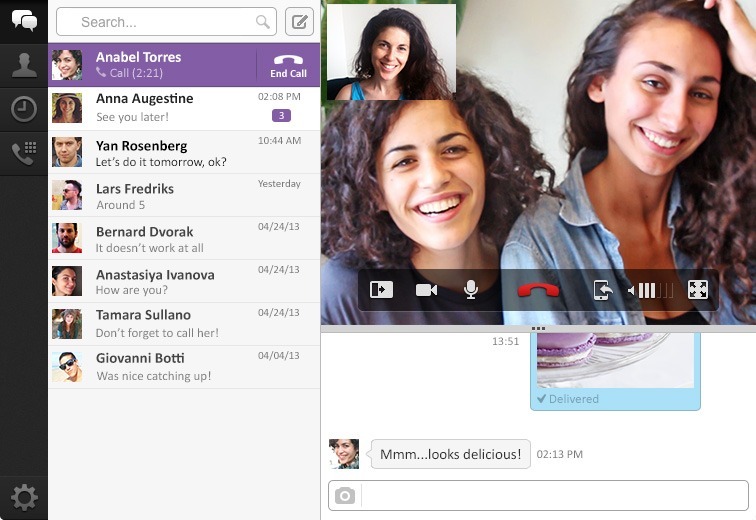
Viber is a free messaging and voice-over-internet protocol (VoIP) service that enables users to make voice calls, send text messages, photos, videos, and other multimedia content over the internet. The app is available on multiple platforms, including Android, iOS, Windows, and macOS.
Why Choose Viber?
There are many reasons why you should choose Viber as your go-to messaging app:
- Free And Secure: Viber offers a secure and free communication experience, allowing you to chat with friends and family without incurring any costs.
- User-friendly Interface: The app’s intuitive interface makes it easy to navigate and use, even for those who are not tech-savvy.
- Group Chats: Viber allows you to create group chats with up to 100 participants, making it perfect for coordinating plans or sharing updates with multiple people at once.
How to Download Viber
Downloading Viber is a straightforward process that requires minimal effort and expertise. Here’s how to do it:
For Android Devices
- Access The Google Play Store: Open the Google Play Store app on your device.
- Search For Viber: Type “Viber” in the search bar and select the app from the results.
- Download And Install: Tap the “Install” button to begin the download process. Once complete, tap “Open” to launch the app.
For Ios Devices
- Access The App Store: Open the App Store app on your device.
- Search For Viber: Type “Viber” in the search bar and select the app from the results.
- Download And Install: Tap the “Get” button to begin the download process. Once complete, tap “Open” to launch the app.
For Windows Devices
- Access The Microsoft Store: Open the Microsoft Store app on your device.
- Search For Viber: Type “Viber” in the search bar and select the app from the results.
- Download And Install: Tap the “Get” button to begin the download process. Once complete, tap “Launch” to launch the app.
For Macos Devices
- Access The Mac App Store: Open the Mac App Store app on your device.
- Search For Viber: Type “Viber” in the search bar and select the app from the results.
- Download And Install: Click the “Install” button to begin the download process. Once complete, click “Open” to launch the app.
Troubleshooting Tips
If you encounter any issues during the download or installation process, here are some troubleshooting tips to help you resolve them:
- Check your internet connection: Ensure that your device has a stable and fast internet connection.
- Restart your device: Sometimes, restarting your device can resolve connectivity issues.
- Check for app updates: Make sure that you have the latest version of Viber installed on your device.
Additional Tips
Here are some additional tips to help you get the most out of Viber:
- Create a Group Chat: Use Viber’s group chat feature to coordinate plans or share updates with multiple people at once.
- Share Media: Share photos, videos, and other multimedia content with friends and family using Viber’s built-in media sharing feature.
- Use Viber’s Stickers And Emojis: Add a personal touch to your conversations by using Viber’s stickers and emojis.
Conclusion
Downloading Viber is a simple process that requires minimal effort and expertise. By following the steps outlined in this guide, you can experience the convenience of instant messaging with Viber. Whether you’re looking for a reliable way to stay connected with friends and family or want to explore new features and functionalities, Viber has got you covered.
Frequently Asked Questions
Here are some frequently asked questions about Viber:
- Q: Is Viber Free?
A: Yes, Viber is completely free to download and use. - Q: What Platforms Does Viber Support?
A: Viber supports multiple platforms, including Android, iOS, Windows, and macOS. - Q: Can I Make Voice Calls With Viber?
A: Yes, Viber allows you to make voice calls over the internet using your device’s microphone and speakers.
Conclusion
Viber is a reliable and efficient way to communicate with friends and family. By following the steps outlined in this guide, you can experience the convenience of instant messaging with Viber. Whether you’re looking for a free and secure communication experience or want to explore new features and functionalities, Viber has got you covered.
Additional Resources
If you need more information about Viber or have any questions, here are some additional resources to help you:
- Viber Official Website: Visit the official Viber website for the latest news, updates, and features.
- Viber Support Page: Check out Viber’s support page for troubleshooting tips, FAQs, and other helpful resources.
- Viber Community Forum: Join the Viber community forum to connect with other users, ask questions, and share experiences.


