
How to Download Videos From Tumblr: A Step-by-step Guide
Are you tired of missing out on your favorite videos shared by users on Tumblr? Do you want to save them for later or share them with friends? Look no further! In this article, we will guide you through the process of downloading videos from Tumblr using various methods and tools.
Table 1: Downloading Videos From Tumblr
| Method | Description |
|---|---|
| TubeNinja | A free online service that allows you to download videos from Tumblr and other platforms. |
| Download-Video.Net | Another free online service that enables you to download videos from Tumblr in a fast and painless manner. |
Table 2: Best Practices For Downloading Videos From Tumblr
| Best Practice | Description |
|---|---|
| Check The Video Source | Before downloading a video, ensure it is not a copyrighted material or an external link that may not work properly. |
| Use Reputable Software | Choose software that is well-known and trusted in the online community to avoid malware or viruses. |
Why Download Videos From Tumblr?
Downloading videos from Tumblr can be beneficial for various reasons:
- You can save them for later viewing without relying on an internet connection.
- You can share them with friends or family members who may not have access to the original content.
- You can use them in educational or creative projects, such as presentations, videos, or social media posts.
How to Download Videos From Tumblr: A Step-by-step Guide
Using Tubeninja
- Go to TubeNinja.Com and click on the “Download” button.
- Enter the URL of the Tumblr post containing the video you want to download.
- Select the format and resolution you prefer (e.G., MP4, 1080p).
- Click on the “Download” button to initiate the process.
Using Download-video.net
- Visit Download-Video.Net and click on the “Download Video” button.
- Enter the URL of the Tumblr post containing the video you want to download.
- Select the format and resolution you prefer (e.G., MP4, 1080p).
- Click on the “Download” button to initiate the process.
Other Solutions For Downloading Videos From Tumblr
Using Desktop Software
If you prefer using desktop software, there are several options available:
- 4K Video Downloader+
- JDownloader
- ClipGrab
Each of these software solutions has its own strengths and weaknesses. Be sure to research and choose the one that best suits your needs.
Using Mobile Apps
For mobile users, there are also app-based solutions:
- Firefox (Android)
- Command Fast (iOS/iPadOS)
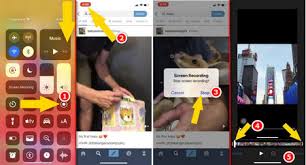
These apps offer a convenient way to download videos from Tumblr directly on your device.
Tips And Tricks For Downloading Videos From Tumblr
- Always check the video source before downloading.
- Use reputable software or online services to avoid malware or viruses.
- Be mindful of copyright laws when sharing downloaded content.
- Consider using browser extensions or add-ons that enable easy video downloads.
By following these steps, tips, and best practices, you can enjoy your favorite Tumblr videos offline or share them with others without any hassle!
Conclusion
Downloading videos from Tumblr is a straightforward process that can be accomplished using various methods and tools. By choosing the right software or online service, you can save your favorite videos for later viewing or sharing with friends. Remember to always follow best practices and respect copyright laws.
Frequently Asked Questions (FAQs)
- Q: Can I Download Videos From Tumblr Without an Internet Connection?
A: No, downloading videos from Tumblr requires an active internet connection. - Q: Are There Any Risks Associated With Downloading Videos From Tumblr?
A: Yes, if you use untrusted software or online services, you may expose yourself to malware or viruses. - Q: Can I Share Downloaded Videos on Social Media Platforms?
A: Yes, but be sure to follow copyright laws and respect the original creator’s rights. - Q: Are There Any Limitations to Downloading Videos From Tumblr Using Tubeninja or Download-video.Net?
A: No, both services offer a wide range of features and formats for downloading videos. - Q: Can I Download Videos From Tumblr on my Mobile Device?
A: Yes, there are dedicated apps available for Android and iOS devices. - Q: How do I Know Which Software or Service is Best For Me?
A: Research and compare different options to find the one that suits your needs and preferences. - Q: Can I Download Videos From Tumblr in HD Quality?
A: Yes, some services and software allow you to download videos in high definition (HD) quality. - Q: Are There Any Additional Fees Associated With Using Tubeninja or Download-video.Net?
A: No, both services are free to use without any additional costs.
Feel free to ask if you have any further questions!


