
How to Design Diagrammi di Flusso (Flowcharts)
Are you tired of cluttered notes and confusing diagrams? Do you want to create clear and concise flowcharts to visualize your ideas and processes? Look no further! In this article, we will guide you through the process of designing diagrammi di flusso, also known as flowcharts.
What Are Diagrammi di Flusso?
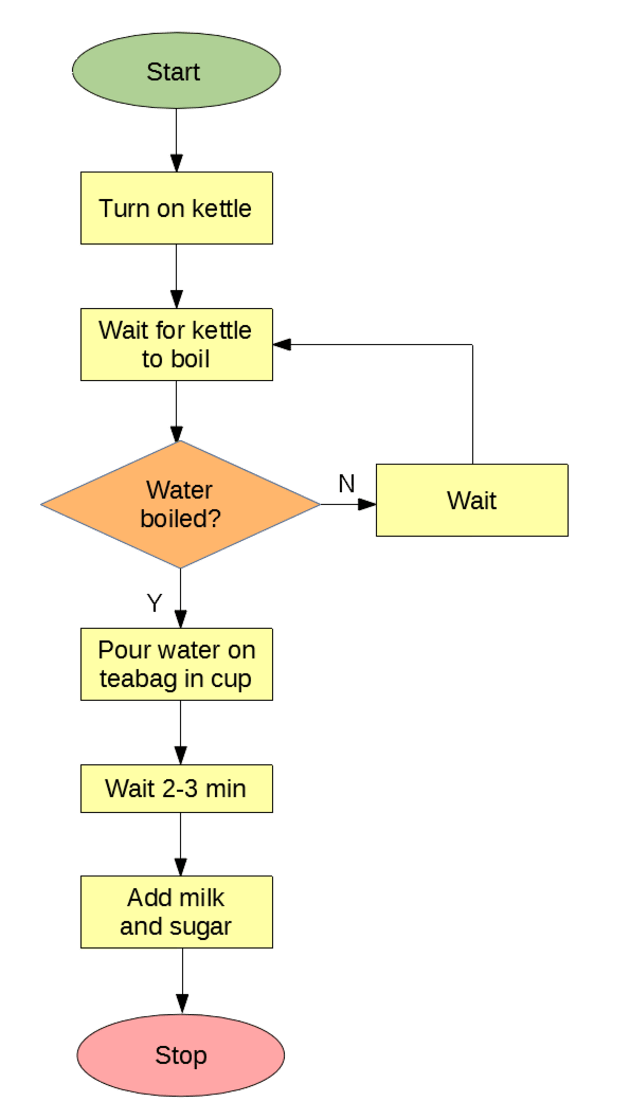
Diagrammi di flusso are visual representations of a process or a series of steps. They are used to illustrate the sequence of events, decisions, and actions that occur in a particular situation. Flowcharts can be simple or complex, depending on the level of detail required.
Why Use Diagrammi di Flusso?
Flowcharts have numerous benefits, including:
- Improved Communication: By visualizing your ideas, you can communicate them more effectively to others.
- Reduced Errors: Flowcharts help you identify potential pitfalls and mistakes in a process.
- Increased Productivity: With a clear understanding of the steps involved, you can streamline processes and reduce waste.
- Enhanced Creativity: Diagrammi di flusso encourage creative thinking and problem-solving.
Tools For Designing Diagrammi di Flusso
You don’t need to be a professional designer or programmer to create flowcharts. There are many tools available that make it easy to design diagrammi di flusso, including:
- Microsoft Office: Word, PowerPoint, and Excel all have built-in features for creating flowcharts.
- Libreoffice: A free, open-source alternative to Microsoft Office.
- Draw.Io: An online tool that allows you to create flowcharts without needing any software or coding knowledge.
- Mindomo: A mobile app for Android and iOS devices that enables you to create flowcharts on the go.
Designing Diagrammi di Flusso With Microsoft Office
Microsoft Office provides a range of tools for creating flowcharts, including:
- Smartart: A feature in Word, PowerPoint, and Excel that allows you to create diagrams and charts.
- Shapes: A collection of pre-designed shapes that can be used to create flowcharts.
To design diagrammi di flusso with Microsoft Office, follow these steps:
- Open your chosen application (Word, PowerPoint, or Excel).
- Click on the “Insert” tab.
- Select the “SmartArt” option.
- Choose a pre-designed flowchart template.
- Customize the design and layout as needed.
Designing Diagrammi di Flusso With Libreoffice
LibreOffice is a free, open-source alternative to Microsoft Office. To design diagrammi di flusso with LibreOffice, follow these steps:
- Open LibreOffice Draw.
- Select the “Flowchart” option.
- Choose a pre-designed template or create your own from scratch.
- Customize the design and layout as needed.
Designing Diagrammi di Flusso Online With Draw.Io
Draw.Io is an online tool that allows you to create flowcharts without needing any software or coding knowledge. To design diagrammi di flusso with Draw.Io, follow these steps:
- Open Draw.Io in your web browser.
- Click on the “Create a new diagram” button.
- Choose a pre-designed template or start from scratch.
- Customize the design and layout as needed.
Designing Diagrammi di Flusso Mobile With Mindomo
Mindomo is a mobile app for Android and iOS devices that enables you to create flowcharts on the go. To design diagrammi di flusso with Mindomo, follow these steps:
- Download and install the Mindomo app.
- Open the app and click on the “Create a new diagram” button.
- Choose a pre-designed template or start from scratch.
- Customize the design and layout as needed.
Tips For Designing Effective Diagrammi di Flusso
Here are some tips to keep in mind when designing diagrammi di flusso:
- Keep it Simple: Avoid cluttering your flowchart with too much information.
- Use Clear Labels: Use descriptive labels to identify each step or process.
- Make it Visually Appealing: Choose colors and shapes that make your flowchart easy to read.
- Test And Refine: Test your flowchart and refine it as needed.
Conclusion
Designing diagrammi di flusso is a powerful tool for visualizing ideas and processes. With the right tools and techniques, you can create clear and concise flowcharts that communicate effectively. Whether you’re using Microsoft Office, LibreOffice, Draw.Io, or Mindomo, remember to keep it simple, use clear labels, make it visually appealing, and test and refine your design.
Frequently Asked Questions (FAQs)
- What is The Difference Between a Diagrammi di Flusso And a Mind Map?
A diagrammi di flusso is a visual representation of a process or series of steps, while a mind map is a visual representation of ideas and concepts. - Can I Use Diagrammi di Flusso For Non-work-related Purposes?
Yes! Diagrammi di flusso can be used to visualize personal projects, creative ideas, or even hobbies. - Do I Need to Have Design Experience to Create Effective Diagrammi di Flusso?
No! With the right tools and techniques, anyone can create clear and concise flowcharts. - Can I Export my Diagrammi di Flusso as an Image or Pdf?
Yes! Most diagrammi di flusso tools allow you to export your design as an image or PDF for sharing or printing.
Additional Resources
For more information on designing diagrammi di flusso, check out the following resources:
- Microsoft Office Tutorials: Find step-by-step guides and videos on using SmartArt and Shapes in Microsoft Office.
- Libreoffice Tutorials: Discover how to create flowcharts with LibreOffice Draw.
- Draw.Io Documentation: Learn more about using Draw.Io for creating diagrammi di flusso online.
- Mindomo Resources: Explore the Mindomo app and find tips for designing effective flowcharts on the go.
I hope this article has been helpful in guiding you through the process of designing diagrammi di flusso. Happy drawing!


