
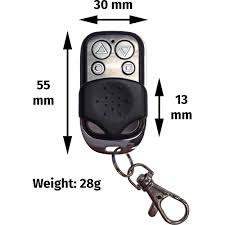
Have you ever faced the challenge of needing an extra gate remote control? Whether you’ve lost your old remote or just want a spare, duplicating your gate remote can seem like a daunting task. But don’t worry, it’s simpler than you might think. In this guide, we’ll cover everything you need to know about how to duplicate a gate remote, including types of remotes, the tools you need, and step-by-step instructions.
Let’s get started!
What You Need to Know Before Duplicating a Gate Remote
Before diving into the duplication process, it’s essential to understand a few key concepts. The type of remote you have, the frequency it operates on, and its coding method are all crucial factors in the duplication process.
1. Types of Remote Coding: Fixed Code vs. Rolling Code
Remote controls for gates generally fall into two categories: fixed code and rolling code. Knowing which type you have will determine whether you can easily duplicate the remote.
Fixed Code
A fixed code remote sends the same signal each time you press a button. These are easier to duplicate, and most universal remotes are compatible with this type.
Rolling Code
A rolling code remote (also known as hopping code) generates a new code every time you press a button, making it much more secure but also harder to duplicate. If your gate remote is rolling code, duplicating it without proper access to the gate’s receiver might not be possible.
2. Frequency: What MHz Does Your Remote Operate On?
Remote controls transmit signals at different frequencies. Most gate remotes in Europe and the US use 433.92 MHz or 315 MHz, but it’s essential to check the frequency on your original remote or the gate’s receiver to ensure compatibility when purchasing a new blank remote.
3. Check Your Remote’s Compatibility
Not all remotes are universal, so you need to ensure the remote you buy for duplication supports the same frequency and coding system as your original remote. Many manufacturers, like CAME or FAAC, offer universal remotes compatible with their systems.
Step-by-Step Guide to Duplicating a Gate Remote
Now that you have an understanding of the technical details, let’s move on to duplicating your gate remote.
4. Gather Your Tools
To duplicate your remote, you’ll need the following:
- Your original remote control (fully functional)
- A blank remote control (compatible with the original)
- A location free of interference (to ensure the remotes can communicate effectively)
5. Enter Programming Mode on the New Remote
Each blank remote has a specific method to enter learning mode. Follow the instructions included with your blank remote. Typically, you’ll need to press and hold two buttons (often buttons 1 and 3) until an indicator light flashes.
6. Start the Duplication Process
- Hold the remotes close together (about 1 cm apart).
- Press and hold the button on the original remote that you wish to duplicate.
- At the same time, press and hold the corresponding button on the blank remote.
- The LED light on the blank remote should flash, indicating the duplication process was successful.
- Release both buttons.
Repeat this process for each button you wish to duplicate.
7. Test the New Remote
After completing the duplication, test the new remote to ensure it functions correctly by trying it on your gate. If it doesn’t work, try reprogramming the remote, ensuring the remotes are closer together or move to a location with less signal interference.
Troubleshooting: Common Issues and Solutions
Sometimes, duplication doesn’t go as smoothly as planned. Here are a few common issues and how to solve them.
The Remote Doesn’t Work After Duplication
- Check the batteries: If the original remote or the new remote has low batteries, duplication may fail.
- Reposition the remotes: Try holding the remotes closer together or farther apart.
- Interference: Avoid areas with Wi-Fi routers, microwaves, or other devices that may cause interference.
The Original Remote is Broken or Missing
If you no longer have the original remote or it’s broken, you may still be able to duplicate a new one by accessing the gate’s receiver directly. This process varies by model, so check the manual or contact your gate’s installer for specific instructions.
Can You Duplicate a Remote Without the Original?
Yes, it’s possible, but it’s more complicated. If you don’t have the original remote, you’ll need to access the receiver unit of the gate. Here’s a general overview of the process:
- Open the gate’s control panel and locate the receiver unit.
- Set the receiver to programming mode (consult the user manual for specific instructions).
- Use the blank remote to program it directly from the receiver.
Note: If you’re unsure or uncomfortable with this process, it’s a good idea to contact a professional installer.
Advanced Duplication for Rolling Code Remotes
As mentioned earlier, duplicating rolling code remotes is more complex. These remotes are designed with security in mind, and duplicating them without access to the gate’s receiver unit may be impossible. Some rolling code systems require a professional installer to program the new remote, especially if the receiver’s memory is full or locked.
Consider Professional Help for Rolling Codes
If you’re dealing with a rolling code system and don’t have access to the gate receiver, it’s often best to contact your installer or building manager for assistance.
Conclusion: Simplifying Remote Duplication
Duplicating a gate remote can be a straightforward task, especially if you have the right tools and knowledge. Always check your remote’s coding type and frequency before purchasing a blank remote. While fixed code remotes are easy to duplicate, rolling code remotes may require professional assistance or access to the receiver.
By following the steps in this guide, you should be able to duplicate your gate remote with ease. Just remember, having an extra remote on hand is always a good idea to avoid any future inconvenience.
FAQs
1. Can I duplicate any gate remote?
No, not all remotes can be duplicated. Fixed code remotes are easy to clone, but rolling code remotes often require access to the receiver unit for duplication.
2. What is the difference between fixed code and rolling code remotes?
Fixed code remotes send the same signal each time, making them easier to duplicate. Rolling code remotes, on the other hand, change the signal with every use for added security, making them harder to duplicate.
3. How do I know if my remote is rolling code or fixed code?
You can check the remote’s manual or look for a model number online. Many rolling code remotes are labeled as such, but if you’re unsure, consult your gate’s installer.
4. Can I duplicate a gate remote without the original?
Yes, but you’ll need access to the gate’s receiver unit, where you can program a new remote directly. This process varies by model, so check your gate’s manual for instructions.
5. What frequency does my gate remote operate on?
Most gate remotes operate on 433.92 MHz or 315 MHz. This information is usually found on the back of the remote or in the manual.
6. How far apart should the remotes be during duplication?
During the duplication process, the remotes should be about 1 cm apart to ensure the signal is transferred correctly.
7. My new remote isn’t working—what can I do?
Try repositioning the remotes or changing the batteries in both the original and new remote. If that doesn’t work, you may be dealing with signal interference.
8. Can I program multiple remotes to the same gate?
Yes, you can usually program multiple remotes to a single gate receiver. Follow the instructions in your gate’s manual to add additional remotes.


