
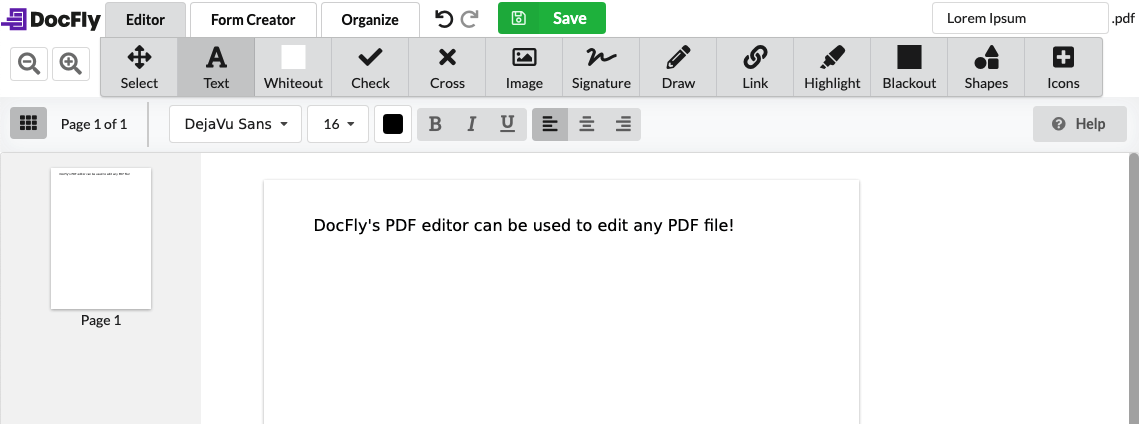
How to Modify a File Pdf Online: A Step-by-step Guide
Are you looking for ways to modify a file PDF online without installing any software? Look no further! In this article, we will explore the best services available that allow you to edit and customize your PDF files directly from your browser.
Why Modify a Pdf Online?
Modifying a PDF online is convenient and saves time. You don’t need to install any software or plugins on your computer, which makes it accessible from anywhere. Plus, most of these services are free, making them an affordable option for personal and professional use.
Services For Modifying Pdfs Online
In this article, we will review three popular services that allow you to modify PDFs online:
- Sejda Pdf Editor
- Smallpdf
- Ilovepdf
How to Use Sejda Pdf Editor
Sejda PDF Editor is a user-friendly service that allows you to edit and customize your PDF files online.
- Step 1: Select The File: Choose the PDF file you want to modify from your computer or upload it directly from the browser.
- Step 2: Access The Editor Tools: Once selected, click on the “Edit” button to access a range of tools for editing your PDF. These include:
- Text tool: Add new text, edit existing text, change font, color, and size.
- Link tool: Insert links in various areas of the document.
- Form tool: Add interactive forms like lists, checkboxes, and more.
- Image tool: Insert images directly into your PDF.
- Step 3: Save Changes: After making all the necessary changes, click on the “Apply” button to save them. Finally, download your modified PDF.
How to Use Smallpdf
Smallpdf is another popular service that allows you to edit and modify PDFs online.
- Step 1: Select The File: Choose the PDF file you want to modify from your computer or upload it directly from the browser.
- Step 2: Access Editing Tools: Once selected, click on the “Edit” button to access a range of editing tools. These include:
- Pencil tool: Draw and edit text in various areas of the document.
- Highlighter tool: Highlight important sections with different colors.
- Rubber tool: Erase content from your PDF.
- Step 3: Save Changes: After making all the necessary changes, click on the “Download” button to save them. Your modified PDF will be saved directly to your computer.
How to Use Ilovepdf
ILovePDF is another online service that allows you to edit and modify PDFs.
- Step 1: Select The File: Choose the PDF file you want to modify from your computer or upload it directly from the browser.
- Step 2: Access Editing Tools: Once selected, click on the “Edit” button to access a range of editing tools. These include:
- Text tool: Add new text, edit existing text, change font, color, and size.
- Image tool: Insert images directly into your PDF.
- Step 3: Save Changes: After making all the necessary changes, click on the “Download” button to save them. Your modified PDF will be saved directly to your computer.
How to Modify a Pdf in Word Online
If you need to convert a PDF file to Microsoft Word format online without installing any software, there are services available that can help you achieve this.
- Step 1: Select The File: Choose the PDF file you want to modify from your computer or upload it directly from the browser.
- Step 2: Access Conversion Tools: Once selected, click on the “Convert” button to access a range of tools for converting your PDF to Word format. These include:
- Pencil tool: Draw and edit text in various areas of the document.
- Highlighter tool: Highlight important sections with different colors.
- Step 3: Save Changes: After making all the necessary changes, click on the “Save” button to save them. Your modified PDF will be saved directly to your computer.
Benefits of Modifying Pdfs Online
Modifying PDFs online offers several benefits:
- Convenience: Edit and customize your PDF files without installing any software or plugins.
- Accessibility: Access these services from anywhere, at any time.
- Cost-effectiveness: Most of these services are free, making them an affordable option for personal and professional use.
Conclusion
Modifying a file PDF online is easy and convenient. With services like Sejda PDF Editor, Smallpdf, and iLovePDF, you can edit and customize your PDF files directly from your browser without installing any software or plugins.


