
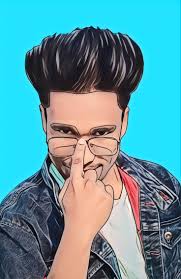
How to Modify a Photo to Look Like a Cartoon: A Step-by-step Guide
Are you tired of looking at your photos in the same old way? Do you want to add some fun and creativity to them? Modifying a photo to look like a cartoon is a great way to do just that. In this article, we will guide you through the process of how to modify a photo to look like a cartoon using various software and online tools.
What You Need to Know Before Starting
Before we dive into the tutorial, it’s essential to understand what modifying a photo to look like a cartoon entails. This process involves applying filters and effects to your photos to make them appear more cartoon-like. The outcome will depend on the software or tool you use and the level of expertise you have.
Software Options For Modifying Photos to Look Like Cartoons
There are several software options available that can help you modify a photo to look like a cartoon. Here are some of the most popular ones:
Xnsketch (Windows, Macos, Linux)
XnSketch is a free and user-friendly software that allows you to create cartoons from your photos. With its intuitive interface, you can easily apply filters and effects to make your photos look more cartoon-like.
How to Use Xnsketch
To use XnSketch, follow these steps:
- Download and install the software on your computer.
- Open XnSketch and select the photo you want to modify from your library or import a new one.
- Apply filters and effects by selecting them from the toolbar.
- Adjust the settings as needed to achieve the desired cartoon-like look.
- Save your modified photo.
Photoshop (Windows, Macos)
Adobe Photoshop is a professional-grade software that offers advanced features for modifying photos to look like cartoons. However, it requires some expertise and can be costly.
How to Use Photoshop
To use Photoshop, follow these steps:
- Download and install the software on your computer.
- Open Photoshop and select the photo you want to modify from your library or import a new one.
- Apply filters and effects by selecting them from the toolbar.
- Adjust the settings as needed to achieve the desired cartoon-like look.
- Save your modified photo.
Gimp (Windows, Macos, Linux)
GIMP is a free and open-source software that offers many features similar to Photoshop. It’s an excellent alternative for those who want to modify photos without breaking the bank.
How to Use Gimp
To use GIMP, follow these steps:
- Download and install the software on your computer.
- Open GIMP and select the photo you want to modify from your library or import a new one.
- Apply filters and effects by selecting them from the toolbar.
- Adjust the settings as needed to achieve the desired cartoon-like look.
- Save your modified photo.
Online Tools For Modifying Photos to Look Like Cartoons
If you don’t want to download and install software on your computer, there are online tools available that can help you modify a photo to look like a cartoon. Here are some of the most popular ones:
Photocartoon (Web-Based)
PhotoCartoon is an online tool that allows you to create cartoons from your photos in just a few clicks.
How to Use Photocartoon
To use PhotoCartoon, follow these steps:
- Visit the website and select the photo you want to modify.
- Choose the style of modification among those presented.
- Adjust the settings as needed to achieve the desired cartoon-like look.
- Save your modified photo.
Lunapic (Web-Based)
LunaPic is another online tool that offers various effects and filters for modifying photos to look like cartoons.
How to Use Lunapic
To use LunaPic, follow these steps:
- Visit the website and select the photo you want to modify.
- Choose the effect or filter among those presented.
- Adjust the settings as needed to achieve the desired cartoon-like look.
- Save your modified photo.
Mobile Apps For Modifying Photos to Look Like Cartoons
There are also mobile apps available that can help you modify a photo to look like a cartoon on-the-go. Here are some of the most popular ones:
Photodirector (Android, Ios)
PhotoDirector is a free app that allows you to create cartoons from your photos using various filters and effects.
How to Use Photodirector
To use PhotoDirector, follow these steps:
- Download and install the app on your mobile device.
- Open the app and select the photo you want to modify from your library or import a new one.
- Apply filters and effects by selecting them from the toolbar.
- Adjust the settings as needed to achieve the desired cartoon-like look.
- Save your modified photo.
Toonart (Android, Ios)
ToonArt is another free app that offers various styles and effects for modifying photos to look like cartoons.
How to Use Toonart
To use ToonArt, follow these steps:
- Download and install the app on your mobile device.
- Open the app and select the photo you want to modify from your library or import a new one.
- Apply filters and effects by selecting them from the toolbar.
- Adjust the settings as needed to achieve the desired cartoon-like look.
- Save your modified photo.
Conclusion
Modifying a photo to look like a cartoon is a fun and creative way to add some personality to your photos. With various software options, online tools, and mobile apps available, you can choose the one that best suits your needs. Remember to always follow the steps provided in this guide to ensure the best results.
Frequently Asked Questions
- What is The Difference Between Modifying a Photo to Look Like a Cartoon And Editing It?
Modifying a photo to look like a cartoon involves applying filters and effects to make it appear more cartoon-like, whereas editing a photo involves making adjustments to its brightness, contrast, color balance, etc. - Can I Modify a Photo to Look Like a Cartoon Using my Smartphone?
Yes, there are mobile apps available that allow you to modify photos to look like cartoons on your smartphone. - What is The Best Software For Modifying a Photo to Look Like a Cartoon?
The best software for modifying a photo to look like a cartoon depends on your level of expertise and what features you need. XnSketch, Photoshop, and GIMP are popular options. - Can I Use Online Tools to Modify a Photo to Look Like a Cartoon?
Yes, there are online tools available that allow you to modify photos to look like cartoons without downloading any software. - How do I Save my Modified Photo?
You can save your modified photo in various formats, such as JPEG, PNG, or TIFF, depending on the software or tool you use.


