
The Ultimate Guide to Using Vsco: A Comprehensive Review
Are you looking for a way to enhance your mobile photography skills? Look no further than VSCO, a popular photo editing app that offers a range of tools and features to help you perfect your snaps. In this article, we’ll take a comprehensive look at how to use VSCO, including its key features, benefits, and tips for getting the most out of the app.
What is Vsco?
VSCO is a mobile app that allows users to edit and enhance their photos using a range of filters, tools, and effects. The app is available for both Android and iOS devices and has become incredibly popular among smartphone photographers.
Benefits of Using Vsco
So, what are the benefits of using VSCO? Here are just a few:
- Easy to Use: VSCO’s interface is simple and intuitive, making it easy to navigate even for those who are new to photo editing.
- High-quality Filters: VSCO offers a range of high-quality filters that can help you give your photos a unique look and feel.
- Powerful Editing Tools: The app includes a range of powerful editing tools, including exposure, contrast, and color balance adjustments.
- Collaborative Features: VSCO allows users to share their edited photos with friends and family via social media or email.
How to Download Vsco
So, how do you get started with VSCO? Here’s a step-by-step guide:
- Download The App: Search for “VSCO” in your device’s app store (Google Play Store or Apple App Store) and download it.
- Install The App: Follow the prompts to install VSCO on your device.
- Launch The App: Once installed, launch VSCO by tapping on its icon.
How to Use Vsco
Now that you’ve downloaded and launched VSCO, here’s a step-by-step guide on how to use it:
- Create an Account: Tap on the “Create” button at the top right of the screen to create an account.
- Select Your Photo: Choose the photo you want to edit by tapping on its thumbnail.
- Apply Filters: Browse through VSCO’s range of filters and apply one that suits your taste.
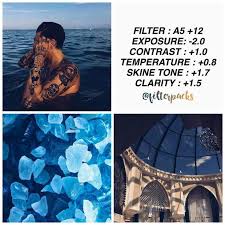
- Adjust Settings: Use VSCO’s editing tools to adjust exposure, contrast, color balance, and more.
- Save And Share: Once satisfied with your edited photo, save it and share it on social media or via email.
Tips For Getting The Most Out of Vsco
Here are some tips for getting the most out of VSCO:
- Experiment With Filters: Don’t be afraid to try out different filters and see what works best for you.
- Use Editing Tools Wisely: Use VSCO’s editing tools judiciously, as over-editing can ruin a photo.
- Save Frequently: Save your edited photos regularly to avoid losing them.
Other Features of Vsco
In addition to its core editing features, VSCO also includes several other useful features, including:
- Social Sharing: Share your edited photos with friends and family via social media or email.
- Photo Gallery: Browse through a curated selection of user-generated content.
- Premium Subscription: Upgrade to VSCO’s premium subscription for access to exclusive filters, effects, and features.
Conclusion
In conclusion, VSCO is a powerful photo editing app that offers a range of tools and features to help you perfect your snaps. With its easy-to-use interface, high-quality filters, and collaborative features, it’s no wonder why VSCO has become so popular among smartphone photographers. Whether you’re looking for a way to enhance your mobile photography skills or simply want to have fun with your photos, VSCO is definitely worth checking out.
Faqs
Here are some frequently asked questions about VSCO:
- What Devices Does Vsco Support?
VSCO is available on both Android and iOS devices. - Is Vsco Free?
Yes, VSCO is a free app that can be downloaded from the Google Play Store or Apple App Store. - Does Vsco Offer Premium Features?
Yes, VSCO offers a range of premium features, including exclusive filters, effects, and features, which can be accessed by upgrading to its premium subscription. - Can I Share my Edited Photos on Social Media?
Yes, you can share your edited photos on social media via VSCO’s built-in sharing feature. - Does Vsco Support Other File Formats?
Yes, VSCO supports a range of file formats, including JPEG, PNG, and TIFF.
Troubleshooting Tips
Here are some troubleshooting tips for common issues with VSCO:
- App Not Launching: Try restarting your device or reinstalling the app.
- Filters Not Working: Try applying filters in a different order or using a different type of filter.
- Saving Issues: Try saving your edited photo to your camera roll or a cloud storage service.
Vsco Premium
VSCO’s premium subscription offers exclusive features, including:
- Access to 200+ Presets
- Video Editing Capabilities
- Weekly Photography Challenges
- Exclusive Formative Content
You can try out VSCO’s premium features for free for 7 days before committing to a paid subscription.


