
Unlocking The Power of 3G on Your Iphone: A Comprehensive Guide
Are you one of the millions of people who have upgraded to a new-generation smartphone, specifically an iPhone? If so, you’re likely eager to explore the vast capabilities of your device, including internet access and app downloads. However, you might be wondering how to unlock the 3G feature on your iPhone, especially when you’re not at home or in a Wi-Fi zone. Worry no more! This article is here to guide you through the process with ease.
What is 3G?
Before we dive into the practical aspects of using 3G on your iPhone, let’s take a moment to understand what this technology entails. 3G stands for third generation, which represents an upgrade from the earlier mobile connections in 2G and 2.5G. This technology allows for faster data transmission rates, typically around 20 Mbit/s using the most recent protocols like HSPA+.
Benefits of Using 3G on Your Iphone
Using 3G on your iPhone comes with several benefits, including:
- Faster internet speeds for browsing and app downloads
- Ability to make voice calls and video chats over the internet
- Instant messaging capabilities
- Better safety features compared to older mobile technologies
Best Bids of Mobile Telephony For 3G
Now that you know what 3G is, it’s time to explore the best bids of mobile telephony that support this technology. Here are some top options:
- Tim 5G Power: This bid offers speeds up to 50 GB in 5G, with boundless calls and messages within Italy and EU countries.
- Vodafone Red Pro: With a monthly fee of €14.99, You’ll get 50 GB in 5G, boundless national calls, and free messages within the EU.
- Windtre Full 5G: This bid includes 100 GB in 5G, along with boundless minutes, SMS, and 50 minutes for foreign numbers.
How to Activate 3G on Your Iphone
Activating 3G on your iPhone is a straightforward process. Here’s how:
- Go to Settings: Tap on the icon representing settings, which looks like a cogwheel.
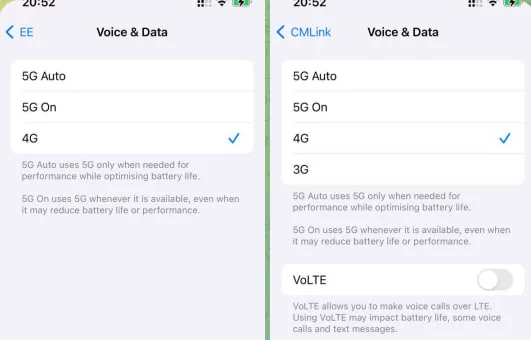
- Cellular Options: Select “Cellular” and then choose “Voice & Data.”
- Choose 3G: From the menu that appears, select “3G” to enable it.
Tips For Using 3G on Your Iphone
To get the most out of your 3G experience on your iPhone:
- Always check your provider’s coverage in your area.
- Ensure your iPhone is running the latest software version.
- Use a reliable power source when using mobile data.
Conclusion
Unlocking the power of 3G on your iPhone is easier than you think. By understanding what this technology entails, choosing the right bid for your needs, and following these simple steps to activate it, you’ll be enjoying the benefits of faster internet speeds, better voice calls, and instant messaging capabilities in no time.
Frequently Asked Questions
Here are some answers to common questions about using 3G on your iPhone:
- What is The Speed Limit For 3G?
- The theoretical maximum speed for 3G is around 20 Mbit/s.
- Can I Use 4G or 5G Instead of 3G?
- Yes, many providers now offer faster technologies like 4G and 5G, which you can choose according to your needs.
- How do I Check my Provider’s Coverage?
- You can visit your provider’s website or contact their customer support for the most up-to-date information on coverage in your area.
Faqs
- What is The Difference Between 2G, 3G, And 4G?
- The main differences lie in data transmission speeds: 2G (up to 9.6 Kbit/s), 3G (up to 20 Mbit/s), and 4G (up to 100 Mbit/s).
- Can I Use my Iphone’s Internet Connection For Voice Calls?
- Yes, you can make voice calls using your iPhone’s mobile data connection.
- Is There a Monthly Fee For Using 3G on my Iphone?
- The fees vary depending on the bid and provider you choose.


