
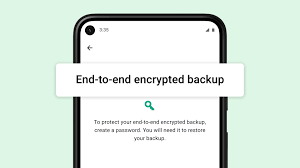
How to Enable End-to-end Encryption on Whatsapp
Are you aware that WhatsApp has introduced a function for encrypting messages? However, do you know how to enable it on your phone? Don’t worry; you don’t have to do anything out of the ordinary. If you’re using a relatively recent version of WhatsApp, encryption is enabled by default, and all conversations are protected automatically.
What is End-to-end Encryption?
End-to-end encryption is a type of encryption that ensures only the sender and recipient can read the messages. This means that even WhatsApp itself cannot access the content of your conversations. The encryption applies to all forms of communication supported by WhatsApp, including messages, group chats, photos, videos, and calls.
How to Check if Your Conversations Are Encrypted
To check if your conversations are encrypted, follow these steps:
- Open WhatsApp and go to the Chats tab.
- Select a conversation you’re interested in.
- Tap on the name of the person at the top of the screen and look for the “Cryptography” section.
- If your conversation is already protected with end-to-end encryption, you’ll see the message “The messages and calls are encrypted end-to-end.”
How to Check End-to-end Encryption in Group Chats
To check if a group chat is encrypted, follow these steps:
- Open WhatsApp and go to the Chats tab.
- Select a group conversation you’re interested in.
- Look for the “Cryptography” section on the top-right corner of the screen.
- If your conversation is already protected with end-to-end encryption, you’ll see the message “The messages and calls are encrypted end-to-end.”
How to Check End-to-end Encryption in Calls
To check if a call is encrypted, follow these steps:
- Open WhatsApp and go to the Chats tab.
- Select a conversation you’re interested in.
- Tap on the name of the person at the top of the screen and look for the “Cryptography” section.
- If your conversation is already protected with end-to-end encryption, you’ll see the message “The messages and calls are encrypted end-to-end.”
How to Enable End-to-end Encryption
To enable end-to-end encryption on WhatsApp, follow these steps:
- Open WhatsApp and go to the Settings menu.
- Look for the option “Chat backup” or “Backup of chats.”
- Tap on it and select the option “Encrypted backup.”
- Enter a password to generate an encrypted backup.
How to Resolve Issues With End-to-end Encryption
If you’re experiencing issues with end-to-end encryption, try updating WhatsApp to the latest version. If that doesn’t work, you may need to reset your device or consider switching to another messaging app that offers better security features.
How to Back Up Your Conversations Encryptedly
To back up your conversations encryptedly on Google Drive (on Android) or iCloud (on iPhone), follow these steps:
- Open WhatsApp and go to the Settings menu.
- Look for the option “Chat backup” or “Backup of chats.”
- Tap on it and select the option “Encrypted backup.”
- Enter a password to generate an encrypted backup.
Conclusion
Enabling end-to-end encryption on WhatsApp is a simple process that ensures your conversations are protected from prying eyes. By following these steps, you can ensure that only the sender and recipient can read your messages, photos, videos, and calls. Remember to always check if your conversations are encrypted before sharing sensitive information.
Frequently Asked Questions
- Q: What is End-to-end Encryption?
A: End-to-end encryption ensures that only the sender and recipient can read a message, photo, video, or call. - Q: How do I Know if my Conversations Are Encrypted on Whatsapp?
A: To check if your conversations are encrypted, look for the “Cryptography” section in the chat window. - Q: Can I Enable End-to-end Encryption on Group Chats?
A: Yes, you can enable end-to-end encryption on group chats by checking the “Cryptography” section in the chat window. - Q: How do I Back up my Conversations Encryptedly on Whatsapp?
A: To back up your conversations encryptedly, go to Settings > Chat backup > Encrypted backup and enter a password to generate an encrypted backup. - Q: Can I Resolve Issues With End-to-end Encryption on Whatsapp?
A: Yes, you can resolve issues with end-to-end encryption by updating WhatsApp to the latest version or resetting your device.


