
How to Get Out of Shadowban on Instagram: A Step-by-step Guide
Are you tired of being shadowbanned on Instagram? Do you want to know how to get out of this frustrating situation? Look no further! In this article, we will guide you through the steps to take to resolve the issue and regain your account’s visibility.
What is Shadowban on Instagram?
Before we dive into the solution, let’s first understand what shadowban means. A shadowban is a type of penalty imposed by Instagram that restricts the visibility of an account’s content without notifying the user. This can happen when an account breaks Instagram’s terms of service or engages in spammy behavior.
Reasons For Shadowban
There are several reasons why your Instagram account might be shadowbanned, including:
- Using banned hashtags
- Mass following and unfollowing
- Engaging in spammy behavior
How to Get Out of Shadowban on Instagram
While there is no official way to lift a shadowban, we will provide you with some steps that may help resolve the issue.
One possible reason for a shadowban is the use of banned hashtags in your last post. To remove these hashtags, follow these steps:
- Open Instagram and navigate to your profile
- Tap on the three dots next to your latest post
- Select “Edit”
- Remove any hashtags that are not allowed by Instagram
2. Remove Third-party Apps And Websites Connected to Your Account
Instagram may consider third-party apps and websites connected to your account as malicious, which can lead to a shadowban. To remove these connections:
- Open Instagram and go to Settings
- Tap on “Safety” and select “App and website access”
- Review the list of connected apps and websites
- Remove any that you don’t recognize or no longer use
3. Switch Back to Your Personal Profile
If you have a professional account, try switching back to your personal profile. This can help resolve issues related to shadowban.
- Go to Instagram settings and select “Account”
- Tap on “Switch to personal account”
- Confirm the change by tapping on “Switch”
4. Make Your Account Private
Making your account private may also help resolve issues related to shadowban.
- Go to Instagram settings and select “Privacy”
- Toggle off “Public” and toggle on “Private”
- Confirm the change by tapping on “Save”
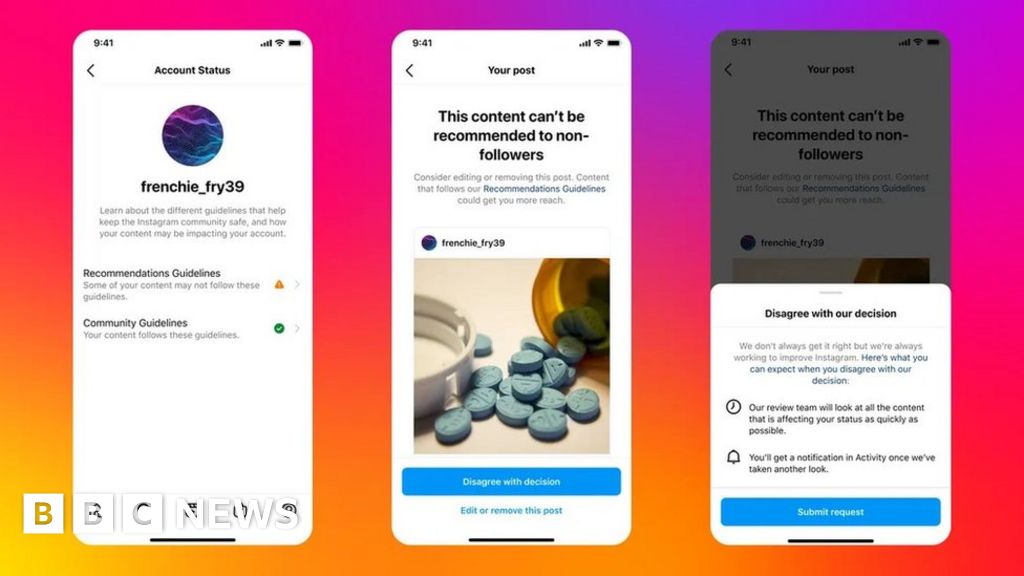
5. Check The Status of Your Account
If you have tried all the above steps but still face issues, try checking the status of your account.
- Open Instagram and go to Settings
- Select “Account” and tap on “Status”
- Review any notifications or messages from Instagram
Conclusion
Getting out of shadowban on Instagram can be frustrating, but by following these steps, you may be able to resolve the issue. Remember that there is no guarantee of success, as the decision to lift a shadowban lies with Instagram’s algorithm.
Frequently Asked Questions (FAQs)
- What is Shadowban on Instagram?
Shadowban is a type of penalty imposed by Instagram that restricts the visibility of an account’s content without notifying the user. - Why am I Being Shadowbanned?
There are several reasons why your Instagram account might be shadowbanned, including using banned hashtags, mass following and unfollowing, or engaging in spammy behavior. - How do I Get Out of Shadowban on Instagram?
Try removing banned hashtags from your last post, remove third-party apps and websites connected to your account, switch back to your personal profile, make your account private, and check the status of your account. - Is There an Official Way to Lift a Shadowban?
No, there is no official way to lift a shadowban. - Can I Appeal if my Account is Still Shadowbanned After Trying These Steps?
Yes, you can contact Instagram’s support team and appeal the decision.
We hope this guide has helped you resolve your shadowban issue on Instagram!


