
The Ultimate Guide to Extending Wifi Coverage at Home
Are you tired of dealing with spotty internet coverage in your home? Do you struggle to get a strong signal from room to room? If so, this guide is for you! In this article, we’ll show you how to extend your WiFi coverage using various devices and techniques. We’ll cover the best solutions for extending WiFi on two floors, in a large house, or even in a garden.
Why Extend Your Wifi Coverage?
Before we dive into the solutions, let’s quickly discuss why extending your WiFi coverage is essential. A strong internet connection is crucial for many aspects of modern life, including:
- Streaming online content
- Online gaming
- Video conferencing
- Remote work or education
- Home security systems
If you’re experiencing frequent disconnections or slow speeds, it can be frustrating and even affect your productivity.
Solution 1: Range Extenders
One effective way to extend your WiFi coverage is by using range extenders. These devices pick up your existing WiFi signal and rebroadcast it to create a stronger network. They’re easy to set up and can be placed anywhere in the house.
How to Use a Range Extender
Using a range extender is relatively straightforward:
- Place the device near your router.
- Connect to the repeater’s WiFi network using your device.
- Configure the repeater by following the manufacturer’s instructions.
Solution 2: Mesh Systems
Mesh systems, also known as whole-home mesh networks, are another excellent option for extending your WiFi coverage. These devices create a network of interconnected nodes that work together to provide a strong and reliable connection throughout your home.
How to Use a Mesh System
Using a mesh system is similar to using range extenders:
- Place the devices throughout your home.
- Connect to the mesh network using your device.
- Configure the system by following the manufacturer’s instructions.
Solution 3: Powerline Adapters
Powerline adapters are another great option for extending your WiFi coverage, especially in homes with thick walls or multiple floors.
How to Use Powerline Adapters
Using powerline adapters is relatively easy:
- Connect the adapters to your router and a device on another floor.
- Configure the system by following the manufacturer’s instructions.
Solution 4: Router Configuration
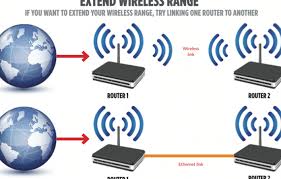
If you have an old router that still works, but the signal strength isn’t great, you can try configuring it as a range extender or repeater.
Solution 5: External Wifi Repeaters
External WiFi repeaters are designed for outdoor use and can extend your WiFi coverage to areas like gardens or patios.
- WAVLINK AC1200 Punctured of Access Wireless Long Range for External
- Repeater WiFi External, WiFi Extender External 1200Mbps Dual Band 5GHz
How to Use an External Wifi Repeater
Using an external WiFi repeater is similar to using a range extender:
- Place the device in your garden or patio.
- Connect to the repeater’s WiFi network using your device.
- Configure the repeater by following the manufacturer’s instructions.
Conclusion
Extending your WiFi coverage at home can be achieved using various devices and techniques. By choosing the right solution for your needs, you can enjoy a strong and reliable internet connection throughout your home. Remember to follow the manufacturer’s instructions when setting up any device, and don’t hesitate to consult online resources or experts if needed.
Frequently Asked Questions (FAQs)
- What is The Best Way to Extend my Wifi Coverage?
- The best solution depends on your specific needs. Range extenders are great for indoor use, while mesh systems offer a more comprehensive whole-home solution.
- Can I Use Powerline Adapters to Extend my Wifi Coverage?
- Yes! Powerline adapters can be an excellent option for extending your WiFi coverage in homes with thick walls or multiple floors.
- How do I Configure my Router as a Range Extender?
- Follow the manufacturer’s instructions, and make sure to set up the repeater correctly to avoid interfering with your main network.
- What Are External Wifi Repeaters, And How Can They Help Me?
- External WiFi repeaters are designed for outdoor use and can extend your WiFi coverage to areas like gardens or patios.
- Do I Need an Expert to Install my New Device?
- While it’s not necessary to have an expert install the device, following the manufacturer’s instructions is crucial to ensure a successful setup.
Bonus Tip:
Remember to regularly update your router and devices to ensure you’re running the latest firmware and software. This will help maintain a strong and reliable internet connection throughout your home.


