
Extracting Audio From Videos: A Step-by-step Guide
Are you tired of having to listen to videos on repeat just to catch that one quote or phrase? Do you want to save your favorite movie lines for future reference? Look no further! In this article, we’ll show you how to extract audio from videos using various methods and tools.
Why Extract Audio From Videos?
Extracting audio from videos can be useful in a variety of situations. For example:
- You want to save quotes or phrases from your favorite movies for future reference.
- You need to create audio content for use in podcasts, videos, or other media.
- You want to convert video files into audio-only format for easier sharing and storage.
Method 1: Using Adapter
One of the most popular methods for extracting audio from videos is using a software called Adapter. This free software can be downloaded on Windows, macOS, and Linux operating systems.
Here’s how to use Adapter:
- Download And Install Adapter: Visit the official website of Adapter and download the software. Follow the installation instructions to set it up on your computer.
- Launch Adapter: Once installed, launch Adapter on your computer.
- Browse For Video File: Click on the “Browse” button to select the video file from which you want to extract audio.
- Select Audio Format: Choose the desired audio format (e.G., MP3, WAV) and settings.
- Convert Video to Audio: Click on the “Convert” button to start the process.
Method 2: Using Vlc
VLC is another popular media player that can also be used to extract audio from videos.
Here’s how to use VLC:
- Download And Install Vlc: Visit the official website of VLC and download the software. Follow the installation instructions to set it up on your computer.
- Launch Vlc: Once installed, launch VLC on your computer.
- Open Video File: Click on “Media” > “Convert / Save” to open the video file.
- Select Audio Format: Choose the desired audio format (e.G., MP3, WAV) and settings.
- Save as Audio File: Click on the “Save” button to start the process.
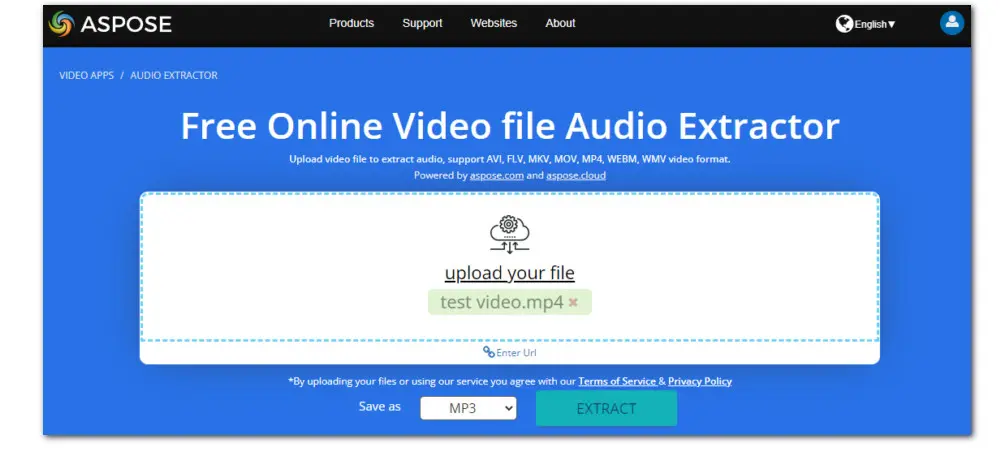
Method 3: Using Online Tools
There are also several online tools that can be used to extract audio from videos without having to download any software.
Here’s how to use an online tool:
- Visit Online Tool Website: Visit a website that offers audio extraction services (e.G., AudioExtractor).
- Upload Video File: Upload the video file from which you want to extract audio.
- Select Audio Format: Choose the desired audio format (e.G., MP3, WAV) and settings.
- Download Audio File: Click on the “Download” button to save the extracted audio file.
Method 4: Using Mobile Apps
If you’re using a mobile device, there are also several apps available that can be used to extract audio from videos.
Here’s how to use a mobile app:
- Download And Install App: Visit the app store (e.G., Google Play Store) and download a video-to-audio conversion app (e.G., MP3 Video Converter).
- Launch App: Once installed, launch the app on your device.
- Select Video File: Choose the video file from which you want to extract audio.
- Select Audio Format: Choose the desired audio format (e.G., MP3, WAV) and settings.
- Save as Audio File: Click on the “Save” button to start the process.
Conclusion
Extracting audio from videos can be a useful skill to have, especially if you’re a content creator or need to create audio content for various purposes. In this article, we’ve shown you four different methods for extracting audio from videos using software, online tools, and mobile apps. Whether you’re using Adapter, VLC, an online tool, or a mobile app, the process is relatively straightforward and can be completed in just a few steps.
Frequently Asked Questions
Q: What are some popular software for extracting audio from videos?
A: Some popular software include Adapter, VLC, and FFmpeg.
Q: Can I extract audio from videos online without downloading any software?
A: Yes, there are several online tools available that can be used to extract audio from videos.
Q: How do I extract audio from a video on my mobile device?
A: You can use various apps available in the app store (e.G., Google Play Store) to extract audio from videos on your mobile device.
Q: What audio formats are supported by these methods?
A: Most of the methods support popular audio formats such as MP3, WAV, and AAC.
Q: Is it possible to extract audio from a video that’s hosted online (e.G., YouTube)?
A: Yes, you can use some online tools or software that allow you to extract audio from videos hosted online.
Q: Can I convert multiple videos at once using these methods?
A: Some of the methods allow you to batch convert multiple videos at once, saving you time and effort.


