
How to Find a Hidden Chat on Whatsapp: A Step-by-step Guide
Are you wondering how to find a hidden chat on WhatsApp? Well, you’re in the right place! In this article, we’ll guide you through the process of discovering these secret conversations on your smartphone, PC, and web.
What Are Hidden Chats on Whatsapp?
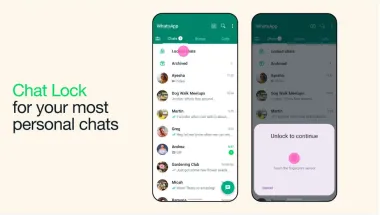
Before we dive into the steps, let’s talk about what hidden chats are. WhatsApp allows users to create private conversations that are not easily accessible by others. These chats can be stored on your device or accessed using a password, digital fingerprint, or face unlock.
Why Are Hidden Chats Important?
Hidden chats are essential for maintaining confidentiality and security in online communication. They help prevent unwanted access to sensitive information and ensure that only authorized individuals can view the conversations.
Finding Hidden Chats on Your Smartphone
To find hidden chats on your smartphone:
- Open Whatsapp: Launch the app on your Android or iOS device.
- Check For Stored Chats: Go to the chat section, and look for any chats stored in the “Storage” area. These chats are easily accessible but not displayed prominently.
- Identify Locked Chats: Check if there are any chats with a padlock icon. These are encrypted conversations that require a password or other authentication methods to access.
Finding Hidden Chats on Your PC
To find hidden chats on your PC:
- Open Whatsapp Web: Access the web version of WhatsApp using a browser.
- Check For Stored Chats: Look for any chats stored in the “Storage” area, similar to the smartphone version.
- Identify Locked Chats: Check if there are any chats with a padlock icon. These require authentication to access.
Finding Hidden Chats on Whatsapp Web
To find hidden chats on WhatsApp Web:
- Open Whatsapp Web: Access the web version of WhatsApp using a browser.
- Check For Stored Chats: Look for any chats stored in the “Storage” area, similar to the smartphone and PC versions.
- Identify Locked Chats: Check if there are any chats with a padlock icon. These require authentication to access.
Tips And Tricks
- To extract a hidden chat on your smartphone, tap and hold on the chat icon, then select “Extract” or “Save” (depending on your device).
- On WhatsApp Web, you can extract a hidden chat by clicking on the chat icon and selecting “Export” or “Save”.
- If you’re using a password-protected chat, make sure to enter the correct password to access the conversation.
Common Faqs
- What Happens if I Delete a Hidden Chat?
If you delete a hidden chat, it will be removed from your device, but it may still exist on WhatsApp servers for some time. - Can Someone See my Hidden Chats if They Have my Phone?
No, even if someone has access to your phone, they won’t be able to see your hidden chats unless they know the password or other authentication methods used to secure them. - How do I Reset my Whatsapp Password?
To reset your WhatsApp password, go to the app settings and select “Account” > “Change Password”. - Can I Recover a Deleted Hidden Chat?
Unfortunately, no. Once you delete a hidden chat, it’s gone forever.
Conclusion
In conclusion, finding a hidden chat on WhatsApp requires some effort, but it’s essential for maintaining online security and confidentiality. By following these steps, you’ll be able to discover hidden conversations on your smartphone, PC, or web. Remember to use your hidden chats responsibly and only share them with trusted individuals.
Frequently Asked Questions (FAQs)
- Q: What is The Purpose of Hidden Chats on Whatsapp?
A: Hidden chats are meant for maintaining confidentiality and security in online communication. - Q: Can I Find a Hidden Chat if Someone Else Has my Phone?
A: No, only authorized individuals with access to your device and authentication methods can view hidden chats. - Q: How do I Extract a Hidden Chat on Whatsapp Web?
A: Click on the chat icon and select “Export” or “Save”. - Q: Can I Recover a Deleted Hidden Chat?
A: No, once you delete a hidden chat, it’s gone forever. - Q: How do I Reset my Whatsapp Password?
A: Go to the app settings and select “Account” > “Change Password”. - Q: What Happens if I Delete a Hidden Chat?
A: It will be removed from your device, but may still exist on WhatsApp servers for some time. - Q: Can Someone See my Hidden Chats if They Have Access to my Phone?
A: No, unless they know the password or other authentication methods used to secure them.


