
Finding Lost Bluetooth Devices: A Step-by-step Guide
Are you tired of searching high and low for your misplaced Bluetooth devices? Do you find yourself frantically scrolling through your phone’s settings, hoping to stumble upon the elusive device? Look no further! In this article, we’ll explore the best ways to find lost Bluetooth devices using various apps and tools.
Why Bluetooth Devices Go Missing
Before we dive into the solutions, let’s take a moment to understand why Bluetooth devices tend to disappear in the first place. It’s not uncommon for devices like earphones or smartwatches to get misplaced due to their compact size and frequent use. Moreover, Bluetooth signals can be weak and prone to interference, making it difficult to locate them.
The Solution: Using Apps to Find Lost Bluetooth Devices
Fortunately, there are several apps available that can help you track down your lost Bluetooth devices. Let’s take a look at some of the most popular ones:
Wunderfind (Android/iOS/iPadOS)
One valid alternative to the app seen so far is Wunderfind, available for Android (and on store alternative) as well as for iOS/iPadOS. The app is in degree to locate devices missed in men that do not say . It be in degree of *rintracciare earphones and bonnets, portable speakers, smartwatch and fitness tracker and a lot of another.
Find My Device (Android)
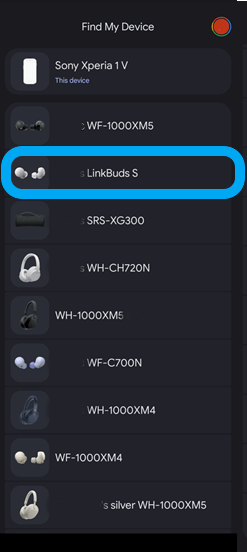
Google offers a service that locates and manages remote devices Android: I speak of Find my device. In our case, how to find devices Bluetooth that place the system fast Mating (Fast Pair), a function studied to render faster and easy the mating among smartphone and earphones or bonnets Bluetooth (for example Pixel Buds, Xiaomi Redmi Buds 4 and OPPO Enco Air3) and by means of which a smartphone can purchase devices in the vicinity and connect to this automatically.
Where (iOS/iPadOS)
The leading solution for users Apple be no doubt the app Where, that be already installed on iPhone and iPad (but be available on App Store) and afford of tracking a device Apple. Necessary condition: You have to have configured Find my [device] before having it missed, differently Where can not help you.
How to Use These Apps
Now that we’ve explored the various apps available, let’s take a closer look at how to use them:
Using Wunderfind
After downloading the app from your preferred store, grant it the necessary permissions and wait for it to search for devices in the vicinity. As soon as you see the device Bluetooth that have missed, tap on the same and the radar will guide you in the enquiry.
Using Find My Device
If you’re using Android, follow these steps:
- Open the app Find my device.
- Sign in with your Google account.
- Access the map to locate devices connected to your account.
- Tap on the device you want to track and select “Reproduce Audio” to play a sound from the device.
Using Where
If you’re using iOS/iPadOS, follow these steps:
- Open the app Where.
- Sign in with your Apple ID (if necessary).
- Access the map to locate devices connected to your account.
- Tap on the device you want to track and select “Reproduce Audio” to play a sound from the device.
Other Apps to Find Lost Bluetooth Devices
While Wunderfind, Find My Device, and Where are some of the most popular apps for finding lost Bluetooth devices, there are other options available as well:
Find My Bluetooth Device (Android)
This app uses a true and own radar to guide you when approaching the device. The distance in meters is also displayed.
Device Tracker (iOS/iPadOS)
This app functions with any device Bluetooth that find quite near of being purchased. When you approach the device, your iPhone or iPad will alert you with a sound.
Conclusion
Finding lost Bluetooth devices can be frustrating, but with the right tools and apps, it’s no longer a challenge. In this article, we’ve explored some of the best ways to locate misplaced earphones, smartwatches, and other Bluetooth-enabled devices using various apps and tools. Whether you’re using Wunderfind, Find My Device, or Where, these solutions will help you retrieve your lost devices in no time.
Frequently Asked Questions
Q: How do I use these apps to find my lost Bluetooth device?
A: Follow the instructions provided for each app, such as Wunderfind, Find My Device, and Where.
Q: Can I use these apps on both Android and iOS devices?
A: Yes, some of these apps are available on multiple platforms, including Android and iOS/iPadOS.
Q: Do I need to have configured Find my [device] before using Where?
A: Yes, you need to have configured Find my [device] before having it missed for Where to be able to help you track the device.
Q: Can I use these apps to find devices that are not associated with my smartphone or tablet?
A: Some of these apps can locate non-associated devices, but it’s essential to note that this may affect their performance and accuracy.
Q: Are these apps free or do they require a subscription?
A: Some of the apps mentioned in this article offer free versions, while others require a subscription for full access to features.
References
- A guide on how to use Where to find lost Bluetooth devices.
- An article about Wunderfind and its capabilities.
- Information on Find My Device and its features.


