
Finding Your Wifi Password: A Step-by-step Guide
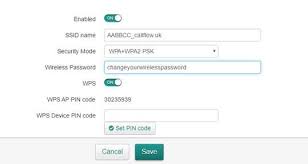
Are you struggling to recall your WiFi password or having trouble accessing your network? This guide will walk you through the process of locating your WiFi password for your modem.
Why Knowing Your Wifi Password Matters
Knowing your WiFi password is crucial for setting up a secure and private connection between your devices and the internet. Without it, you may not be able to access important online resources or enjoy seamless connectivity with your devices.
Step-by-step Instructions: Finding Your Wifi Password
For Router Modem Telecom Users:
- Check the adhesive label on the back of your router for the default WiFi password.
- Access the panel gestionale (administrative panel) of your modem Telecom by typing its IP address in a web browser and following the instructions.
For Computer, Smartphone, or Tablet Users:
| Device | Method | Description |
|---|---|---|
| Windows | Control Panel > Network and Sharing Center > Manage Wireless Networks > Properties > Wireless Properties | Access the panel gestionale (administrative panel) of your modem Telecom and follow the instructions to find your WiFi password. |
| Macos | Keychain Access > Passwords > Look for WiFi password | Use the built-in utility called Keychain Access to retrieve your WiFi password. |
| Android | Settings > Wi-Fi > Menu icon (3 dots) > Advanced > Save Network Credentials | Enable the feature to save network credentials, and you’ll be able to see your WiFi password. |
| Iphone/ipad | iCloud > Passwords | Use the built-in utility called Keychain Access to retrieve your WiFi password from another device associated with the same Apple ID. |
Testing The Safety of Your Modem: Tips And Tricks
To ensure that your modem is secure, consider using:
- Smartphone or tablet apps like WIFI WPS WPA Tester
- Linux distributions such as Kali Linux for penetration testing
- Specialized software for security testing
Remember: Prioritize Security
When performing any kind of security testing, be mindful of potential risks and follow best practices. If you’re unsure about the process, consider consulting with experts or seeking guidance from reputable sources.
Conclusion
This guide has provided a comprehensive overview of how to find your WiFi password for modem Telecom, including step-by-step instructions for various devices and operating systems. By following these steps, you can ensure that you have a secure and private connection between your devices and the internet.
Frequently Asked Questions (FAQs)
- What is The Default Wifi Password For Modem Telecom?
The default WiFi password varies depending on the specific model of your router. - How do I Find my Wifi Password on my Windows Computer?
You can access the panel gestionale (administrative panel) of your modem Telecom and follow the instructions to find your WiFi password. - Can I Use a Smartphone App to Find my Wifi Password?
Yes, there are various apps available that allow you to view your WiFi password. However, be aware of any potential security risks associated with these apps. - How do I Test The Safety of my Modem Telecom?
You can use specialized software or perform penetration testing using tools like Kali Linux to ensure that your modem is secure. - Can I Recover my Wifi Password if I Forgot It?
Yes, you can try recovering your WiFi password by accessing the panel gestionale (administrative panel) of your modem Telecom or using a smartphone app.


