
How to Find The Code on Your Tv: A Step-by-step Guide
Are you tired of searching for the code on your TV? Look no further! In this article, we will guide you through a step-by-step process to find the code on various TV brands, including LG, Samsung, Panasonic, Sharp, Akai, Telefunken, Hisense, and Saba.
Why Do I Need to Find The Code on My Tv?
Before we dive into the details, let’s quickly discuss why you might need to find the code on your TV. In some cases, finding the code is necessary for troubleshooting or contacting customer support. Perhaps your TV has stopped working, and you need to provide the code to a technician to fix it. Or maybe you want to encode a universal remote control with the correct code to match your TV’s settings.
How to Find The Code on an LG TV
If you have an LG TV, finding the code is relatively straightforward. Here’s how:
- Check The Label: Look for a label on the back or bottom of your TV that says “LG” followed by a series of numbers and letters.
- Access The Menu: Press the Menu button on your remote control and navigate to Settings > General > Information.
- Find The Code: In the information screen, you should see the code displayed.
If you’re having trouble finding the code using these steps, check out LG’s official support page for more guidance.
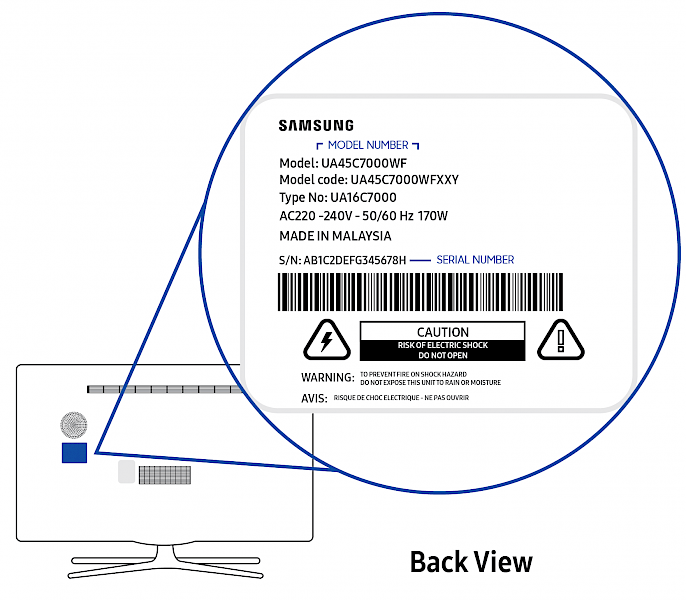
How to Find The Code on a Samsung TV
Finding the code on a Samsung TV is similar to the process for an LG TV:
- Check The Label: Look for a label on the back or bottom of your TV that says “Samsung” followed by a series of numbers and letters.
- Access The Menu: Press the Menu button on your remote control and navigate to Support > Contact Samsung or Support > Information.
- Find The Code: In the information screen, you should see the code displayed.
For more detailed instructions or troubleshooting tips, head over to Samsung’s official support page.
How to Find The Code on a Panasonic TV
Finding the code on a Panasonic TV is relatively easy:
- Check The Label: Look for a label on the back or bottom of your TV that says “Panasonic” followed by a series of numbers and letters.
- Access The Menu: Press the Menu button on your remote control and navigate to Settings > Information.
- Find The Code: In the information screen, you should see the code displayed.
If you’re having trouble finding the code using these steps, check out Panasonic’s official support page for more guidance.
How to Find The Code on a Sharp TV
Finding the code on a Sharp TV is similar to the process for other brands:
- Check The Label: Look for a label on the back or bottom of your TV that says “Sharp” followed by a series of numbers and letters.
- Access The Menu: Press the Menu button on your remote control and navigate to Settings > Preferences > Information.
- Find The Code: In the information screen, you should see the code displayed.
For more detailed instructions or troubleshooting tips, head over to Sharp’s official support page.
How to Find The Code on an Akai TV
Finding the code on an Akai TV can be a bit tricky:
- Check The Label: Look for a label on the back or bottom of your TV that says “Akai” followed by a series of numbers and letters.
- Access The Menu: Press the Menu button on your remote control and navigate to Settings > Information.
- Find The Code: In the information screen, you should see the code displayed.
If you’re having trouble finding the code using these steps, check out Akai’s official support page for more guidance.
How to Find The Code on a Telefunken TV
Finding the code on a Telefunken TV is similar to the process for other brands:
- Check The Label: Look for a label on the back or bottom of your TV that says “Telefunken” followed by a series of numbers and letters.
- Access The Menu: Press the Menu button on your remote control and navigate to Settings > Information.
- Find The Code: In the information screen, you should see the code displayed.
For more detailed instructions or troubleshooting tips, head over to Telefunken’s official support page.
How to Find The Code on a Hisense TV
Finding the code on a Hisense TV can be done in two ways:
- Check The Label: Look for a label on the back or bottom of your TV that says “Hisense” followed by a series of numbers and letters.
- Access The Menu: Press the Menu button on your remote control and navigate to Settings > Information.
For more detailed instructions or troubleshooting tips, head over to Hisense’s official support page.
How to Find The Code on a Saba TV
Finding the code on a Saba TV can be done in two ways:
- Check The Label: Look for a label on the back or bottom of your TV that says “Saba” followed by a series of numbers and letters.
- Access The Menu: Press the Menu button on your remote control and navigate to Settings > Information.
For more detailed instructions or troubleshooting tips, head over to Saba’s official support page.
Conclusion
Finding the code on your TV can be a simple process if you follow these step-by-step guides. Remember to always check the label on the back or bottom of your TV for the most accurate information. If you’re having trouble finding the code using these steps, don’t hesitate to reach out to the manufacturer’s official support page for more guidance.
Frequently Asked Questions
Q: Why do I need to find the code on my TV?
A: You might need to find the code for troubleshooting or contacting customer support.
Q: How can I encode a universal remote control with the correct code to match my TV’s settings?
A: To encode a universal remote control, follow the instructions provided by the manufacturer or consult the manual.
Final Thoughts
Finding the code on your TV is an important step in maintaining and troubleshooting your device. Remember to always refer to the manufacturer’s official support page for more detailed instructions and troubleshooting tips. If you have any further questions or concerns, don’t hesitate to reach out to our team of experts.


