
How to Share a Video on Whatsapp: A Step-by-step Guide
Are you wondering how to share a video on WhatsApp? You’re not alone! With the rise of social media, it’s become easier than ever to share videos with friends and family. But have you ever struggled to find the right way to do it? Don’t worry, we’ve got you covered!
In this article, we’ll show you how to share a video on WhatsApp using both your smartphone and computer. We’ll also cover some additional tips and tricks to make sharing videos even easier.
Sharing Videos From Your Smartphone
To start, open the WhatsApp app on your smartphone and select the conversation where you want to share the video. Tap on the “Media” tab at the bottom of the screen and then tap on the “Gallery” or “Camera” icon to access your device’s photo and video gallery.
From here, you can browse through your videos and select the one you want to share. Once you’ve selected the video, tap on the “Share” button to forward it to the recipient.
How to Forward a Video From Whatsapp
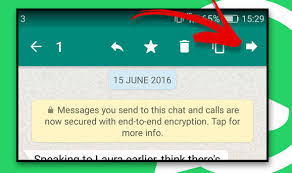
If someone has sent you a video on WhatsApp and you want to forward it to another contact, you can do so by following these steps:
- Open the WhatsApp app and select the conversation containing the video.
- Tap on the “Media” tab at the bottom of the screen.
- Select the video you want to forward by tapping on it.
- Tap on the “Share” button and then tap on the contact’s name to whom you want to forward the video.
Sharing Videos From Your Computer
If you want to share a video on WhatsApp using your computer, you can do so by accessing WhatsApp Web or the desktop client.
- Open WhatsApp Web or the desktop client on your computer.
- Select the conversation where you want to share the video.
- Click on the “Media” tab and then select the video you want to forward.
- Click on the “Share” button and then select the contact’s name to whom you want to forward the video.
Sharing Large Videos
If you have a large video that you want to share on WhatsApp, you may encounter some issues with file size limits. To overcome this, you can use an app like Videocompress (for Android) or iMovie (for iOS and iPadOS) to compress the video before sharing it.
Alternatively, you can use services like WeTransfer to upload your video to the cloud and share a link with others.
Sharing Videos Without Audio
If you want to share a video on WhatsApp without audio, you can do so by following these steps:
- Open the WhatsApp app and select the conversation where you want to share the video.
- Tap on the “Media” tab at the bottom of the screen.
- Select the video you want to forward by tapping on it.
- Tap on the “Share” button and then tap on the contact’s name to whom you want to forward the video.
- In the menu that appears, toggle off the audio option.
Sharing Youtube Videos
If you want to share a YouTube video on WhatsApp, you can do so by following these steps:
- Open the YouTube app on your smartphone or computer.
- Select the video you want to share and tap on the “Share” button.
- In the menu that appears, select the contact’s name to whom you want to forward the video.
Sharing Tiktok Videos
If you want to share a TikTok video on WhatsApp, you can do so by following these steps:
- Open the TikTok app on your smartphone or computer.
- Select the video you want to share and tap on the “Share” button.
- In the menu that appears, select the contact’s name to whom you want to forward the video.
Sharing Videos Without a Link
If you want to share a video on WhatsApp without using an external link, you can do so by following these steps:
- Open the WhatsApp app and select the conversation where you want to share the video.
- Tap on the “Media” tab at the bottom of the screen.
- Select the video you want to forward by tapping on it.
Troubleshooting
If you’re having trouble sharing a video on WhatsApp, try checking the following:
- Make sure your internet connection is stable.
- Ensure that the video file is not too large or corrupted.
- Try compressing the video using an app like Videocompress (for Android) or iMovie (for iOS and iPadOS).
We hope this guide has helped you learn how to share videos on WhatsApp! If you have any further questions or need additional assistance, feel free to ask.
Conclusion
Sharing videos on WhatsApp is a simple process that can be done using both your smartphone and computer. By following the steps outlined in this article, you should be able to share your favorite videos with friends and family with ease. Remember to troubleshoot any issues that may arise by checking your internet connection, video file size, and compressing the video if necessary.
References
- Mondadori Computer Science
- Mondadori


