
How to Forward an Email: A Step-by-step Guide
Are you tired of manually copying and pasting emails from one account to another? Do you want to know how to forward an email with just a few clicks? Look no further! In this article, we will guide you through the process of forwarding an email using popular email services such as Gmail, Libero, Outlook, Yahoo, and more.
Why Forward an Email?
Forwarding an email is a convenient way to share a message with someone else without having to rewrite it from scratch. It’s especially useful when you receive an email that’s relevant to someone else, but not necessarily to you. By forwarding the email, you can save time and effort while still keeping the original sender informed.
Forwarding an Email With Gmail
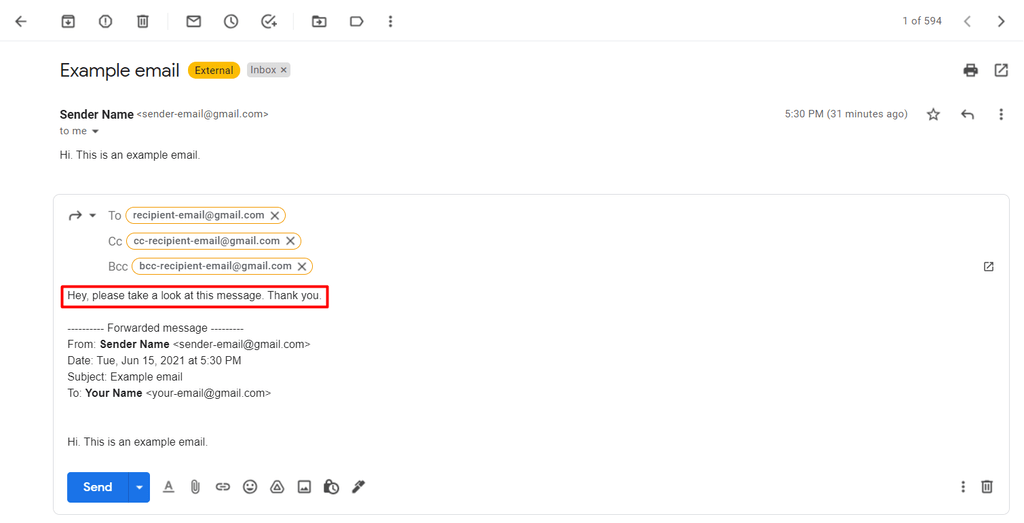
Using Gmail to forward an email is a breeze. Here’s how:
- Log in to your Gmail account using your computer.
- Find the email you want to forward and click on it.
- Click on the “Forward” button located at the top of the email window.
- Enter the recipient’s email address in the “To” field.
- Add any additional comments or messages if desired.
- Click on the “Send” button.
Forwarding an Email With Libero
Libero is another popular email service that makes forwarding emails easy. Here’s how to do it:
- Log in to your Libero account using your computer.
- Find the email you want to forward and click on it.
- Select the “Forward” option from the menu bar.
- Enter the recipient’s email address in the “To” field.
- Add any additional comments or messages if desired.
- Click on the “Send” button.
Forwarding an Email With Outlook
Outlook is a powerful email client that allows you to forward emails with ease. Here’s how:
- Log in to your Outlook account using your computer.
- Find the email you want to forward and double-click on it.
- Select the “Forward” option from the menu bar.
- Enter the recipient’s email address in the “To” field.
- Add any additional comments or messages if desired.
- Click on the “Send” button.
Forwarding an Email With Yahoo
Yahoo is another popular email service that makes forwarding emails easy. Here’s how:
- Log in to your Yahoo account using your computer.
- Find the email you want to forward and click on it.
- Select the “Forward” option from the menu bar.
- Enter the recipient’s email address in the “To” field.
- Add any additional comments or messages if desired.
- Click on the “Send” button.
Forwarding an Email With Mobile Devices
What about forwarding emails using your mobile device? It’s just as easy! Here’s how:
- Open your email app (e.G. Gmail, Mail) and find the email you want to forward.
- Tap on the email to open it.
- Select the “Forward” option from the menu bar.
- Enter the recipient’s email address in the “To” field.
- Add any additional comments or messages if desired.
- Tap on the “Send” button.
Can I Forward an Email With Attachments?
Yes, you can forward emails with attachments using some email services. Here’s how:
- Open your email client and find the email with the attachment you want to forward.
- Double-click on the email to open it.
- Select the “Forward” option from the menu bar.
- Enter the recipient’s email address in the “To” field.
- Add any additional comments or messages if desired.
- Click on the “Send” button.
Conclusion
Forwarding an email is a simple process that can save you time and effort. Whether you’re using Gmail, Libero, Outlook, Yahoo, or another email service, forwarding emails is just as easy as sending a new email. By following these step-by-step guides, you’ll be able to forward emails like a pro in no time!
Faqs
- What is The Purpose of Forwarding an Email?
Forwarding an email allows you to share a message with someone else without having to rewrite it from scratch. - How do I Forward an Email Using Gmail?
To forward an email using Gmail, find the email you want to forward and click on it. Then, click on the “Forward” button located at the top of the email window. - Can I Forward Emails With Attachments?
Yes, you can forward emails with attachments using some email services. Check your email client’s documentation for more information. - How do I Forward an Email Using my Mobile Device?
To forward an email using your mobile device, open your email app and find the email you want to forward. Then, tap on the email to open it and select the “Forward” option from the menu bar. - What Are Some Benefits of Forwarding Emails?
Some benefits of forwarding emails include saving time and effort, keeping the original sender informed, and sharing relevant information with others. - Can I Forward Emails Using Yahoo Mail?
Yes, you can forward emails using Yahoo Mail. To do so, find the email you want to forward and click on it. Then, select the “Forward” option from the menu bar. - How do I Forward an Email Using Outlook?
To forward an email using Outlook, double-click on the email to open it. Then, select the “Forward” option from the menu bar and enter the recipient’s email address in the “To” field. - Can I Forward Emails With Attachments Using my Iphone or Ipad?
Yes, you can forward emails with attachments using your iPhone or iPad. To do so, open the Mail app and find the email you want to forward. Then, tap on the email to open it and select the “Forward” option from the menu bar.


