
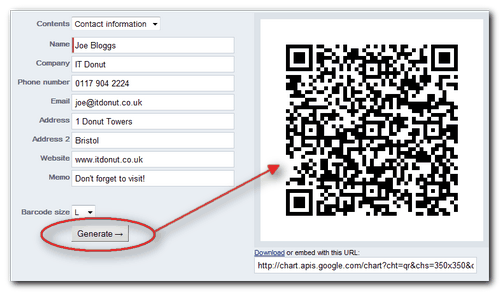
Creating QR Codes: A Comprehensive Guide
Are you looking for ways to create QR codes for personal or professional use? Look no further! In this article, we will explore the world of QR code creation, discussing various tools and methods to generate high-quality QR codes.
What Are QR Codes?
QR codes, short for Quick Response codes, are two-dimensional barcodes that can store information such as text, URLs, contact details, or even videos. They were first used in Japan in the 1990s for tracking parts in manufacturing, but have since become popular worldwide for various uses.
Why Create QR Codes?
QR codes offer several advantages over traditional barcodes:
- Easy to Create: With numerous online tools and mobile apps available, creating QR codes has never been easier.
- Space-efficient: QR codes can store more information than traditional barcodes in a smaller space.
- Scannable: QR codes can be scanned quickly using smartphones or dedicated QR code readers.
Tools For Creating QR Codes
There are numerous online tools and mobile apps available to create QR codes. Here are some of the most popular ones:
<UQR.me (Online)
Key Features:
- Generate dynamic QR codes
- Create static QR codes for websites, tickets, and more
- Personalize QR codes with custom designs
- Advanced security protocols for data protection
Creating QR Codes With
To get started with
- Go to the
website and sign up for a free account. - Choose the type of QR code you want to create (e.G., Website, contact card).
- Enter the required information (e.G., URL, name, phone number).
- Customize your QR code with a logo or design (optional).
- Save and download your QR code in various formats.
The QR Tails Generator (Windows/MacOS/Linux)
The QR Tails Generator is an application that can be installed directly into Google Chrome. This tool allows users to create QR codes for various purposes, including text, URLs, contacts, and more.
Key Features:
- Generate QR codes offline or online
- Create static QR codes for different types of content
- Customizable design options
To use the QR Tails Generator, follow these steps:
- Install the application from the Chrome Web Store.
- Open the application in Google Chrome.
- Choose the type of QR code you want to create (e.G., Text, URL).
- Enter the required information and customize your QR code as needed.
- Save and download your QR code.
QR Stuff (Online)
QR Stuff is a web-based service that allows users to create QR codes for various purposes, including text, URLs, contacts, and more.
Key Features:
- Generate static QR codes
- Create dynamic QR codes with customizable content
- Advanced security protocols for data protection
To use QR Stuff, follow these steps:
- Go to the QR Stuff website.
- Choose the type of QR code you want to create (e.G., Text, URL).
- Enter the required information and customize your QR code as needed.
- Save and download your QR code.
Generator of Codes QR (Android)
The Generator of Codes QR is a mobile app for Android devices that allows users to create QR codes on-the-go.
Key Features:
- Generate static QR codes
- Create dynamic QR codes with customizable content
- Advanced security protocols for data protection
To use the Generator of Codes QR, follow these steps:
- Download and install the app from the Google Play Store.
- Choose the type of QR code you want to create (e.G., Text, URL).
- Enter the required information and customize your QR code as needed.
- Save and share your QR code.
Qrafter (iOS/iPadOS)
Qrafter is a mobile app for iOS devices that allows users to create QR codes on-the-go.
Key Features:
- Generate static QR codes
- Create dynamic QR codes with customizable content
- Advanced security protocols for data protection
To use Qrafter, follow these steps:
- Download and install the app from the App Store.
- Choose the type of QR code you want to create (e.G., Text, URL).
- Enter the required information and customize your QR code as needed.
- Save and share your QR code.
Conclusion
Creating QR codes is a straightforward process that can be achieved using various online tools and mobile apps. From dynamic QR codes with customizable content to static QR codes for different purposes, there are numerous options available to suit different needs. Whether you’re looking to create QR codes for personal or professional use, the tools and methods discussed in this article will help you get started.
Faqs
- What is a QR Code?
A QR code, short for Quick Response code, is a two-dimensional barcode that can store information such as text, URLs, contact details, or even videos. - Why Create QR Codes?
QR codes offer several advantages over traditional barcodes, including ease of creation, space efficiency, and scannability. - What Are The Benefits of Using
?
offers advanced security protocols for data protection, customizable designs, and a free plan with up to 100 scannings per month. - Can I Create QR Codes Offline?
Yes, some tools such as The QR Tails Generator allow users to create QR codes offline or online. - What is The Difference Between Static And Dynamic QR Codes?
Static QR codes are non-editable and cannot be modified once created, while dynamic QR codes can be updated without recreating the entire code. - Can I Customize my QR Code Design?
Yes, many tools such asand The QR Tails Generator allow users to personalize their QR code designs with custom logos or colors. - How do I Share my QR Code?
You can share your QR code via email, social media, or messaging apps using the sharing features available on most mobile devices.
Conclusion
In conclusion, creating QR codes is a simple and effective way to store information and connect with others. With numerous online tools and mobile apps available, users can choose the best option for their needs.


