
How to Generate a Pin Telephone Inps: A Step-by-step Guide
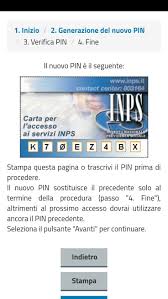
Are you tired of dealing with long wait times or difficulty accessing the services provided by Istituto Nazionale della Previdenza Sociale (INPS)? Look no further! In this article, we will guide you through the process of generating a PIN telephone INPS, also known as a temporary phone code, which can be used to access various services and contact the assistance service.
What is a Pin Telephone Inps?
Before diving into the steps, it’s essential to understand what a PIN telephone INPS is. A PIN telephone INPS is an alphanumeric code consisting of 8 characters that serves as a temporary phone code for accessing INPS services via phone. This code is unique and has a minimum validity of 1 day and maximum of 3 months.
Why Do I Need a Pin Telephone Inps?
In recent years, INPS has introduced the PIN telephone system to ensure full accessibility to its services, especially through contact centers. As a result, citizens can now access various services without needing to provide their SPID (Public Administration Identifier), CIE (Electronic Identity Card), or CNS (Sanitary Card) credentials.
How to Generate a Pin Telephone Inps on Computer
Generating a PIN telephone INPS on computer is a straightforward process that requires accessing your personal area on the INPS website. To do this:
- Access Your Personal Area: Log in to your INPS account using your SPID, CIE, or CNS credentials.
- Select The Option For Generating a Temporary Code: Choose the option to generate a temporary code from the menu.
- Specify The Duration: Select the desired duration of validity for the PIN telephone INPS (1 day, 1 week, 1 month, or 3 months).
- Generate The Pin Telephone Inps: Click on the “Generate Temporary PIN” button to create your PIN telephone INPS.
How to Generate a Pin Telephone Inps on Smartphone And Tablet
If you don’t have access to a computer, you can still generate a PIN telephone INPS using the INPS Mobile app for Android devices or by accessing the official INPS website through a browser (Chrome on Android or Safari on iOS/iPadOS). To do this:
- Access Your Personal Area: Log in to your INPS account using your SPID, CIE, or CNS credentials.
- Select The Option For Generating a Temporary Code: Choose the option to generate a temporary code from the menu.
- Specify The Duration: Select the desired duration of validity for the PIN telephone INPS (1 day, 1 week, 1 month, or 3 months).
- Generate The Pin Telephone Inps: Tap on the “Generate Temporary PIN” button to create your PIN telephone INPS.
Tips And Reminders
- The generated PIN telephone INPS is valid for the specified duration.
- In case of a forgotten or expired PIN telephone INPS, you can generate a new one at any time.
- If you have already created a PIN telephone INPS but want to change it, you can generate a new one without affecting the previous one.
Conclusion
Generating a PIN telephone INPS is an easy and convenient way to access various services provided by INPS. By following these steps, you can ensure that you have a valid temporary phone code at all times. Remember to update your knowledge on the latest developments in this area to stay ahead of any potential changes or updates.
Frequently Asked Questions (FAQs)
Q: What is a PIN telephone INPS?
A: A PIN telephone INPS is an alphanumeric code consisting of 8 characters that serves as a temporary phone code for accessing INPS services via phone.
Q: Why do I need a PIN telephone INPS?
A: The PIN telephone system ensures full accessibility to INPS services, especially through contact centers.
Q: How do I generate a PIN telephone INPS on computer?
A: Access your personal area on the INPS website, select the option for generating a temporary code, specify the duration, and click on the “Generate Temporary PIN” button.
Q: Can I generate a PIN telephone INPS on my smartphone or tablet?
A: Yes, you can use the INPS Mobile app (for Android devices) or access the official INPS website through a browser to generate a PIN telephone INPS.
Q: How long is the PIN telephone INPS valid for?
A: The generated PIN telephone INPS is valid for the specified duration (1 day, 1 week, 1 month, or 3 months).


