
How to Generate a QR Code: A Step-by-step Guide
Are you looking for a way to share information, links, or even your contact details quickly and easily? Look no further than the humble QR code! In this article, we’ll show you how to generate a QR code using various online tools and mobile apps.
What is a QR Code?
A QR (Quick Response) code is a type of two-dimensional barcode that can store information such as text, URLs, email addresses, and more. It’s like a bar code, but instead of being scanned at a checkout counter, you can use your smartphone to scan it and access the stored information.
Why Use a QR Code?
QR codes are incredibly useful for sharing information quickly and easily. You can use them to share links, contact details, or even menus with customers. They’re also great for storing information like event schedules or product details.
Online Tools For Generating QR Codes
There are many online tools available that allow you to generate QR codes for free. Here are a few of our favorites:
- QR Tails Generator: This is one of the most popular online QR code generators, with a user-friendly interface and plenty of customization options.
- Uqr.Me: This service allows you to create static or dynamic QR codes, with features like custom colors and shapes.
- Goqr.Me: Another popular choice, goQR.Me offers a range of customization options and is free to use.
Mobile Apps For Generating QR Codes
If you prefer using mobile apps, there are plenty of great choices available. Here are a few:
- QR & Barcode Scan (Android): This app allows you to generate and scan QR codes with ease.
- Code QR And Bar Code (iOS/iPadOS): A similar app for iOS devices.
- Qrafter (iOS/iPadOS): Another popular choice, Qrafter offers a range of customization options.
Generating a QR Code With Uqr.Me
Let’s take a closer look at generating a QR code using the uQR.Me service. Here’s how:
- Sign up: Create an account on uQR.Me to get started.
- Choose Your QR Code Type: Select the type of information you want to store in your QR code, such as a URL or contact details.
- Customize Your QR Code: Choose from a range of customization options, including colors and shapes.
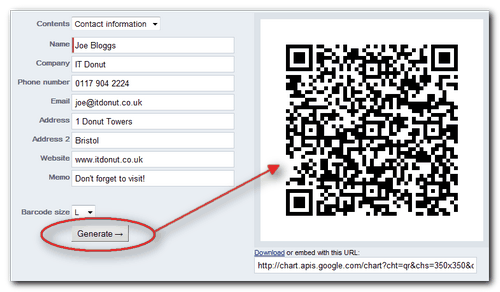
- Generate Your QR Code: Click the “generate” button to create your QR code.
Generating a QR Code With QR Tails Generator
Here’s how to generate a QR code using the QR Tails Generator:
- Visit The Website: Go to qr-tails.Com to get started.
- Choose Your QR Code Type: Select the type of information you want to store in your QR code, such as a URL or contact details.
- Customize Your QR Code: Choose from a range of customization options, including colors and shapes.
- Generate Your QR Code: Click the “generate” button to create your QR code.
How to Use a QR Code
Once you’ve generated your QR code, how do you use it? Here are a few ideas:
- Share Your QR Code: Share your QR code on social media or via email.
- Scan Your QR Code: Use a mobile app to scan your QR code and access the stored information.
Frequently Asked Questions (FAQs)
Here are some frequently asked questions about QR codes:
- Q: What is a QR Code?
A: A QR code, or Quick Response code, is a type of two-dimensional barcode that can store information such as text, URLs, email addresses, and more. - Q: How do I Generate a QR Code?
A: There are many online tools available that allow you to generate QR codes for free, including uQR.Me and QR Tails Generator. - Q: What Can I Use a QR Code For?
A: QR codes are incredibly useful for sharing information quickly and easily. You can use them to share links, contact details, or even menus with customers.
Conclusion
In this article, we’ve shown you how to generate a QR code using various online tools and mobile apps. We hope this guide has been helpful in showing you the possibilities of QR codes!


