
How to Contact Amazon Seller Central: A Step-by-step Guide
As an Amazon seller, you’re likely aware of the importance of having a smooth and efficient experience when it comes to customer support. However, sometimes technical issues can arise that prevent you from getting in touch with Amazon Seller Central via phone. Don’t worry; we’ve got you covered! In this article, we’ll guide you through the process of contacting Amazon Seller Central using your mobile device or computer.
Understanding The Limitations
Before we dive into the step-by-step instructions, it’s essential to understand that Amazon has specific requirements for accessing their customer support services. If you’re using a smartphone or tablet, you won’t be able to access Amazon Seller Central through the app on Android and iOS/iPadOS devices. This is because these platforms only allow email-based assistance.
Mobile Device Access
If you prefer using your mobile device, follow these steps:
Step 1: Open Your Browser
To start, open your web browser (such as Chrome or Safari) and navigate to the Amazon Seller Central website by typing www.Sellercentral.Amazon.It into the address bar.
Step 2: Log In to Your Account
If you haven’t already logged in, click on the “Access” button and enter your login credentials. If you’ve forgotten your password or need help with login issues, please refer to Amazon’s dedicated support resources.
Step 3: Select The Marketplace
Choose the marketplace for which you need assistance (e.G., Italy). You’ll see a dropdown menu or a specific link; select it accordingly.
Step 4: Access Customer Support
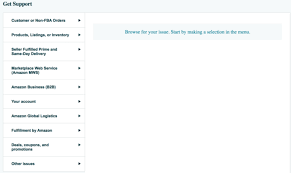
Tap on the symbol (?) in the top-right corner of the leading page. A form will appear, asking you to describe your problem. Enter the necessary information and click “Continue.”
Step 5: Choose Your Problem Type
Select a category from the list displayed. If your issue isn’t listed, tap on the voice “My problem is not in this list.” Then, choose an alternative category and select “Continue” again.
Step 6: Provide Additional Information (Optional)
If required, provide any additional information that might help Amazon’s customer support team assist you better. Be sure to include relevant details such as ASIN or SKU numbers for products.
Step 7: Fill Out The Contact Form
Complete the form with your email address and phone number. If you’d like to attach files or documents, use the designated function.
Step 8: Submit Your Request
Click on the “Forward” button to send your request to Amazon Seller Central’s customer support team. You’ll receive a response via email or telephone within a short period.
Computer-based Access
If you find it more comfortable using your computer, follow these steps:
Step 1: Open Your Browser
Access your web browser (e.G., Google Chrome) and navigate to the Amazon Seller Central website by typing www.Sellercentral.Amazon.It.
Step 2: Log In to Your Account
If you haven’t already logged in, click on the “Access” button and enter your login credentials.
Step 3: Select The Marketplace
Choose the marketplace for which you need assistance (e.G., Italy). You’ll see a dropdown menu or a specific link; select it accordingly.
Step 4: Access Customer Support
Click on the icon (?) in the top-right corner of the leading page. A form will appear, asking you to describe your problem. Enter the necessary information and click “Continue.”
Step 5: Choose Your Problem Type
Select a category from the list displayed. If your issue isn’t listed, click on the voice “My problem is not in this list.” Then, choose an alternative category and select “Continue” again.
Step 6: Provide Additional Information (Optional)
If required, provide any additional information that might help Amazon’s customer support team assist you better. Be sure to include relevant details such as ASIN or SKU numbers for products.
Step 7: Fill Out The Contact Form
Complete the form with your email address and phone number. If you’d like to attach files or documents, use the designated function.
Step 8: Submit Your Request
Click on the “Forward” button to send your request to Amazon Seller Central’s customer support team. You’ll receive a response via email or telephone within a short period.
Earn Rewards Through Amazon Affiliates
As an affiliated Amazon partner, you earn rewards from eligible purchases made through links on your website. This is an excellent way to monetize your online presence and build a loyal customer base.


