
How to Gain Coupons on Ebay: A Step-by-step Guide
Are you an avid online shopper looking to save some extra euros on your purchases? Look no further! In this article, we will guide you through the process of gaining coupons on eBay, one of the world’s largest e-commerce platforms. Whether you’re a seasoned eBay user or just starting out, this guide will show you how to take advantage of discounts and promotions available on the site.
What Are Coupons on Ebay?
Coupons on eBay refer to promotional codes that can be used to reduce the cost of purchases made on the platform. These coupons can be found on various websites, social media platforms, or even directly on the eBay website itself. By using these coupons, buyers can enjoy significant discounts on their purchases, making online shopping even more attractive.
How to Find Coupons on Ebay
There are several ways to find coupons on eBay:
Method 1: Check The Ebay Website
The most straightforward way to find coupons is to check the eBay website directly. Here’s how:
- Access the eBay website using your computer, smartphone, or tablet.
- Click on the “Account” icon located in the top right corner of the page and select “My eBay.”
- In the “My eBay” menu, click on the option that says “Account & Lists” and then select “Preferences.”
- In the preferences section, click on the tab labeled “Notifications” and ensure that the box next to “General Promotions by email” is checked.
- Click on the “Save Changes” button to apply your changes.
Method 2: Use Facebook
You can also find coupons on eBay through Facebook:
- Log in to your Facebook account and search for the official eBay page.
- Scroll down the page to see if there are any new coupon posts or promotions available.
- If you find a coupon post, click on it and copy the code to use during checkout.
Method 3: Check Your Email
Make sure to check your email for notifications about coupons:
- Log in to your eBay account and go to the “Notifications” section.
- Click on the tab labeled “Marketing communications” and ensure that the box next to “General Promotions by email” is checked.
How to Use Coupons on Ebay
Now that you have found a coupon, it’s time to use it:
- Access Your Ebay Account: Log in to your eBay account using your computer, smartphone, or tablet.
- Add The Item You Want to Buy: Search for the item you want to purchase and add it to your cart.
- Go to Checkout: Click on the “Checkout” button to proceed with payment.
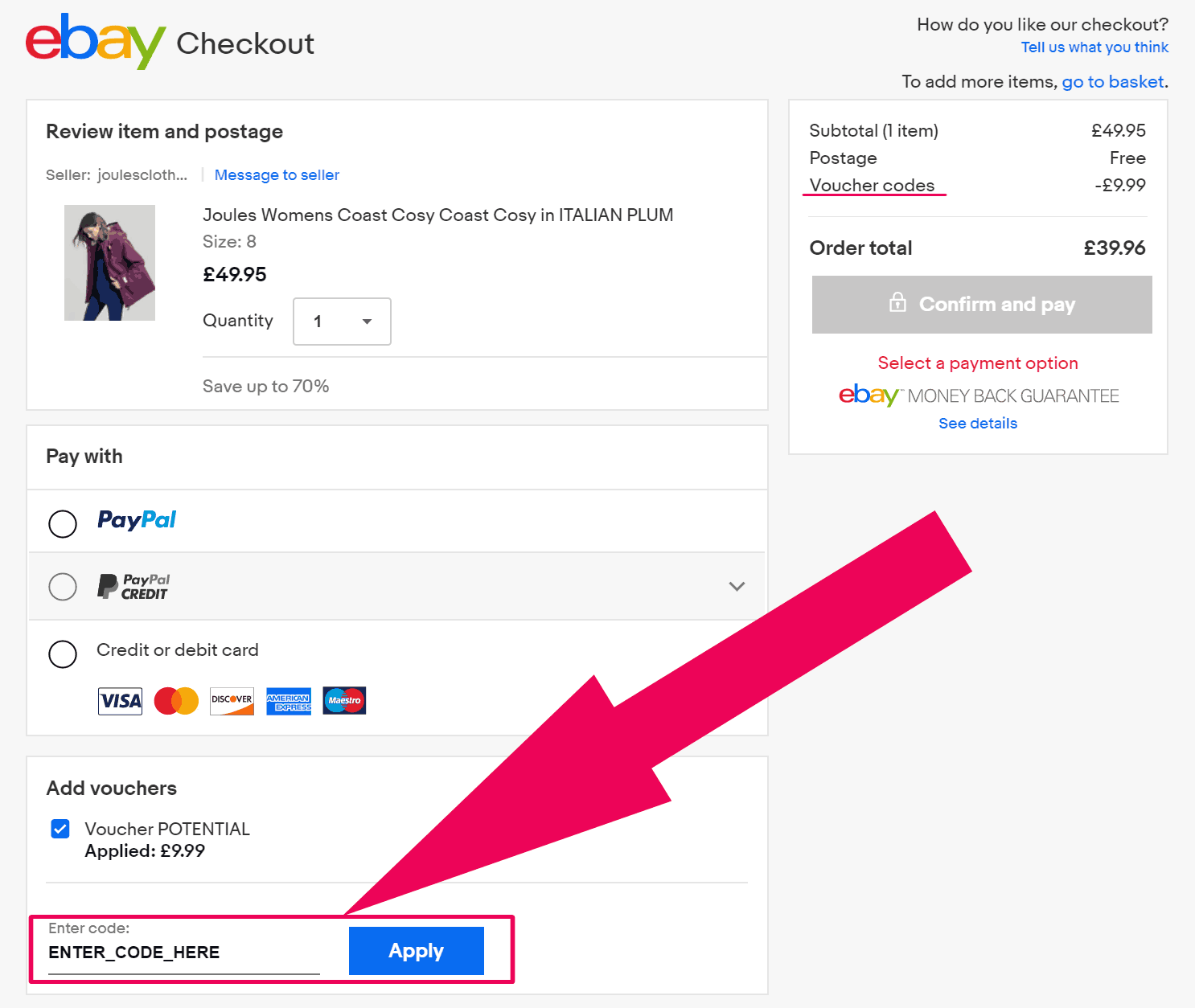
- Apply Your Coupon Code: In the “Payment” section, look for the box labeled “Add codes discount.” Enter your coupon code in the text field provided.
Tips And Reminders
When using coupons on eBay, keep the following tips in mind:
- Only one coupon can be used per purchase.
- Coupons cannot be combined with other promotions or discounts.
- Make sure to check the expiration date of your coupon before applying it.
- Keep an eye out for notifications about new coupons and promotions.
Conclusion
Gaining coupons on eBay is a straightforward process that can help you save even more on your online purchases. By following these simple steps, you can take advantage of discounts and promotions available on the platform. Remember to check the eBay website directly, use Facebook, or monitor your email for notifications about new coupons. Happy shopping!
Faqs
Here are some additional questions related to using coupons on eBay:
- Q: Can I Use Multiple Coupons in a Single Purchase?
A: No, only one coupon can be used per purchase. - Q: How do I Find New Coupons And Promotions on Ebay?
A: Check the eBay website directly, use Facebook, or monitor your email for notifications about new coupons. - Q: Can I Combine Coupons With Other Promotions or Discounts?
A: No, coupons cannot be combined with other promotions or discounts.
If you have any further questions or concerns, feel free to ask.


