
How to Gain Coupons on Shein: A Step-by-step Guide
Are you a fan of online shopping? Do you love saving money with coupons? Look no further! In this article, we’ll show you how to gain coupons on SHEIN, one of the most popular online shopping platforms.
What is Shein?
SHEIN is a Chinese e-commerce platform that offers a wide range of fashion products at competitive prices. With millions of active users worldwide, SHEIN has become a go-to destination for fashion enthusiasts looking for trendy and affordable clothing, shoes, and accessories.
Why Gain Coupons on Shein?
Gaining coupons on SHEIN can help you save even more money on your favorite fashion items. Whether you’re shopping for yourself or as a gift, using coupons can make your online shopping experience even more enjoyable.
How to Gain Coupons on Shein: A Step-by-step Guide
- Sign up For an Account: The first step is to create an account on SHEIN’s official website. This will give you access to exclusive discounts and promotions.
- Download The App: If you prefer shopping on-the-go, download the SHEIN app on your smartphone or tablet. You can find it in the App Store (for iOS devices) or Google Play Store (for Android devices).
- Log in to Your Account: Once you’ve signed up for an account or downloaded the app, log in to access your dashboard.
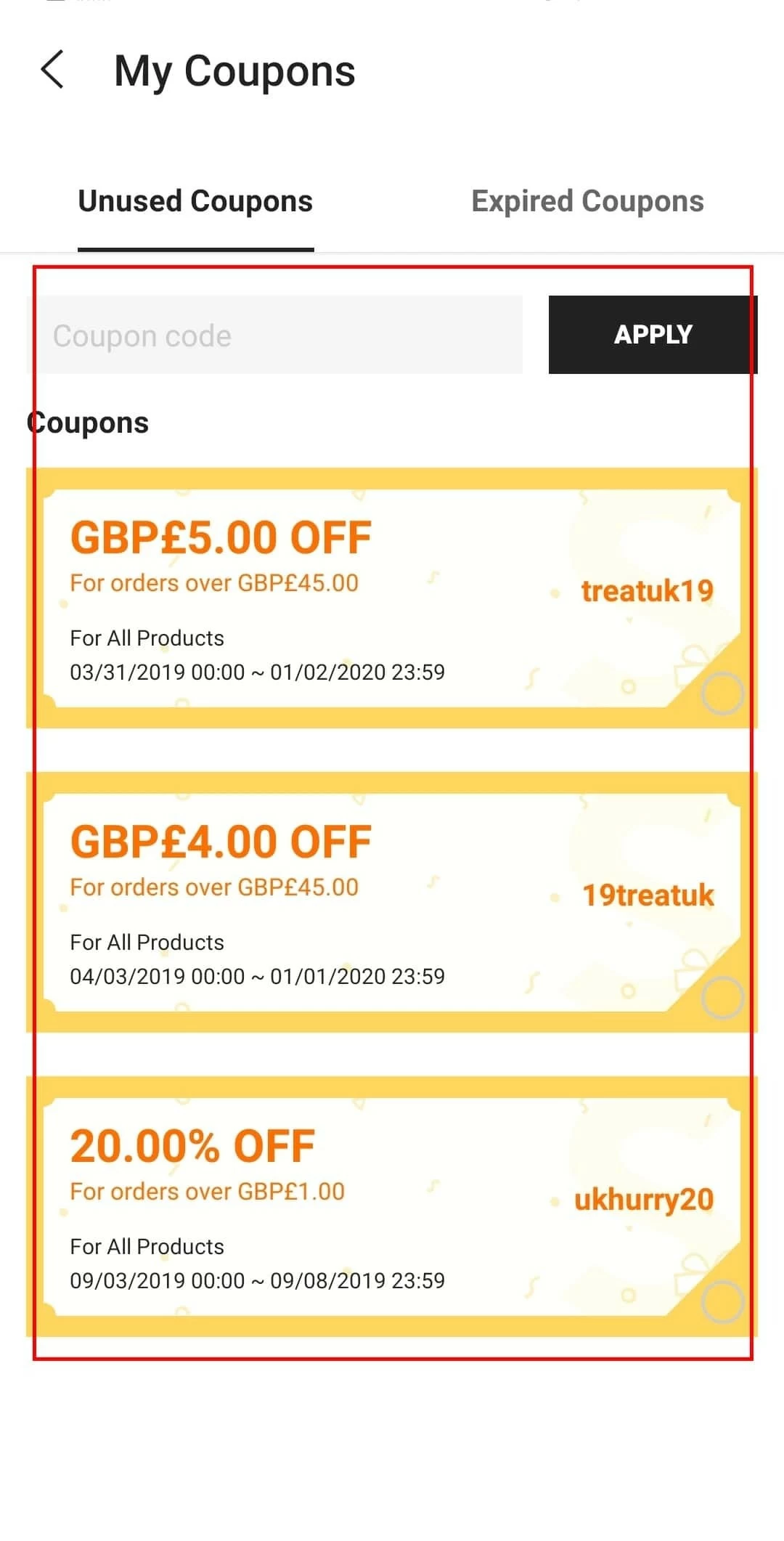
- Check For Available Coupons: On the SHEIN website or mobile app, navigate to the “My Coupons” section. Here, you’ll find a list of active coupons that you can use on your next purchase.
- Copy And Paste The Coupon Code: Choose the coupon that suits your needs and copy the code. You can then paste it into the checkout page when making a purchase.
How to Use a Coupon on Shein
- Add Items to Your Cart: Browse through SHEIN’s vast collection of products and add the items you’d like to purchase to your shopping cart.
- Proceed to Checkout: Once you’ve added all the items you want, proceed to the checkout page.
- Apply The Coupon Code: In the “My Coupons” section on the checkout page, paste the coupon code you copied earlier.
- Get Your Discount: The system will automatically apply the discount to your purchase.
Tips And Tricks
- Always check the expiration date of the coupon before using it.
- Be sure to read the terms and conditions associated with each coupon.
- Don’t forget to combine coupons for even bigger savings!
Conclusion
Gaining coupons on SHEIN is easy and convenient. By following these simple steps, you can enjoy exclusive discounts and save money on your favorite fashion items. Whether you’re shopping online or using the mobile app, SHEIN’s got you covered.
Frequently Asked Questions (FAQs)
- Q: What Are The Benefits of Gaining Coupons on Shein?
A: Gaining coupons on SHEIN allows you to enjoy exclusive discounts and save money on your favorite fashion items. - Q: How do I Gain Coupons on Shein?
A: You can gain coupons by signing up for an account, downloading the mobile app, or checking for available coupons in the “My Coupons” section. - Q: Can I Use Multiple Coupons at Once?
A: Yes, you can combine multiple coupons to get even bigger savings! - Q: Are Shein’s Coupons Limited to Specific Products?
A: No, most coupons are applicable across a wide range of products on the platform. - Q: How do I Find Out if my Coupon Has Expired?
A: You can check the expiration date in the “My Coupons” section or contact customer support for assistance. - Q: Can I Share my Coupon With Friends And Family?
A: No, SHEIN’s coupons are exclusive to individual accounts and cannot be shared or transferred. - Q: How do I Get Notified About New Coupons?
A: You can follow SHEIN on social media or sign up for their newsletter to stay updated on new promotions and coupon releases! - Q: Are There Any Specific Rules or Restrictions When Using a Coupon on Shein?
A: Yes, be sure to read the terms and conditions associated with each coupon before making a purchase.
Want More?
For more fashion tips, tricks, and style inspiration, follow us on social media or subscribe to our newsletter for exclusive updates!


