
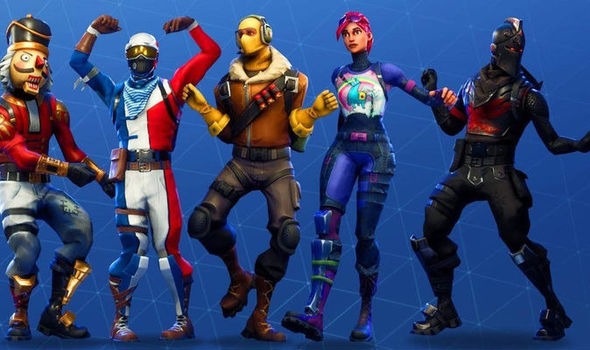
Giving a Skin on Fortnite For Ps4: A Step-by-step Guide
Are you looking to give a skin on Fortnite to your friend or family member? Look no further! In this article, we will guide you through the process of giving a skin on Fortnite for PS4.
What is Giving a Skin on Fortnite?
Giving a skin on Fortnite refers to the act of gifting a cosmetic item, such as a skin, emote, or back bling, to another player. This can be done in-game and requires a subscription to the game’s service.
Requirements For Giving a Skin on Fortnite
To give a skin on Fortnite, you must have the following:
- A PlayStation 4 console
- A copy of Fortnite on PS4
- A V-Bucks account (the game’s virtual currency)
- A friend or family member who also plays Fortnite
How to Give a Skin on Fortnite
Here are the steps to follow:
- Log in to Your Fortnite Account: Make sure you have logged into your Fortnite account on your PS4.
- Access The Gift Menu: Navigate to the gift menu by selecting “Gift” from the main menu.
- Select The Skin or Item You Want to Give: Choose the skin or item you want to give to your friend or family member.
- Enter The Recipient’s Information: Enter the recipient’s Epic Games ID and select their platform (PS4, in this case).
- Confirm The Gift: Confirm that you want to send the gift by selecting “Send Gift”.
Pass Battaglia: Unofficial Gift Option
Another unofficial gift option is the Pass Battaglia. This allows you to gift a skin or item from the Battle Pass to another player.
Gift Card For V-buck And Packs
If you don’t have enough V-Bucks to purchase a skin, you can also buy a gift card that includes V-Buck credits and other items. These cards are available on various online stores like Amazon.
Shopping For Gift Cards
Here are some options:
- 10€ Play Station Store Gift Card: Buy a 10€ gift card from the PlayStation Store.
- 20€ Play Station Store Gift Card: Buy a 20€ gift card from the PlayStation Store.
Buying Packs With Skins
You can also buy packs that include skins and other items. These packs are available on various online stores like Amazon.
Fortnite Transformers Pack: Buy a pack that includes skins, emotes, and other items.
* Fortnite Minty Legends Pack: Buy a pack that includes skins and other items.
* Fortnite – Bundle Focus Get Dark: Buy a pack that includes skins and other items.
Conclusion
Giving a skin on Fortnite for PS4 is a relatively simple process. Make sure you have the necessary requirements, follow the steps outlined in this article, and choose the gift option that suits your needs.
Faqs
- What is The Minimum Time Required to Give a Skin on Fortnite?
The minimum time required to give a skin on Fortnite is 5 minutes. - Can I Give a Skin From The Battle Pass?
Yes, you can give a skin from the Battle Pass using the Pass Battaglia gift option. - What Are The Requirements For Giving a Skin on Fortnite?
You need a PS4 console, a copy of Fortnite on PS4, and a V-Bucks account to give a skin on Fortnite. - How do I Know if my Friend Has Already Received a Gift From Me?
You can check your friend’s inventory in-game to see if they have already received the gift. - Can I Cancel a Gift I’ve Sent?
No, gifts cannot be canceled once they have been sent. - What Happens if The Recipient Doesn’t Have Enough V-bucks to Receive The Gift?
If the recipient doesn’t have enough V-Bucks, the gift will not be delivered. - How do I Know if a Skin is Available in The Game?
You can check the game’s store or look for information on the skin’s availability online.
The Benefits of Giving a Skin on Fortnite
Giving a skin on Fortnite can bring numerous benefits to both you and your friend, including:
- Increased gaming experience
- Enhanced gameplay
- Improved social interaction
Remember to always follow the game’s rules and regulations when giving a skin on Fortnite. Happy gaming!


