
How to Convert Amazon Business Account to Personal
Are you an entrepreneur looking to switch from a professional Amazon account to a personal one? Or perhaps you want to know how to quickly change between your business and personal accounts without having to log in every time? Look no further! In this article, we’ll guide you through the process of converting your Amazon Business account to a personal one, as well as show you how to link or unlink your professional and personal accounts seamlessly.
Why Convert Your Amazon Business Account?
Before diving into the process, let’s quickly cover why you might want to convert your Amazon Business account to a personal one. As an entrepreneur, it’s common to use Amazon Business for your company, but when you’re not working, you might prefer to shop as an individual rather than a business owner. Converting your account allows you to enjoy the benefits of shopping on Amazon without the professional label.
Converting Your Account
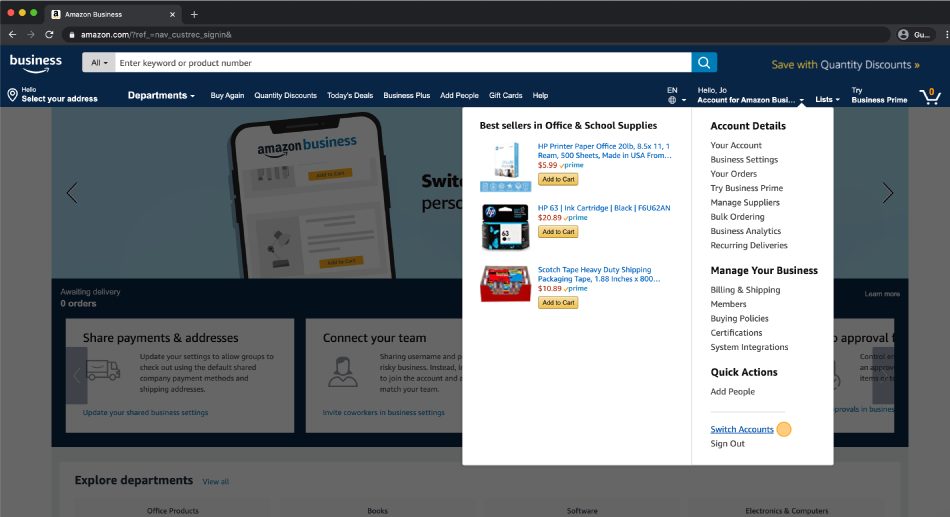
To convert your Amazon Business account to a personal one:
- Log in to your Amazon account using the computer.
- Click on “Account & Lists” and select your Amazon Business account.
- In the menu, choose “Settings” then click on the option labeled “Use another account.”
- Add your personal Amazon account details (email address and password).
- Confirm that you want to link your accounts.
That’s it! Your professional Amazon account has now been converted into a personal one, linked with your business account for seamless shopping experiences.
Converting Using a Smartphone or Tablet
If you prefer using your smartphone or tablet:
- Download the official Amazon app on your device.
- Log in to your Amazon Business account.
- Navigate to “Settings” and select the option labeled “Use another account.”
- Add your personal Amazon account details (email address and password).
- Confirm that you want to link your accounts.
Your Amazon Business account has now been successfully converted into a personal one, linked with your business account for easy access.
Linking Your Accounts
To link your professional and personal Amazon accounts:
- Log in to your Amazon Business account.
- Navigate to the “Account & Lists” menu and select “Other accounts.”
- Choose the option labeled “Link another account.”
- Add your personal Amazon account details (email address and password).
- Confirm that you want to link your accounts.
That’s it! Your professional and personal Amazon accounts are now linked, allowing for seamless switching between them.
Unlinking Your Accounts
If you need to unlink your professional and personal Amazon accounts:
- Log in to your Amazon Business account.
- Navigate to the “Account & Lists” menu and select “Other accounts.”
- Choose the option labeled “Suspend another account.”
- Confirm that you want to suspend your linked account.
Your professional and personal Amazon accounts are now unlinked, allowing for separate shopping experiences.
Conclusion
Converting your Amazon Business account to a personal one or linking/unlinking your professional and personal accounts is a straightforward process on both computers and mobile devices. Whether you’re an entrepreneur looking to simplify your shopping experience or just need to manage multiple accounts, this guide has shown you how to do it with ease.
Frequently Asked Questions (FAQs)
Q: How do I convert my Amazon Business account to a personal one?
A: To convert your Amazon Business account, log in using a computer, select “Account & Lists,” then choose the option labeled “Use another account” and follow the prompts to add your personal Amazon account details.
Q: Can I convert my account on a smartphone or tablet?
A: Yes! Download the official Amazon app on your device, log in to your Amazon Business account, navigate to “Settings,” select the option labeled “Use another account,” and follow the prompts to add your personal Amazon account details.
Q: How do I link my professional and personal Amazon accounts?
A: To link your accounts, log in using a computer or mobile device, navigate to the “Account & Lists” menu on your business account, choose the option labeled “Link another account,” and follow the prompts to add your personal Amazon account details.
Q: Can I unlink my professional and personal Amazon accounts if needed?
A: Yes! To unlink your accounts, log in using a computer or mobile device, navigate to the “Account & Lists” menu on your business account, choose the option labeled “Suspend another account,” and confirm that you want to suspend your linked account.
Q: What happens when I convert my Amazon Business account?
A: When you convert your Amazon Business account, it will automatically become a personal one, and any previous Professional Prime shipping benefits will be transferred to your new personal account.
Q: Will converting my account delete all my business account information?
A: No! Converting your account does not delete any of your business account information. Your professional account details will still be accessible for future use.
Q: Can I convert my Amazon Business account on a mobile device if it’s linked to my company’s email address?
A: Unfortunately, converting an Amazon Business account linked to a company email address can’t be done directly using the Amazon app on your smartphone or tablet. You’ll need to use your computer to manage this process.
Q: What are some benefits of having multiple Amazon accounts for business and personal purposes?
A: Having separate Amazon accounts for business and personal shopping can simplify your checkout experiences, keep professional purchases organized, and make it easier to manage business expenses.


