
How to Do Live on Tiktok: A Step-by-step Guide
Are you ready to go live on TikTok? With over a billion active users, TikTok has become a popular platform for creators to share their talents, showcase their personalities, and connect with their audience. In this article, we will guide you through the process of going live on TikTok, covering everything from setting up your account to streaming live video.
What You Need to Go Live on Tiktok
Before you start, make sure you have:
- A TikTok account (if you haven’t already created one)
- A smartphone or computer with a stable internet connection
- A camera and microphone to capture high-quality video and audio
Step 1: Create Your Account
If you don’t have a TikTok account, create one by downloading the app from the App Store or Google Play Store. Follow the prompts to sign up for an account, and make sure to fill out your profile completely.
Step 2: Initiate The Live Streaming Function
To go live on TikTok, you need to initiate the live streaming function. This can be done by:
- Opening the TikTok app
- Tapping on the “+” icon at the top right corner of the screen
- Selecting “Live” from the menu options
- Choosing a title for your live stream and adding any relevant details
Step 3: Configure Your Settings
Before going live, make sure you configure your settings correctly:
- Set up your camera and microphone to capture high-quality video and audio
- Choose the correct resolution and quality for your stream
- Make sure you have a stable internet connection
How to Go Live on Tiktok on Android
To go live on TikTok on an Android device, follow these steps:
- Open the TikTok app
- Tap on the “+” icon at the top right corner of the screen
- Select “Live” from the menu options
- Choose a title for your live stream and add any relevant details
- Tap on the “Go Live” button to start streaming
How to Go Live on Tiktok on Iphone
To go live on TikTok on an iPhone, follow these steps:
- Open the TikTok app
- Tap on the “+” icon at the top right corner of the screen
- Select “Live” from the menu options
- Choose a title for your live stream and add any relevant details
- Tap on the “Go Live” button to start streaming
How to Go Live on Tiktok Without 1000 Followers
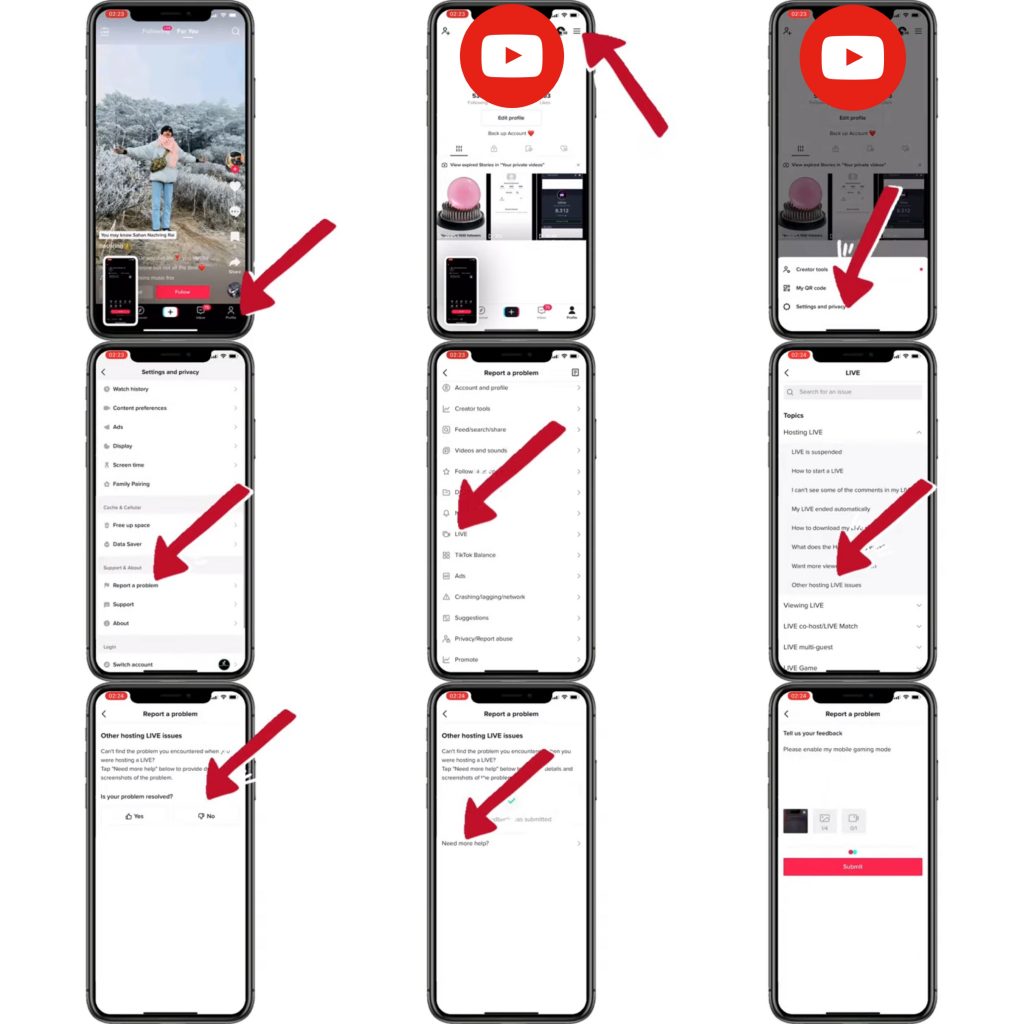
If you don’t have at least 1,000 followers on TikTok, you won’t be able to go live using the native app. However, you can try requesting assistance from the TikTok team by following these steps:
- Open the TikTok app
- Tap on the profile icon at the bottom right corner of the screen
- Select “Settings and privacy” from the menu options
- Scroll down to the “LIVE” section and tap on it
- Tap on the “Point a problem” button and select “Live”
- Fill out the form with your request, specifying that you want to go live without 1,000 followers
How to Go Live on Tiktok With Obs
If you have a powerful computer or gaming setup, you can use OBS (Open Broadcasting Software) to go live on TikTok. This requires setting up a separate stream key and configuring your settings correctly.
How to Go Live on Tiktok From Ps5 or Ps4
To go live on TikTok using your PlayStation console, follow these steps:
- Connect your console to the internet
- Set up your camera and microphone to capture high-quality video and audio
- Use a program like TikTok LIVE Studio to stream your gameplay directly to TikTok
How to Go Live on Tiktok From Xbox
To go live on TikTok using your Xbox console, follow these steps:
- Connect your console to the internet
- Set up your camera and microphone to capture high-quality video and audio
- Use a program like TikTok LIVE Studio to stream your gameplay directly to TikTok
Conclusion
Going live on TikTok is an exciting way to connect with your audience, share your talents, and showcase your personality. With these step-by-step guides, you should be able to set up your account, configure your settings correctly, and start streaming live video in no time. Remember to follow the guidelines above and use high-quality equipment to ensure a smooth and enjoyable experience for both you and your viewers.
Faqs
- What is The Minimum Requirement to go Live on Tiktok?
The minimum requirement to go live on TikTok is 1,000 followers. - Can I go Live on Tiktok Without 1000 Followers?
Yes, you can try requesting assistance from the TikTok team by following the steps outlined above. - What Equipment do I Need to go Live on Tiktok?
You’ll need a smartphone or computer with a stable internet connection, a camera and microphone, and high-quality video and audio capture capabilities. - How do I Set up my Account For Live Streaming?
Follow the step-by-step guide above to set up your account and configure your settings correctly. - Can I Use Obs to go Live on Tiktok?
Yes, you can use OBS (Open Broadcasting Software) to go live on TikTok, but it requires setting up a separate stream key and configuring your settings correctly. - How do I Connect my Ps5 or Ps4 Console to Tiktok For Live Streaming?
Follow the steps outlined above to connect your console to TikTok using a program like TikTok LIVE Studio. - Can I Use Obs to go Live on Tiktok From Xbox?
Yes, you can use OBS (Open Broadcasting Software) to go live on TikTok from your Xbox console, but it requires setting up a separate stream key and configuring your settings correctly.
I hope this article has been helpful in guiding you through the process of going live on TikTok. Remember to follow these tips and best practices for a smooth and enjoyable experience for both you and your viewers!


