
How to Get Colored Messages on Instagram
Are you tired of having plain white messages on Instagram? Do you want to add some color to your conversations? Look no further! In this article, we will guide you through the process of getting colored messages on Instagram.
Why Get Colored Messages on Instagram?
Instagram is a popular social media platform that allows users to share photos and videos. It also has a messaging feature that lets users chat with each other. However, the default white color scheme can be bland and boring. By getting colored messages on Instagram, you can personalize your conversations and make them more visually appealing.
Method 1: Using Instagram’s Built-in Feature
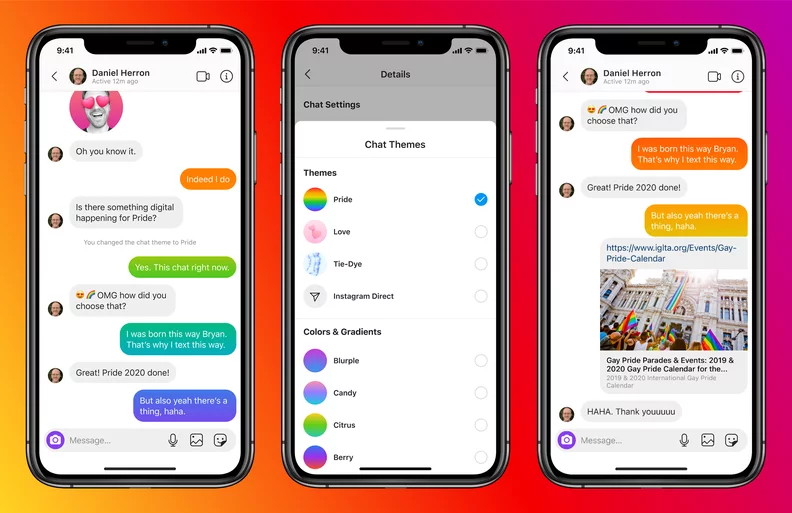
Instagram has a built-in feature that allows users to change the color of their private messages. To access this feature, follow these steps:
- Open the Instagram app and go to the chat section
- Tap on the three dots in the top-right corner of the screen
- Select “Topic” from the menu
- Choose a color from the available options
Once you’ve selected a color, all future messages will be displayed in that color. You can also change the color at any time by going back to the topic settings.
Method 2: Using Third-party Apps
If you want more control over your message colors or if Instagram’s built-in feature doesn’t offer enough options, there are third-party apps available that can help. Some popular options include:
- Adobe Express
- Canva
These apps allow you to create and customize images with colored text, which can then be shared on Instagram. You can choose from a wide range of colors and fonts to make your messages stand out.
How to Use Third-party Apps
To use third-party apps, follow these steps:
- Download and install the app of your choice
- Open the app and create a new image or edit an existing one
- Add colored text to the image using the app’s editing tools
- Save the image and share it on Instagram
Tips And Tricks
Here are some tips and tricks for getting the most out of colored messages on Instagram:
- Experiment with different colors to find the perfect scheme for your brand or personal style.
- Use colored messages to highlight important information or to add visual interest to your conversations.
- Consider using a consistent color scheme across all your social media platforms to create a cohesive brand identity.
Conclusion
Getting colored messages on Instagram is a simple and fun way to personalize your conversations. With Instagram’s built-in feature or third-party apps, you can add a pop of color to your messages and make them more visually appealing. Experiment with different colors and techniques to find the perfect scheme for your needs.
Frequently Asked Questions
- Q: How do I Get Colored Messages on Instagram?
A: To get colored messages on Instagram, use the built-in feature or third-party apps like Adobe Express or Canva. - Q: What Are Some Tips And Tricks For Using Colored Messages on Instagram?
A: Experiment with different colors to find the perfect scheme for your brand or personal style. Use colored messages to highlight important information or add visual interest to your conversations. - Q: How do I Change The Color of my Private Messages on Instagram?
A: To change the color of your private messages, go to the chat section and tap on the three dots in the top-right corner. Select “Topic” from the menu and choose a new color. - Q: Can I Use Colored Messages in my Instagram Stories?
A: Yes, you can use colored messages in your Instagram stories by using third-party apps like Adobe Express or Canva. - Q: How do I Save Images With Colored Text to Share on Instagram?
A: To save an image with colored text, open the app and go to the “Share” menu. Select “Instagram” as the platform and follow the prompts to share your image.


