
Concealing Folders And Rows: A Comprehensive Guide
In today’s digital age, it’s essential to protect your personal files and data from unwanted access. Concealing folders and rows is a simple yet effective way to safeguard your sensitive information. In this article, we’ll explore various methods for concealing folders and rows on Windows, macOS, Android, and iOS.
Why Conceal Folders And Rows?
Concealing folders and rows provides an additional layer of security by making them invisible to unauthorized users. This is particularly important for individuals who handle sensitive data or have multiple users accessing the same device.
Method 1: Using Built-in Functions on Windows
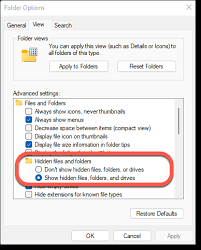
On Windows, you can use the built-in function “Conceal” to hide folders and rows. To do this:
- Open File Explorer.
- Select the folder or row you want to conceal.
- Right-click on the selected item and select “Properties.”
- In the Properties window, check the box next to “Concealed” under the “General” tab.
Method 2: Using Veracrypt on Windows
VeraCrypt is a free, open-source software that allows you to create encrypted volumes. To conceal folders and rows using VeraCrypt:
- Download and install VeraCrypt from their official website.
- Launch VeraCrypt and select “Create a volume…”
- Choose the file system for your volume (e.G., NTFS or exFAT).
- Select the folder or row you want to conceal and add it to the volume.
- Create a password for the volume and encrypt it.
Method 3: Using Terminal on Macos
On macOS, you can use the Terminal app to conceal folders and rows using built-in commands:
- Open Terminal and navigate to the directory containing the folder or row you want to conceal.
- Run the command
chflags hiddenfollowed by the path of the folder or row. - To reveal the folder or row, run the command
chflags nohiddenfollowed by the path.
Method 4: Using Veracrypt on Macos
Similar to Windows, you can use VeraCrypt on macOS to conceal folders and rows:
- Download and install VeraCrypt from their official website.
- Follow the same steps as in Method 2 to create an encrypted volume.
Concealing Folders And Rows on Android
On Android devices, you can use file manager apps like Solid Explorer to conceal folders and rows:
- Download and install Solid Explorer.
- Select the folder or row you want to conceal.
- Tap the three dots at the top-right corner and select “Conceal.”
- Choose a password to encrypt the folder or row.
Concealing Folders And Rows on Ios
On iOS devices, you can use third-party apps like Private Photo Vault to conceal photos and videos:
- Download and install Private Photo Vault.
- Select the photo or video you want to conceal.
- Tap the “Conceal” button to encrypt it.
Conclusion
In conclusion, concealing folders and rows is a simple yet effective way to protect your sensitive data from unwanted access. By using built-in functions on Windows, macOS, Android, and iOS devices, or third-party apps like VeraCrypt and Private Photo Vault, you can ensure that your personal files remain secure. Remember to always use strong passwords and encryption methods to safeguard your data.
Frequently Asked Questions (FAQs)
- What is The Difference Between Concealing And Encrypting Folders And Rows?
Concealing makes the folder or row invisible, while encrypting scrambles the contents so that only authorized users can access it.
- Can I Conceal Specific Files Within a Folder?
Yes, you can use various methods to conceal individual files within a folder.
- How do I Access Concealed Folders And Rows?
To access concealed folders and rows, you’ll need to enter the correct password or follow specific procedures for each method used.
- Can I Conceal Folders And Rows on External Hard Drives or Usb Drives?
Yes, most methods mentioned above can be applied to external storage devices as well.
- Are There Any Limitations or Potential Issues With Concealing Folders And Rows?
Some methods may have limitations or vulnerabilities, so it’s essential to research and choose the best approach for your specific needs.
- Can I Conceal Folders And Rows on Multiple Devices Simultaneously?
Yes, you can apply various methods across different platforms, but ensure compatibility and follow each device’s specific procedures.
- How do I Recover Concealed Files or Folders if I Forget my Password?
You may need to contact a professional data recovery service or reset your system settings depending on the method used.
- Can I Conceal Entire Partitions or Drives?
While concealing individual folders and rows is feasible, concealing entire partitions or drives might require more advanced techniques or third-party software.


