
How to Augment Speed Adsl: A Step-by-step Guide
Are you tired of slow internet speeds? Do you want to know how to augment speed ADSL? If so, this guide is for you.
Understanding Adsl Speeds
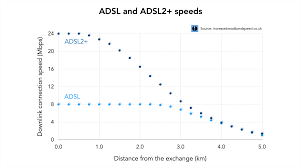
Before we dive into the nitty-gritty of augmenting ADSL speeds, let’s quickly understand what ADSL speeds are. ADSL (Asymmetric Digital Subscriber Line) is a type of internet connection that uses existing phone lines to deliver high-speed internet access. The speeds offered by ADSL vary depending on several factors, including the quality of your line, distance from the exchange, and the provider’s equipment.
What is The Normal Speed of an Adsl Connection?
The normal speed of an ADSL connection typically ranges from 1-8 Mbps download and 0.5-2 Mbps upload. However, some providers may offer faster speeds depending on their network infrastructure and pricing plans.
How to Check Your Current Adsl Speeds
To check your current ADSL speeds, you can use online speed tests like Ookla’s Speedtest or Andritch’s Speed Test. These tools will provide you with a detailed report of your download and upload speeds.
What Can Affect My Adsl Speeds?
Several factors can affect your ADSL speeds, including:
- Distance from the exchange
- Quality of your line
- Number of users connected to your router
- Interference from other devices or electrical sources
- Faulty equipment or hardware
How to Augment Speed Adsl: Step-by-step Guide
Now that we’ve covered the basics, let’s dive into the step-by-step guide on how to augment speed ADSL:
1. Check Your Current Adsl Speeds
As mentioned earlier, use online speed tests like Ookla’s Speedtest or Andritch’s Speed Test to check your current download and upload speeds.
2. Limit Download Activity
Limiting download activity can help improve your ADSL speeds. Try to avoid downloading large files during peak hours when multiple users are connected to your router.
3. Use a Wired Connection
Using a wired connection (Ethernet) instead of Wi-Fi can significantly improve your ADSL speeds. Make sure to use a high-quality Ethernet cable and connect it directly to your computer or device.
4. Update Your Router Firmware
Regularly update your router firmware to ensure you have the latest features and improvements for better performance.
5. Change Your Router Channel
Change your router channel to avoid interference from other devices or electrical sources. You can use tools like Wi-Fi Analyzer to scan for available channels and select the one with the least congestion.
6. Use a Dns Server
Using a public DNS server (like Google’s 8.8.8.8) Instead of your provider’s default DNS can improve your internet speeds.
7. Reset Your Router
Resetting your router to its factory settings can help resolve connectivity issues and improve ADSL speeds.
Conclusion
Augmenting speed ADSL requires a combination of technical knowledge, patience, and persistence. By following these steps and understanding the factors that affect your ADSL speeds, you can significantly improve your internet experience.
Faqs
- What is The Normal Speed of an Adsl Connection?
The normal speed of an ADSL connection typically ranges from 1-8 Mbps download and 0.5-2 Mbps upload.
- How do I Check my Current Adsl Speeds?
Use online speed tests like Ookla’s Speedtest or Andritch’s Speed Test to check your current download and upload speeds.
- What Can Affect my Adsl Speeds?
Several factors can affect your ADSL speeds, including distance from the exchange, quality of your line, number of users connected to your router, interference from other devices or electrical sources, and faulty equipment or hardware.
- How Can I Limit Download Activity?
Try to avoid downloading large files during peak hours when multiple users are connected to your router.
- What is a Wired Connection, And How Does it Improve Adsl Speeds?
A wired connection (Ethernet) uses a physical cable to connect your device directly to the router, significantly improving ADSL speeds compared to Wi-Fi.
- Why Should I Update my Router Firmware?
Regularly updating your router firmware ensures you have the latest features and improvements for better performance.
- How Can I Change my Router Channel to Improve Adsl Speeds?
Use tools like Wi-Fi Analyzer to scan for available channels and select the one with the least congestion.
- What is a Public Dns Server, And How Does it Improve Adsl Speeds?
Using a public DNS server (like Google’s 8.8.8.8) Instead of your provider’s default DNS can improve your internet speeds.


