
How to Augment Your Dropbox Storage Space
Are you tired of running out of space on your Dropbox account? Do you wish there was a way to increase the storage capacity without breaking the bank? You’re in luck! In this article, we’ll explore the various ways to augment your Dropbox storage space, both for free and paid options.
Understanding Your Current Dropbox Plan
Before we dive into the solutions, let’s take a look at what you currently have. If you’ve already upgraded to a paid plan or have a large amount of free storage space, you may not need to worry about running out of space soon. However, if your needs have changed and you require more storage space, then this article is for you.
Free Ways to Augment Your Dropbox Storage Space
If you’re on the free plan and are looking for ways to increase your storage capacity without spending a dime, here are some options:
Complete Activities to Earn Free Storage
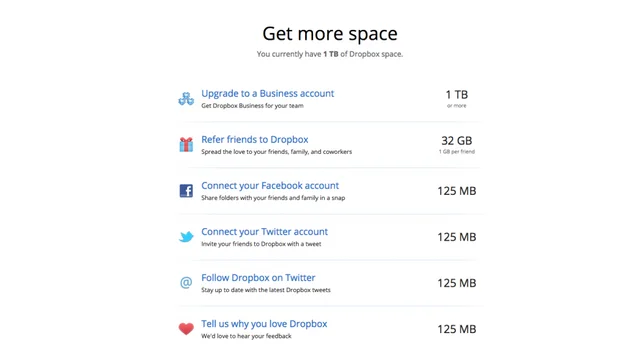
Dropbox offers various activities that can help you earn additional storage space. By completing these activities, you’ll gain 250 MB of extra storage space per activity. Here’s how it works:
- Log in to your Dropbox account and click on the “Start” button.
- You’ll be taken to a page with a list of available activities.
- Choose an activity that interests you and follow the instructions provided.
Some examples of activities include installing Dropbox on multiple devices, referring friends to join Dropbox, and taking the Dropbox tour.
Refer Friends to Join Dropbox
If you have friends who are interested in joining Dropbox, this is another great way to earn free storage space. For each friend who joins Dropbox using your referral link, you’ll get 500 MB of extra storage space up to a maximum of 16 GB.
To refer friends, follow these steps:
- Click on the initial letters of your name and surname in the top right corner.
- Select “Settings” from the menu.
- Choose “Invite a friend” and click on the “Copy referral link” button.
- Share the referral link with your friends.
Sharing folders is another way to earn extra storage space. When you share a folder, Dropbox will give you an additional 500 MB of free storage space for each person who joins that folder using your shared link.
To share a folder:
- Log in to your Dropbox account and navigate to the folder you want to share.
- Click on the three dots next to the folder name.
- Select “Share” from the menu.
- Enter the email addresses of the people you want to share the folder with.
Paid Options For Augmenting Your Dropbox Storage Space
If the free storage options are not enough, and you need more space, here are some paid subscription plans that can help:
Dropbox Plus
The Dropbox Plus plan offers 2 TB of storage space, and it’s ideal for individuals who require a large amount of storage capacity. You’ll also get access to additional features like Dropbox Sign, which allows you to create electronic signatures, and Dropbox Passwords, which helps you manage your passwords securely.
Price: $11.99/Month (billed annually) or $9.99/Month (billed annually)
Dropbox Family
The Dropbox Family plan is perfect for families who need a large amount of storage space and want to share it with multiple users. You’ll get 2 TB of total storage space, which can be divided among family members.
Price: $19.99/Month (billed annually) or $16.99/Month (billed annually)
Dropbox Professional
The Dropbox Professional plan offers advanced features like add-ons for shared files and the ability to add a watermark to shared files. You’ll get 3 TB of storage space, which is perfect for teams who require a large amount of storage capacity.
Price: $19.99/Month (billed annually) or $16.58/Month (billed annually)
Dropbox Business
For businesses that need even more storage space and advanced features, Dropbox offers various business plans. The Standard plan starts at 5 TB of storage space per user, while the Advanced plan offers unlimited storage capacity.
Price: Varies depending on the plan and number of users
Conclusion
In conclusion, there are several ways to augment your Dropbox storage space both for free and paid options. Whether you’re looking to earn extra storage through activities or referring friends, or if you need more space with a paid subscription plan, this article has provided you with the information you need to make an informed decision.
Frequently Asked Questions (FAQs)
- How Can I Refer Friends to Join Dropbox?
You can refer friends by clicking on your name and surname in the top right corner, selecting “Settings,” and choosing “Invite a friend.” You’ll then be able to share a referral link with your friends.
- What is The Maximum Amount of Storage Space I Can Earn For Free?
The maximum amount of free storage space you can earn is 16 GB, which is awarded for each friend who joins Dropbox using your referral link.
- Can I Cancel my Paid Subscription Plan at Any Time?
Yes, you can cancel your paid subscription plan at any time by going to the “Settings” page and selecting “Cancel slowly.”
- How do I Upgrade or Downgrade my Dropbox Plan?
To upgrade or downgrade your Dropbox plan, click on your name and surname in the top right corner, select “Settings,” and choose “Carry out an upgrade.” Follow the instructions provided to complete the payment.
- What is The Difference Between a Paid Subscription Plan And a Free Account?
A paid subscription plan offers more storage space and additional features like Dropbox Sign and Dropbox Passwords. A free account has limited storage capacity and does not include these features.


