
Augmenting Lasted Battery Iphone: A Comprehensive Guide
Are you tired of your iPhone’s battery draining too quickly? Do you want to squeeze out every last bit of juice from your device? Look no further! In this article, we will explore the various ways to augment your iPhone’s battery life.
Understanding The Issue
Before we dive into the solutions, it’s essential to understand why your iPhone’s battery might be draining too quickly. There are several reasons for this:
- Overuse: Heavy usage can put a strain on your device’s battery.
- Old Age: As your iPhone gets older, its battery life may deteriorate.
- Hardware Issues: Problems with the battery itself or other hardware components can affect battery performance.
Solutions to Augment Lasted Battery Iphone
Here are some effective ways to extend your iPhone’s battery life:
1. Reduce Monitor Luminosity And Disable Auto-brightness
One of the simplest ways to save battery is by reducing the monitor luminosity and disabling auto-brightness. To do this:
- Go to Settings > Display & Brightness
- Drag the slider down to reduce the brightness
- Turn off Auto-Brightness
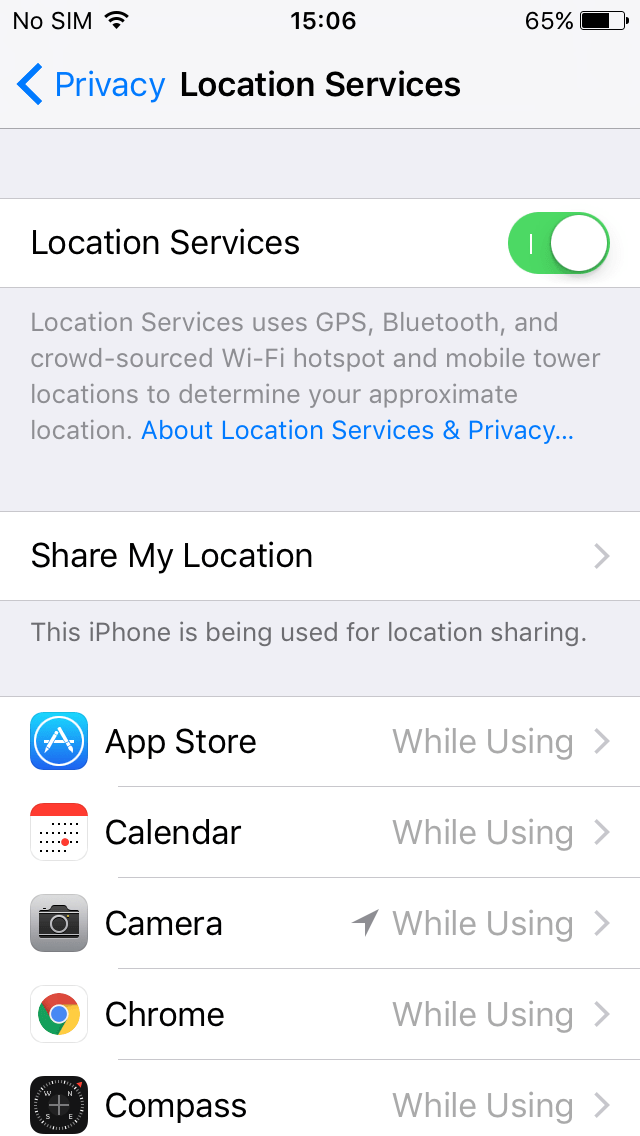
2. Disable Wi-fi, Bluetooth, And Location Services
Disabling these features when not in use can significantly extend your battery life.
- Go to Settings > Wi-Fi and toggle it off
- Go to Settings > Bluetooth and toggle it off
- Go to Settings > Location Services and toggle off the switch for each app
3. Disable Background App Updates
Background app updates can consume a lot of battery, so disable them when not necessary.
- Go to Settings > General > Background App Refresh
- Toggle off the switch for each app
4. Use Low Power Mode
Low power mode can help extend your battery life by reducing CPU performance and background data usage.
- Go to Settings > Battery
- Toggle on Low Power Mode
5. Save Energy With Ios’s Built-in Features
IOS has several built-in features that can help save energy:
- Go to Settings > Battery
- Toggle on Low Power Mode
- Enable Reduce Motion and Dark Mode
Other Suggestions to Augment Lasted Battery Iphone
Here are some additional suggestions to extend your iPhone’s battery life:
- Use Airplane Mode: When not in use, put your iPhone in airplane mode to prevent data consumption.
- Use a Black Background on Oled Displays: If you have an OLED display, using a black background can help save energy.
- Disable Push Notifications For Email Accounts: Disabling push notifications for email accounts can help reduce battery drain.
- Charge Your Iphone Optimally: Keep your iPhone charged between 30-80% to prolong its lifespan.
Things That Do Not Function to Augment Lasted Battery Iphone
Some methods may not work or even harm your device’s performance. Here are some things to avoid:
- Closing Open Apps Manually: Closing apps manually can actually drain more battery, so it’s best to let iOS handle app closure.
- Overcharging Your Iphone: Avoid overcharging your iPhone as this can reduce its lifespan.
Checking The State of Deterioration of Your Battery
If you’ve tried these methods and still experience battery issues, there might be a hardware problem. To check:
- Go to Settings > Battery
- Tap on Battery Health
If your maximum capacity is below 80%, it’s recommended to replace your battery.
Conclusion
Augmenting your iPhone’s battery life requires some effort, but with these simple tips and tricks, you can squeeze out every last bit of juice from your device. Remember to avoid methods that may not work or even harm your device’s performance.
Frequently Asked Questions (FAQs)
- What Are The Most Effective Ways to Extend my Iphone’s Battery Life?
- Reducing monitor luminosity, disabling auto-brightness, and turning off features like Wi-Fi, Bluetooth, and location services can significantly extend your battery life.
- How Often Should I Charge my Iphone?
- Charge your iPhone between 30-80% to prolong its lifespan.
- Can Using a Black Background on Oled Displays Help Save Energy?
- Yes, using a black background on OLED displays can help save energy.
- What Are The Things That do Not Function to Augment Lasted Battery Iphone?
- Closing open apps manually and overcharging your iPhone can actually drain more battery or reduce its lifespan.
- How Can I Check if my Battery is Deteriorating?
- Go to Settings > Battery and tap on Battery Health to see the maximum capacity of your battery.
By following these tips, you’ll be able to make the most out of your iPhone’s battery life!


