
The Ultimate Guide to Extending Music Playback Time on Instagram
Are you tired of your favorite songs ending too soon while creating stories or Reels on Instagram? Do you wish there was a way to extend the playback time of music in your posts? You’re not alone! Many users have been searching for ways to do this, and we’ve got the answers. In this article, we’ll show you how to extend the seconds of music on Instagram in both Stories and Reels.
Understanding Instagram’s Music Features
Before we dive into the step-by-step guide, it’s essential to understand that Instagram’s music features are limited to specific sections of the app. The “Music” feature is only available in the mobile app for Android (also downloadable from alternative stores) and iOS. This feature can be used to add background music to stories or Reels, but its limitations need to be acknowledged.
Extending Music Playback Time on Instagram Stories
Let’s start with extending music playback time on Instagram Stories. To do this, you’ll need to create a story with the maximum duration of 15 seconds and add a song as background music. Here’s how:
- Open The Instagram App: First, open the Instagram app that you’ve previously downloaded on your device.
- Access Your Account: If you haven’t accessed your account recently, do so now by following the usual login process.
- Create a Story: To create a story, swipe left to right in the leading screen and record a video or take a photo from your device’s memory.
- Add Music: After recording or taking the content, tap on the icon of the squared face situated in the top-right corner, then select “Music” from the menu that appears. The duration of the music will automatically be set to 15 seconds.
Extending Music Playback Time on Instagram Reels
Now, let’s move on to extending music playback time on Instagram Reels. This process is slightly different and allows for a maximum duration of 90 seconds.
- Open The Instagram App: Open the Instagram app on your smartphone.
- Access Your Account: If necessary, access your account by following the usual login process.
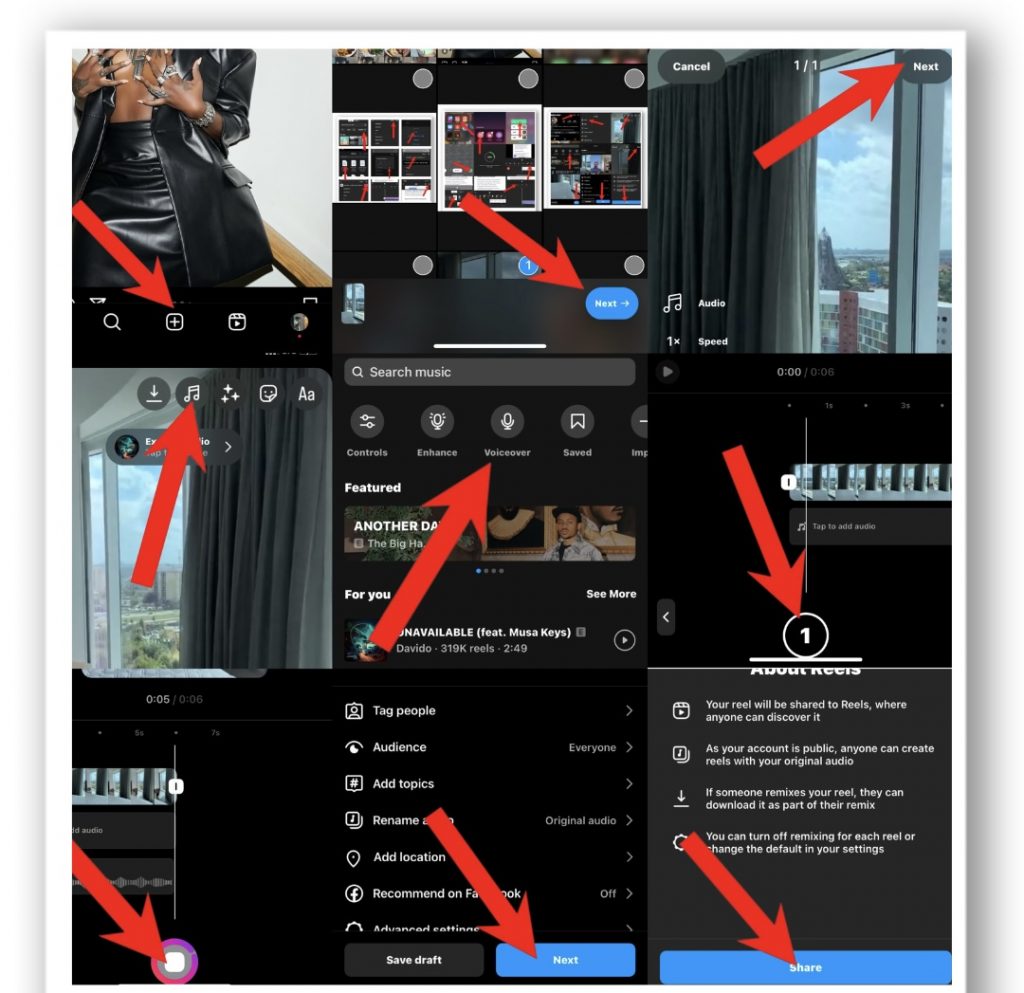
- Create a Reel: Tap on the icon (+) in the initial screen and then select “Reel.”
- Extend Duration: To extend the duration of the Reel and its accompanying music, tap repeatedly on the 15-second symbol until you reach a maximum of 90 seconds.
- Add Music: After extending the duration, add your preferred song by tapping on the musical note icon and selecting the piece you want to use.
Tips For Creating Engaging Content
When creating engaging content on Instagram, keep these tips in mind:
- Use high-quality visuals that capture attention.
- Keep your message concise and clear.
- Experiment with different formats like stories, Reels, or IGTV.
- Utilize relevant hashtags to reach a wider audience.
Conclusion
Extending music playback time on Instagram can be achieved through simple steps. Whether you’re creating stories or Reels, the process is straightforward once you understand the limitations of the “Music” feature. By following these guides, you’ll be able to create more engaging content that resonates with your audience.
Frequently Asked Questions
Q: Can I extend music playback time on Instagram beyond 90 seconds?
A: No, according to Instagram’s current features, music playback can only be extended up to a maximum of 90 seconds in Reels and 15 seconds in stories.
Q: How do I add music to my Instagram posts?
A: To add music to your Instagram posts, tap on the icon of the musical note situated in the top-right corner while creating or editing your content.


