
The Art of Communication: Mastering Emoticons And Emojis in Email
As we navigate the world of digital communication, it’s essential to master the art of expressing ourselves effectively through email. With the rise of emoticons and emojis, we can now convey emotions and tone more accurately than ever before. In this article, we’ll delve into the world of emoticons and emojis, exploring how to insert them in various email platforms.
What Are Emoticons?
Emoticons are typographical representations of facial expressions, typically created using punctuation marks and letters. They can convey a range of emotions, from happiness to sadness, anger to surprise. Emoticons have been around since the early days of online communication, allowing users to express themselves in a more personal and engaging way.
Types of Emoticons
There are numerous types of emoticons available, each with its own unique expression. Some common ones include:
- ???? (Smiling face)
- ???? (Smiling eyes)
- ???? (Frowning face)
- :-/ (Confused face)
- XD (giggling face)
These emoticons can be used to add a touch of personality and humor to our emails, making them more enjoyable and relatable.
How to Insert Emoticons in Email
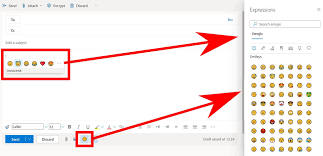
Inserting emoticons in email is relatively straightforward. Here’s how to do it:
- PC: Open your email client, such as Microsoft Outlook or Gmail.
- Mac: Access the emoji menu by pressing ⌘ + spacebar or clicking on the smiley face icon.
- Android: Tap on the keyboard settings and select “Emoji” from the list of options.
- Iphone/ipad: Tap on the keyboard settings and select “Emoji” from the list of options.
Once you’ve accessed the emoji menu, simply choose your desired emoticon and insert it into the email body.
What Are Emojis?
Emojis are small digital images or icons used to express emotions, objects, or actions. They can be found in various platforms, including messaging apps, social media, and email clients.
Types of Emojis
There are numerous types of emojis available, each with its own unique expression. Some common ones include:
- ???? (Smiling face)
- ???? (Thumbs up)
- ???? (Thinking face)
- ❤️ (Heart)
Emojis can be used to add visual interest and personality to our emails, making them more engaging and memorable.
How to Insert Emojis in Email
Inserting emojis in email is similar to inserting emoticons:
- PC: Access the emoji menu by pressing Windows key + . Or clicking on the smiley face icon.
- Mac: Press ⌘ + spacebar or click on the smiley face icon.
- Android: Tap on the keyboard settings and select “Emoji” from the list of options.
- Iphone/ipad: Tap on the keyboard settings and select “Emoji” from the list of options.
Once you’ve accessed the emoji menu, simply choose your desired emoji and insert it into the email body.
Conclusion
Mastering emoticons and emojis in email is an essential skill for effective communication. By understanding how to insert these visual elements, we can add personality and humor to our emails, making them more enjoyable and relatable. Whether you’re using a PC, Mac, Android, or iPhone/iPad, the process of inserting emoticons and emojis is relatively straightforward.
Frequently Asked Questions
- What’s The Difference Between Emoticons And Emojis?
Emoticons are typographical representations of facial expressions, while emojis are small digital images or icons. - Can I Use Both Emoticons And Emojis in my Email?
Yes! You can mix and match both types to add visual interest and personality to your emails. - How do I Insert Emoticons And Emojis in my Email on Pc?
Access the emoji menu by pressing Windows key + . Or clicking on the smiley face icon. - Can I Use Emoticons And Emojis in Other Platforms, Such as Social Media or Messaging Apps?
Yes! Emoticons and emojis can be used across various digital platforms to add visual interest and personality. - What’s The Purpose of Using Emoticons And Emojis in Email?
The primary purpose is to convey emotions and tone more accurately than text alone, making communication more engaging and relatable.
By mastering the art of inserting emoticons and emojis in email, you’ll be well on your way to becoming a digital communication expert!


