
How to Insert Images in Your Thesis: A Step-by-step Guide
As you near the completion of your thesis, you may be wondering how to insert images in a way that will make your work shine. In this article, we’ll provide a step-by-step guide on how to insert images in Microsoft Word and PowerPoint, as well as tips on copyright and plagiarism.
Why Insert Images in Your Thesis?
Images can serve several purposes in your thesis:
- Illustration: They can help illustrate complex concepts or ideas.
- Visual Interest: They can break up the monotony of text and make your thesis more engaging to read.
- Emotional Connection: They can create an emotional connection with the reader.
How to Insert Images in Microsoft Word
- Select The Insertion Point: Choose the location where you want to insert the image.
- Go to Insert > Images: Select the image you want to insert from your computer or online library.
- Modify The Image: Use the tools provided to resize, rotate, or crop the image as needed.
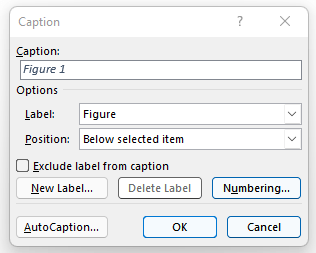
- Add a Caption: Go to References > Caption and add a brief description of the image.
How to Insert Images in Powerpoint
- Select The Slide: Choose the slide where you want to insert the image.
- Go to Insert > Images: Select the image you want to insert from your computer or online library.
- Modify The Image: Use the tools provided to resize, rotate, or crop the image as needed.
- Add a Caption: Go to References > Caption and add a brief description of the image.
Copyright And Plagiarism
When using images in your thesis, it’s essential to consider copyright and plagiarism:
- Credit The Source: Always give credit to the original creator or owner of the image.
- Use Public Domain Images: Use images that are public domain or licensed under Creative Commons.
- Check For Plagiarism: Run a plagiarism check on your thesis to ensure you haven’t inadvertently copied someone else’s work.
Tips And Tricks
- Use High-quality Images: Choose high-resolution images that will not pixelate when enlarged.
- Keep it Relevant: Ensure the image is relevant to the text and doesn’t distract from the main message.
- Consistency is Key: Use a consistent style throughout your thesis, including font, size, and color.
Conclusion
Inserting images in your thesis can be a great way to enhance its visual appeal and make it more engaging to read. By following these steps and tips, you can ensure that your images are inserted correctly and don’t compromise the integrity of your work.
Frequently Asked Questions (FAQs)
- Q: How do I Insert an Image in Microsoft Word?
A: Select the insertion point, go to Insert > Images, and choose the image you want to insert. - Q: What is Copyright, And Why is it Important?
A: Copyright refers to the exclusive rights of the creator or owner of an image. It’s essential to credit the source and use public domain images to avoid plagiarism. - Q: How Can I Ensure my Thesis Doesn’t Plagiarize Someone Else’s Work?
A: Run a plagiarism check on your thesis using online tools or consult with a professional. - Q: Can I Use Any Image I Find Online in my Thesis?
A: No, always check the copyright and licensing terms of an image before using it. - Q: How Can I Make Sure my Images Are Inserted Correctly in Powerpoint?
A: Follow the same steps as for Microsoft Word, and ensure the image is relevant to the text and doesn’t distract from the main message. - Q: Can I Insert Multiple Images on The Same Slide?
A: Yes, but be mindful of the visual balance and ensure each image adds value to the content. - Q: How Can I Check For Plagiarism in my Thesis?
A: Use online tools or consult with a professional to ensure your work is original and doesn’t plagiarize someone else’s ideas.
Bonus Tips
- Always credit the source of an image, even if it’s public domain.
- Use images that are consistent with your thesis’s tone and style.
- Ensure images don’t distract from the main message or compromise the integrity of your work.
I hope this article has provided you with a comprehensive guide on how to insert images in your thesis. Remember to always follow copyright laws, ensure consistency throughout your thesis, and use high-quality images that will make your work shine!


