
Installing Avast Antivirus Free: A Comprehensive Guide
Are you looking for a reliable antivirus software to protect your computer from malware and other online threats? Look no further than Avast! In this article, we will guide you through the process of installing Avast antivirus free on Windows, Mac, Android, and iPhone/iPad devices.
Why Choose Avast Antivirus Free?
Avast is one of the most popular and effective antivirus software available in the market. Its free version offers a robust set of features that can protect your computer from various types of malware, including viruses, Trojans, spyware, and adware. The software is also highly customizable, allowing you to choose which components to install and how to configure them.
Installing Avast Antivirus Free on Windows
To install Avast antivirus free on Windows, follow these steps:
- Visit The Official Website: Go to the Avast website (www.Avast.Com) and click on the “Download” button.
- Choose The Correct Version: Select the Windows version (32-bit or 64-bit) that matches your operating system.
- Run The Installer: Run the downloaded file (AvastFreeSetup.Exe) to initiate the installation process.
- Follow The Prompts: Follow the on-screen instructions to complete the installation process. You may be asked to restart your computer.
Installing Avast Antivirus Free on Mac
To install Avast antivirus free on Mac, follow these steps:
- Visit The Official Website: Go to the Avast website (www.Avast.Com) and click on the “Download” button.
- Choose The Correct Version: Select the Mac version (Intel or PPC) that matches your operating system.
- Run The Installer: Run the downloaded file (AvastSetup.Dmg) to initiate the installation process.
- Follow The Prompts: Follow the on-screen instructions to complete the installation process.
Installing Avast Antivirus Free on Android
To install Avast antivirus free on Android, follow these steps:
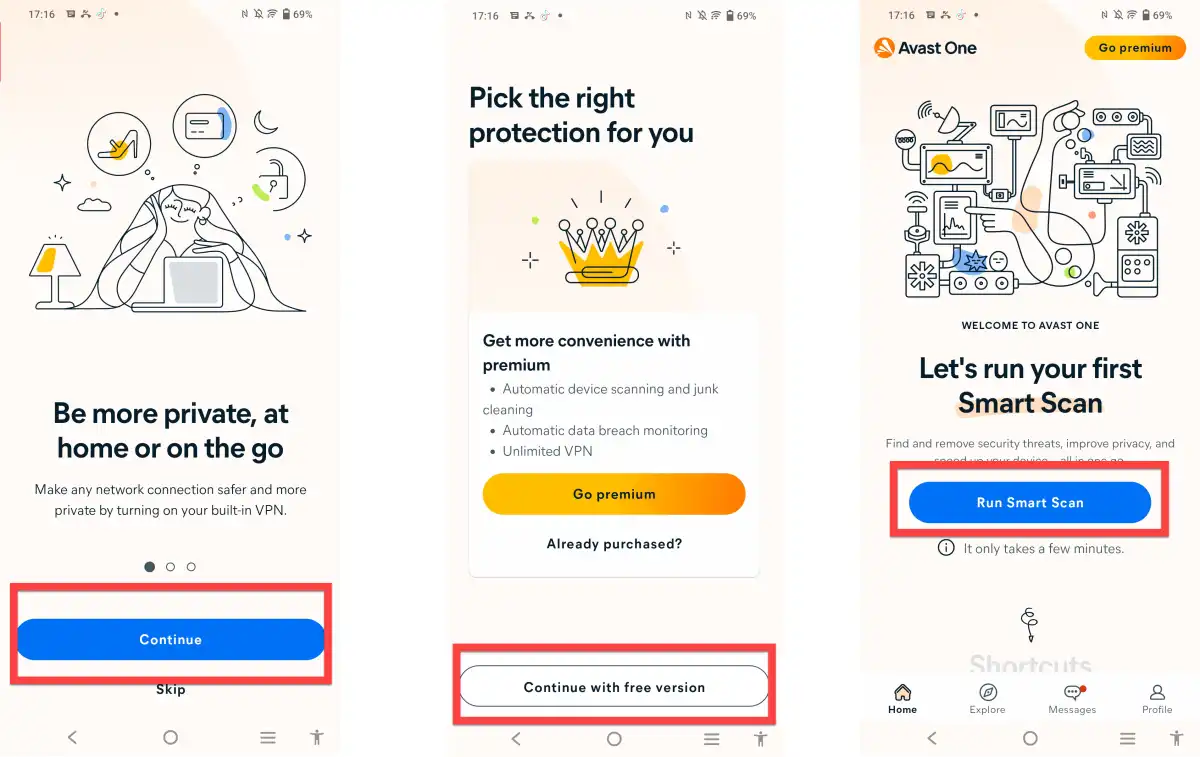
- Visit The Google Play Store: Go to the Google Play Store and search for “Avast Mobile Security & Antivirus”.
- Download And Install: Download and install the app by clicking on the “Install” button.
- Launch The App: Launch the app and accept the terms of service.
- Configure The Settings: Configure the settings to your liking, such as allowing notifications or choosing which features to enable.
Installing Avast Antivirus Free on Iphone/ipad
To install Avast antivirus free on iPhone/iPad, follow these steps:
- Visit The App Store: Go to the App Store and search for “Avast Mobile Security & Antivirus”.
- Download And Install: Download and install the app by clicking on the “Get” button.
- Launch The App: Launch the app and accept the terms of service.
- Configure The Settings: Configure the settings to your liking, such as allowing notifications or choosing which features to enable.
Troubleshooting Common Issues
If you encounter any issues during the installation process, refer to our troubleshooting guide below:
- Problem: Installation Hangs or Freezes
- Solution: Restart your computer and try installing again.
- Problem: Avast Antivirus is Not Scanning my Files
- Solution: Check that Avast is enabled in your system settings and that the software has been updated to the latest version.
Conclusion
Installing Avast antivirus free on Windows, Mac, Android, or iPhone/iPad devices is a straightforward process. By following these step-by-step guides, you can ensure that your computer or mobile device is protected from various types of malware and online threats.
Frequently Asked Questions (FAQs)
Here are some frequently asked questions about Avast antivirus free:
- Q: What Are The System Requirements For Installing Avast Antivirus?
A: The system requirements for installing Avast antivirus vary depending on the device. For Windows, it requires a 32-bit or 64-bit operating system with at least 1 GB RAM and 2 GB disk space. - Q: How Often Should I Update my Avast Antivirus Software?
A: It is recommended to update your Avast antivirus software regularly to ensure that you have the latest protection against malware and other online threats. - Q: Can I Use Avast Antivirus Free on Multiple Devices?
A: Yes, you can install Avast antivirus free on multiple devices, but each device will require a separate license.
Conclusion
In conclusion, installing Avast antivirus free is a simple process that provides robust protection against malware and online threats. By following the step-by-step guides provided above, you can ensure that your computer or mobile device is protected from various types of malware and online threats.
InstallingAvastAntivirus Free OnWindows** #H1
Step 1: Visit The Official Website
To install Avast antivirus free on Windows, follow these steps:
- Go to the Avast website (www.Avast.Com) and click on the “Download” button.
- Choose the correct version of Avast that matches your operating system (32-bit or 64-bit).
- Run the downloaded file (AvastFreeSetup.Exe) to initiate the installation process.
Step 2: Follow The Prompts
Follow the on-screen instructions to complete the installation process. You may be asked to restart your computer.
Step 3: Configure The Settings
Configure the settings to your liking, such as allowing notifications or choosing which features to enable.
InstallingAvastAntivirus Free OnMac** #H1
To install Avast antivirus free on Mac, follow these steps:
- Go to the Avast website (www.Avast.Com) and click on the “Download” button.
- Choose the correct version of Avast that matches your operating system (Intel or PPC).
- Run the downloaded file (AvastSetup.Dmg) to initiate the installation process.
Step 2: Follow The Prompts
Follow the on-screen instructions to complete the installation process.
Step 3: Configure The Settings
Configure the settings to your liking, such as allowing notifications or choosing which features to enable.
InstallingAvastAntivirus Free OnAndroid** #H1
To install Avast antivirus free on Android, follow these steps:
- Go to the Google Play Store and search for “Avast Mobile Security & Antivirus”.
- Download and install the app by clicking on the “Install” button.
- Launch the app and accept the terms of service.
Step 2: Configure The Settings
Configure the settings to your liking, such as allowing notifications or choosing which features to enable.
InstallingAvastAntivirus Free OniPhone/iPad** #H1
To install Avast antivirus free on iPhone/iPad, follow these steps:
- Go to the App Store and search for “Avast Mobile Security & Antivirus”.
- Download and install the app by clicking on the “Get” button.
- Launch the app and accept the terms of service.
Step 2: Configure The Settings
Configure the settings to your liking, such as allowing notifications or choosing which features to enable.
Troubleshooting Common Issues
If you encounter any issues during the installation process, refer to our troubleshooting guide below:
- Problem: Installation Hangs or Freezes
- Solution: Restart your computer and try installing again.
- Problem: Avast Antivirus is Not Scanning my Files
- Solution: Check that Avast is enabled in your system settings and that the software has been updated to the latest version.
Conclusion
Installing Avast antivirus free on Windows, Mac, Android, or iPhone/iPad devices is a straightforward process. By following these step-by-step guides, you can ensure that your computer or mobile device is protected from various types of malware and online threats.
Frequently Asked Questions (FAQs)
Here are some frequently asked questions about Avast antivirus free:
- Q: What Are The System Requirements For Installing Avast Antivirus?
A: The system requirements for installing Avast antivirus vary depending on the device. For Windows, it requires a 32-bit or 64-bit operating system with at least 1 GB RAM and 2 GB disk space. - Q: How Often Should I Update my Avast Antivirus Software?
A: It is recommended to update your Avast antivirus software regularly to ensure that you have the latest protection against malware and other online threats. - Q: Can I Use Avast Antivirus Free on Multiple Devices?
A: Yes, you can install Avast antivirus free on multiple devices, but each device will require a separate license.
Conclusion
In conclusion, installing Avast antivirus free is a simple process that provides robust protection against malware and online threats. By following the step-by-step guides provided above, you can ensure that your computer or mobile device is protected from various types of malware and online threats.


