
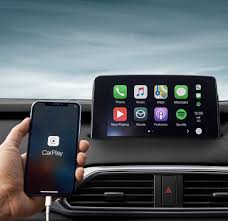
How to Install And Use Carplay
Are you one of the lucky ones who has just discovered that your car is compatible with Apple’s revolutionary system, CarPlay? Or perhaps you’ve recently acquired a new iPhone and want to utilize it via your car’s display? Do you wish to forward SMS and enjoy music while driving with ease? Look no further! With this guide, we’ll walk you through how to install and use CarPlay on your car.
What is Carplay?
CarPlay is the software developed by Apple that enables drivers to access their iPhone’s features safely and easily while driving. It provides a copilot experience, allowing users to make phone calls, send messages, choose music, and get directions without ever taking their hands off the steering wheel.
Compatibility With Cars And Iphones
With over 600 compatible car models and almost all iPhones being compatible with CarPlay, it’s easy to see why this system has become a game-changer in the automotive industry. To configure your iPhone for CarPlay, you’ll need an iPhone 5 or later, running on iOS 7.1 Or later.
Installing And Configuring Carplay
Fortunately, installing CarPlay is a breeze! The software is already present on your car’s system, so all you need to do is connect your iPhone to the car via cable (Lightning or USB-C) or wirelessly (Bluetooth and Wi-Fi). Access the Settings app on your iPhone, go to Siri, and activate the voice assistant. If it’s not activated, simply toggle the switch.
Next, connect your iPhone to the car using a cable or through wireless connectivity. Make sure both devices are connected via Bluetooth and Wi-Fi. On your iPhone, tap on the CarPlay icon in the top right corner of the screen, then select “CarPlay” from the menu. Choose your vehicle from the list of available cars, and follow the guided configuration process.
Using Carplay
Once configured, using CarPlay is a breeze! Simply say “Hey Siri” to initiate voice commands. You can ask Siri for directions, make phone calls, send messages, or choose music. With CarPlay, you can even interact with compatible apps on your iPhone without ever taking your eyes off the road.
Installing Carplay on Incompatible Cars
Don’t worry if your car isn’t compatible with CarPlay out of the box! You can still install a compatible audio system that integrates with Apple’s software. Many popular brands, such as Alpine, Blaupunkt, Clarion, JVC, Kenwood, Pioneer, and Sony, offer systems that work seamlessly with CarPlay.
Installing Carplay on Ipads
Sorry to say, but iPads are not compatible with CarPlay. However, you can still connect your iPad to the car’s audio system via cable or Bluetooth, which will allow you to enjoy music and podcasts while driving.
Faqs:
-
What Cars Are Compatible With Carplay?
There are over 600 compatible car models, including Abarth, Acura, Alfa Romeo, Aston Martin, Audi, Baojun, Bentley, BMW, Borgward, Buick, Cadillac, Chery, Chevrolet, Chrysler, Citroen, Cowin Car, Datsun, Dodge, DS Automobiles, Ferrari, Fiat, Ford, Genesis, GMC, Haima, Haval, Honda, Hyundai, Infinite, Jaguar, Jeep, Kia, Lada, Lamborghini, Land Rover, Lexus, LDV, Lifan, Lincoln, Mahindra, Maserati, Maxus, Mazda, Mercedes-Benz, MG, Mini, Mitsubishi, Nissan, Opel, Peugeot, Polestar, Porsche, Qoros, RAM, Renault, Roewe, Rolls-Royce, Seat, Skoda, Subaru, Suzuki, Tata, Toyota, Vauxhall, Volkswagen, and Volvo. -
How do I Install Carplay on my Car?
To install CarPlay, you’ll need to connect your iPhone to the car using a cable or through wireless connectivity. Access the Settings app on your iPhone, go to Siri, and activate the voice assistant. -
What Features Can I Access With Carplay?
With CarPlay, you can make phone calls, send messages, choose music, get directions, and more – all without taking your hands off the steering wheel. -
Can I Use Carplay on an Ipad?
Unfortunately, iPads are not compatible with CarPlay. However, you can still connect your iPad to the car’s audio system via cable or Bluetooth. -
What if my Car Isn’t Compatible With Carplay?
Don’t worry! You can install a compatible audio system that integrates with Apple’s software. -
How do I Configure Carplay on my Iphone?
To configure CarPlay, connect your iPhone to the car using a cable or through wireless connectivity. Access the Settings app on your iPhone, go to Siri, and activate the voice assistant. Follow the guided configuration process. -
Can I Use Compatible Apps With Carplay?
Yes! With CarPlay, you can interact with compatible apps on your iPhone without ever taking your eyes off the road. -
What if I Have an Incompatible Car Audio System?
Don’t worry! You can still install a compatible audio system that integrates with Apple’s software.
Conclusion:
CarPlay has revolutionized the way we drive and use our iPhones while driving. With its user-friendly interface, seamless integration with compatible cars and apps, and enhanced safety features, CarPlay is an essential tool for any iPhone user. Whether you’re looking to forward SMS, enjoy music, or get directions safely, CarPlay has got you covered!


