
Exploring The World of Bedwars: A Guide to Playing on Minecraft And Fortnite
Are you ready to dive into the exciting world of BedWars? This popular game mode has taken the gaming community by storm, and we’re here to guide you through the process of playing it on both Minecraft and Fortnite.
What is Bedwars?
BedWars is a multiplayer game mode that originated in the Minecraft community. The objective is simple: Destroy the bed of your opponents’ teams, preventing them from respawning, and emerge victorious as the last team standing. This mode has gained immense popularity among players, and its unique gameplay mechanics have made it a staple in many online gaming communities.
Finding The Right Server
The first step to playing BedWars is finding a server that meets your requirements. Unlike traditional game modes, BedWars servers are created by community members, which means they can vary greatly in terms of rules, player count, and overall experience.
To find a suitable server, you’ll need to search for one that supports the BedWars mode. Websites like Minecraft Italia and Minecraft Server List are great resources for finding public servers that cater to your needs. Be sure to check the server’s specifications, such as platform (Java or Bedrock), player count, and game mode options.
Playing on Minecraft
To play BedWars on Minecraft, follow these steps:
- Launch Minecraft: Open the game on your PC or mobile device.
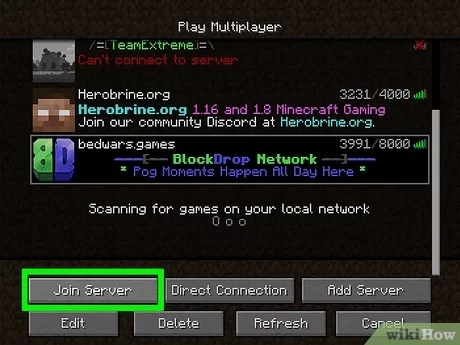
- Access The Multiplayer Menu: Click on the “Play” button and select “Multiplayer” from the drop-down menu.
- Add a Server: Click on the “+” icon to add a new server, then enter the server’s address (e.G., Mc.Hypixel.Net) and name (e.G., BedWars).
- Join The Server: Once you’ve added the server, click on it to join the game.
Playing on Fortnite
To play BedWars on Fortnite, follow these steps:
- Launch Fortnite: Open the game on your PC or mobile device.
- Access The Play Menu: Click on the “Play” button and select a solo or squad mode.
- Join a Server: Select a server that supports BedWars (e.G., 4164-3090-6037) From the list, then click on it to join the game.
Tips And Tricks
- Always research a server before joining to ensure it’s safe and meets your expectations.
- Familiarize yourself with the server’s rules and gameplay mechanics.
- Practice makes perfect! Joining a few games will help you get accustomed to the BedWars mode.
Conclusion
BedWars is an exciting game mode that offers a unique blend of strategy and action. By following this guide, you’ll be able to find suitable servers for both Minecraft and Fortnite and start playing in no time. Remember to always respect the server’s rules and community guidelines to ensure a positive gaming experience.
Frequently Asked Questions
Q: What is BedWars?
A: BedWars is a multiplayer game mode where players must destroy their opponents’ beds, preventing them from respawning.
Q: How do I find a suitable server for BedWars?
A: Search online resources like Minecraft Italia and Minecraft Server List to find public servers that support the BedWars mode.
Q: Can I play BedWars on both Minecraft and Fortnite?
A: Yes! Both games have BedWars modes available, but you’ll need to follow different steps to access them.
Q: What are some tips for playing BedWars?
A: Practice makes perfect! Joining a few games will help you get accustomed to the mode. Research servers before joining and respect their rules and community guidelines.
Q: Are there any specific server requirements for BedWars on Minecraft?
A: Yes, make sure to select the Java or Bedrock edition that supports the BedWars mode.
Q: How do I join a BedWars server on Fortnite?
A: Select a server from the list that supports BedWars (e.G., 4164-3090-6037) And click on it to join the game.


