
Welcome to The Social Club: A Guide to Enrolling And Exploring Its Features
Are you a passionate fan of Grand Theft Auto (GTA) and other Rockstar Games? Do you want to share your experiences, successes, and discoveries with like-minded individuals? Look no further than the Social Club, a platform dedicated to connecting players and fostering a sense of community. In this article, we’ll guide you through the process of enrolling in the Social Club and exploring its features.
What is The Social Club?
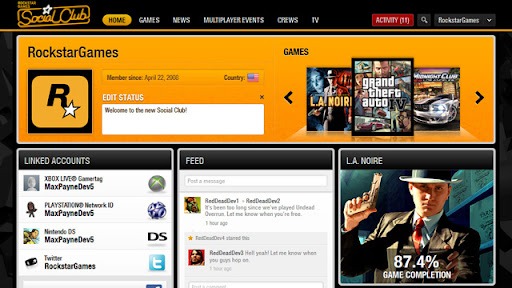
The Social Club is a social network created by Rockstar Games for fans of their games, including GTA, Red Dead Redemption, and Bully. It’s a place where players can share updates, photos, and videos with fellow gamers, follow community news, and participate in discussions. By joining the Social Club, you’ll become part of a vibrant community that shares your passion for gaming.
How to Enroll in The Social Club
Enrolling in the Social Club is a straightforward process:
- Create an Account: Go to the official Social Club website and click on the “Recorded” button. Follow the instructions to create a new account.
- Fill Out Your Profile: Complete your profile with basic information, such as your name, email address, and password.
- Connect Your Psn or Xbox Live Account: If you have an existing PlayStation Network (PSN) or Xbox Live account, you can link it to the Social Club.
What Are The Benefits of Joining The Social Club?
By joining the Social Club, you’ll gain access to a range of features that enhance your gaming experience:
- Share Updates And Content: Share your in-game achievements, photos, and videos with fellow players.
- Follow Community News: Stay up-to-date with the latest news and updates from Rockstar Games and the gaming community.
- Join Crews: Participate in online multiplayer games with other players who share your interests.
Exploring The Social Club Features
Once you’ve enrolled in the Social Club, you can explore its features:
- Feed: A section where you’ll see updates from Rockstar Games, the gaming community, and your friends.
- Crews: Join online multiplayer groups with other players who share your interests.
- Activity Feed: Discover what’s happening in the online world of GTA and other games.
- Photos And Videos: View content created by other players and share your own.
Inviting Friends to The Social Club
Want to invite friends to join you in the Social Club? You can do so through the Settings menu:
- Link Your Facebook, Google, Psn, or Xbox Live Account: Connect your social media accounts to find friends who are already part of the Social Club.
- Manually Invite Friends: Send a personalized invitation to friends who aren’t yet part of the Social Club.
Troubleshooting Common Issues
If you encounter any issues while enrolling in the Social Club or exploring its features, don’t hesitate to reach out to Rockstar Games’ support team:
- Visit The Official Website: Look for troubleshooting guides and FAQs on the Rockstar Games website.
- Contact Customer Support: Send a message to the customer support team through the Social Club platform.
Conclusion
The Social Club is an excellent way to connect with fellow gamers, share your experiences, and stay up-to-date with the latest news from Rockstar Games. By following this guide, you’ll be able to enroll in the Social Club, explore its features, and join a vibrant community of passionate fans.
Frequently Asked Questions
Q: What is the Social Club?
A: The Social Club is a social network created by Rockstar Games for fans of their games.
Q: How do I enroll in the Social Club?
A: Go to the official website, create an account, and follow the instructions.
Q: What are the benefits of joining the Social Club?
A: Share updates and content with fellow players, follow community news, and join Crews.
Q: Can I invite friends to join me in the Social Club?
A: Yes, you can link your social media accounts or manually invite friends through the Settings menu.
Q: What should I do if I encounter issues while enrolling or using the Social Club?
A: Visit the official website for troubleshooting guides and FAQs, or contact customer support directly.
Q: Is the Social Club available on all platforms?
A: Yes, the Social Club is available on PlayStation Network (PSN), Xbox Live, and other gaming platforms.
Q: Can I share my content with friends who are not part of the Social Club?
A: Yes, you can share your content publicly or with specific groups through the Settings menu.
Q: How do I update my profile information in the Social Club?
A: Go to the Profile section, click on “Edit,” and make changes as needed.


